I wasn’t clear about “editing”. I’m referring to the route/trigger editor in cantabile, not the editor for text. I don’t want to have to switch between a browser and Cantabile in the field if I need to make a quick adjustment. In the current system I just switch out of live mode, make the change, switch back, and that is all done by a single button on the controller bar. When In live mode, the system shows title bars, notes, and the controller bar on the bottom, and I just click a button in the controller bar to be able to edit the volume of a route.
1 Like
Currently the new show notes are in a separate browser. Eventually they’ll be integrated into Cantabile and sit in the same place as the current show notes using an embedded browser.
Hi @brad ,
I am having fun figuring it out how to use the new editor but have a few questions to ask. First, I know that a CSS font-stretch function exists and wondered if you could implement it in our system or if it is already there and I don’t get how to use it? A lot of times stretching or condensing font size can help with fit and readability when using columns to keep it all on a single screen. Any examples of how I could use font stretching would be much appreciated.
I also wanted your comments on what I show in this picture

When notating a song the chords are often displayed on the line above in a position near a word in the lyric. As shown above the editor alignment of the chord and word are out of sync between the live view and the editor view. This is not helpful when editing. What causes this and how would you recommend dealing with an issue like this?
Thanks 
Dave
I have to say that I also find HTML/XML/Markdown or whatever all a bit scary. Plus I will no doubt have to go re-learning it and finding the syntax each time I need to make a change.
Maybe there are friendly editors out there where you can create pages and it handles all this stuff that can be exported into the new notes feature?
For all I know, maybe MS Word already does it?!
Can anyone advise of such?
And I make extensive use of timed State changes to hide/show notes. I assume this will still be possible?
1 Like
Wow, I’ve been away a while (major deadlines, very little time to keep up with the forum), but today I return to find this absolutely amazing new show notes system coming along very nicely!
@brad, as I was reading through the features and watching your usage video I was thinking, “Ah, but what about…” and you quickly answered my question, usually with a really nice elegant solution that surpassed expectations.
I particularly like the section system, where you can style whole blocks and get controllable line break positions, support for fixed-width etc. The ABC/MusicXML support is a real treat, with PDF support with direct page access. Amazing!!
For state sensitive sections, if you rename a state, will it be possible to have that auto-updated in the show notes? Similarly if you delete a state that’s referenced in the show notes, will that reference be removed from the show notes?
A couple of feature requests…
It would be great to have support for templates, so you could add a note for a song section with some pre-made formatting already in place, to maintain consistency. Or better still, some kind of parameterized macro feature, along the lines of:
!macro MyMacro("Verse 1")
Some show note text
!/macro
defined somewhere central, maybe like:
!define-macro MyMacro($1)
!section visible($1)=true fg=color3 align=left fixed
$body
!/section
!/define-macro
which expands to this when rendered:
!section visible("Verse 1")=true fg=color3 align=left fixed
Some show note text
!/section
For those of us who like to maintain consistent formatting, we could just define a few basic re-usable macros and use them throughout our whole repertoire. And then later if we want to modify the style (say our eyesight gets worse as we age and we want to increase the font size!) we just change it in one place, and it applies everywhere.
Another feature suggestion - it would be cool if the markdown that is currently not being rendered (as it is disabled on the current state) could be dimmed/greyed in some way in the editing panel. I’m guessing that might be non-trivial if you’re using a pre-made editor control though.
Fantastic work @brad, this really is amazing!!!
2 Likes
Hi Neil,
I was just thinking last week it’s been a while since I’ve heard from you, but suspected you’d just been busy. I hope all is well.
Glad you’re enjoying the new show notes. I know it’s been a long time coming, but I’m glad I didn’t take any of the previously considered routes. I think this is much cleaner/simpler and I like that it’s mostly external to Cantabile.
Now: no, eventually: probably. I think I mentioned elsewhere that this started as a proof of concept one weekend when I kind of hit on the idea. I then decided it was worth pursuing, so posted some screen shots here and started getting questions about it. I figured a working proof of concept would help make these ideas more concrete so I set aside the audio engine rework I was doing to get this proof of concept out - and that’s where it’s at. Yes it should respond to state edits but that will come as part of the tightened up integration that will come later. (Right now I need to get back to the audio engine work and get it out).
Yep, something like should be possible, but I’m also deliberately holding back on things like this. Every other attempt at reworking show notes has become bloated/too complex and aborted because I tried to do too much to start with. Keeping it simpler for now and will collect feedback.
Interesting idea. I’m not sure what would be involved in this. The editor is based on codemirror which is pretty flexible but I don’t know it well enough to know how much control over dynamic text colouring there is. The markdown processor can provide line number info so it should be possible to map that back to the original markdown. Nice idea though.
Thanks
1 Like
You can always stick with the original show notes until you’re comfortable with it. Forget HTML/XML you probably will never need it except perhaps for some very edge cases and I’m sure I or someone on the forum can probably help you with it.
Markdown is basically just text - type in what you want and it displays it.
fwiw: everytime your post to this forum, you’re using Markdown.
I don’t think MS Word does markdown. There are some editors that can work with markdown, but they’re mostly web based I think. The problem is those editors won’t understand the custom directives used by Cantabile.
I do plan to include tools in the editor to help with the editing. eg; buttons for bold, italic, headings, sections etc…
Visibility of notes in the new system is basically just this:
!section visible(State1,State2)
Stuff to show only in State1 and State2
!/section
or:
!section visible(State1,State2)=false
Stuff to show in all states except State1 and State2
!/section
And eventually a button to create these sections for you.
If you’re still worried about all this, send me a couple of song with typical notes you might use and I’ll show you how they would translate to the new system.
I know it seems daunting but I really do think that once you grasp a few simple concepts with it, and become familiar with the !section syntax you’ll find it much more flexible and much easier/quicker to edit your notes.
You can use the font-stretch style directly like this, however most fonts don’t support it in which case it won’t have any effect:
This is some <span syle="font-stretch: condensed">codensed text</span>
An easier way might be to just explicitly switch to a narrow font family:
This is some <span style="font-family: Arial Narrow">condensed text</span>
Does this help?

@brad, I’ve been deep diving into shownote2 I’ve realised just exactly how powerful shownotes2 feature is going to be. I’m hoping to adopt it properly and integrate into my environment.
I have however. come across a little obstacle. I mainly us ‘states’ to switch routing between MIDI routing, etc. and my music scores are in the main in PDF format. Unfortunately, the routing states do not relate to a particular PDF page. For example, I could have MIDI routing states labelled “Solo” and “Strings” and show notes states “Pg1”, “Pg2”, etc. which don’t necessarily relate to PDF pages, I might well switch between “Strings” and “solo” on “Pg2”. Ant ideas?
PS I forgot to mention, I use the “Song-Next state” binding to toggle through “states”
By the way, looking forward to seeing the new “input/output” racks, excellent idea!
Two more show notes feature requests!
Firstly, it would be great to be able to insert an identifier that renders the notes for the next song state, ideally in a modified colour/style. The use case would be so that at the bottom of the rendered note, you can see a preview of what’s coming up in the show notes for the next song state, so you can be mentally ready for it. I would think this would be a really common thing to want. In my (original style) show notes I explicitly copy the first part of the next state’s show note to the bottom so I can see what’s coming up. But to have a way to do this automatically would be super handy, and would simplify the process of producing/managing show notes.
Something like:
!preview-next-state fg=color1
…which would render the notes for the next song state, but with foreground overridden to be color1.
Alternatively, maybe it would be generally useful enough to have as a built-in feature rather than something defined in markdown, so a song-level option that enables “next state note preview”.
My second suggestion is hopefully much simpler to implement. An option to have the markdown editor appear below the main rendered note instead of on the right. It would be useful for people with full-width notes, to avoid horizontal scrolling, or for people like me who have their Cantabile monitor in portrait mode.
Or even dockable to right / bottom (or top / left if you’re so inclined!)?
1 Like
What would you like to use to control the show notes? I’m considering adding markers in the show notes that say “jump to here” or “show these sections” separate from states, but curious what would work best for you.
2 Likes
Hrm… tricky. I’d need to have a think about this and my brain is elsewhere at the moment.
Yes, this is on my list but wasn’t mentioned on the github page.
I’ve updated the TODO/Suggestions section on github to mention both of these.
Brad
1 Like
Hi @brad
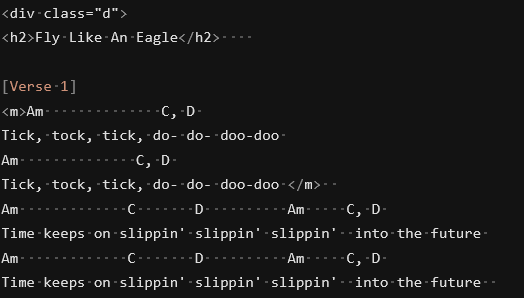
This turned out to be false. The current editor does have the capability to do something like what I wanted. After more investigating I found that there is an advanced CSS layout module called CSS Multiple Columns and it shows css properties for setting up the columns. In addition I found a CSS visual tool was out there called a multi column generator. The tool has controls that you slide or switch to set and generates the code for you to copy. CSS column properties like this allow you to automatically fill the designated number of columns with the markdown text you place in the body of the editor. It required using the <div> HTML syntax to create a container for the body text. So after some fiddling with it I got something going. Here was the code that worked for me. I set the document width and placed the !section command at the top and followed it with a style division class declaration that configures the body text type, color, column count, column fill, column gap, font stretch, font weight, alignment, width and height of the division and border and column separator parameters. I created a style declaration as well for any highlighted text I have in the song. I used a variable style font with width and weight adjustments so I can fit different amounts of text on a single view.
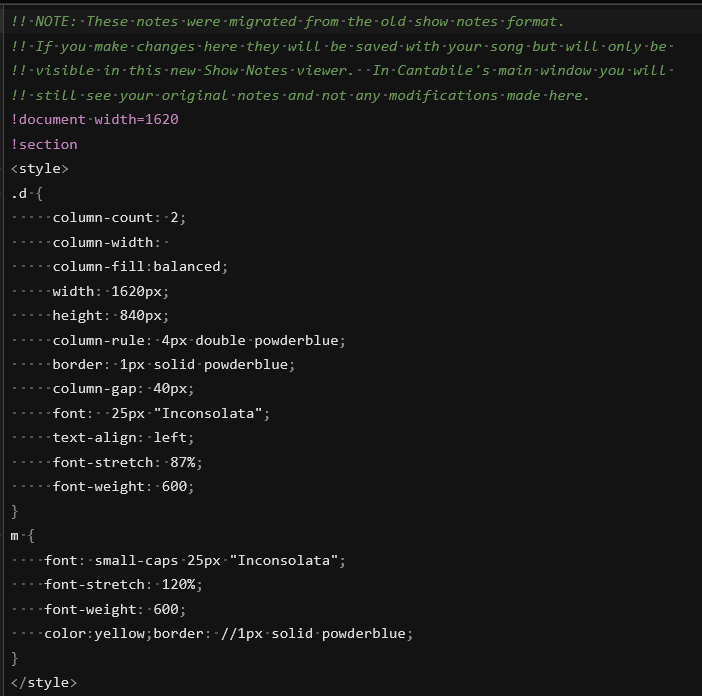
I started the text area off wit the <div> statement that included my class data I set above.
here is the output

After the lyrics in the markdown body part I placed </div> and !/section to finish it up.
I think this will speed my flow up so that I can just paste my whole lyrics chords data I already have into the editor below my declarations and the columns will fill in a balanced way according to the number of columns specified and font size. Just wanted to share what I found.
Dave
1 Like
Just wanted to say, I use Show Notes in a very limited way (reminders of keys, what ,my controller pedals do, etc., what different states do), so a lot of this is way beyond my needs, but all I can say is
wow
With what I have followed, I can see possibilities for making my notes more dynamic.
1 Like
Ah I think I understand what you were asking for now. You want the column breaks automatically based on the height of the container rather than explicitly creating breaks. The approach you’ve suggested should work fine but you’ll need to specify the height - like you are.
Let me think about whether this should be included in the shows notes with some simpler directives. I think most people want to be explicit about where the column breaks are.
One more suggestion, have you considered using chordpro formatting? It would save you from relying on all those spaces. (But I suppose if you already have these all formatted, then they’ll work as is.
eg:
```chordpro
[Am]Tick, Tock, tick, [C]do- [D]do- doo-doo
[Am]Tick, Tock, tick, [C]do- [D]do- doo-doo
```
Or, if you’ve already got things formatted with spaces
```chord
Am                C   C
Tick, Tock, tick, do- do- doo-doo
Am                C   C
Tick, Tock, tick, do- do- doo-doo
```
Both of the above will give:
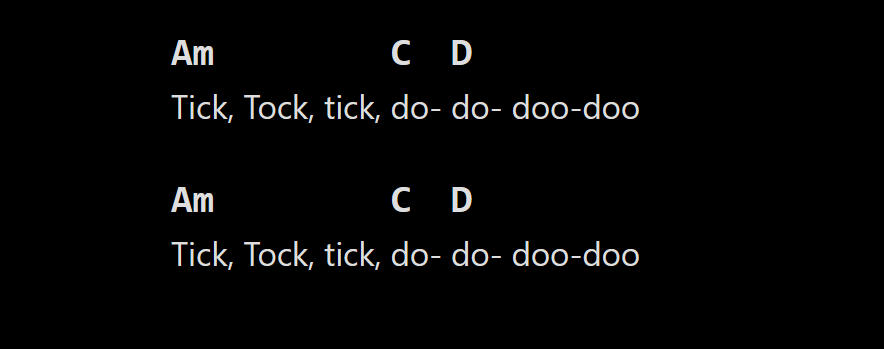
Thanks for your comments and the suggestion about the Chordpro formatting. I checked it out and it works in your examples on a new song with none of my front end coding but the script doesn’t seem to get along with the HTML container language or inline HTML and bracketed text. I think HTML can’t be used inside a Chordpro script area and it also may be reacting to anything in brackets since might think it’s a bracketed chord. So in general trying to use the script is breaking other stuff. How would you add it to what I have already without it having conflicts with the other coding? I think I will probably stick with the mix of markdown and HTML/CSS because it gives me control over the line spacing where the script adds blank lines between text for scrolling I guess and I don’t know how to get rid of them. All in all I am very happy with how flexible this new system is.
Sorry for not replying earlier.
I currently use and app running on an android tablet (Mobilesheets) to display music. In Cantabile I use a binding ‘set list → selected song program’ —> 'MIDI Ports → ‘To tablet’ this selects the the required song. To turn through the song pages I use a further binding from a pedal to trigger the page turns, forward only at the min.
I’d like to see something similar to trigger page turns, section advances, etc. in show notes, but independent of the Song states. I’d imagine a new set of binding, similar to the song state bindings (load state, Next state, etc) but for shownotes E.g. next page/section, previous page/section.
Sorry if this seems a clumsy explanation ../Steve
That’s correct. Anything inside the chordpro block will be processed by chord pro and not passed directly to the browser. Have you tried putting the column split layout stuff outside the chordpro.
As for spacing etc of chord pro output there are styles you can set to override this. I’ll put up some examples if you like or just inspect the generated output if you want to figure it out yourself.
Not at all. I think this fits with what I’ve got planned.
1 Like