@brad ,
Works like a champ now. Thanks!
Dave
@brad
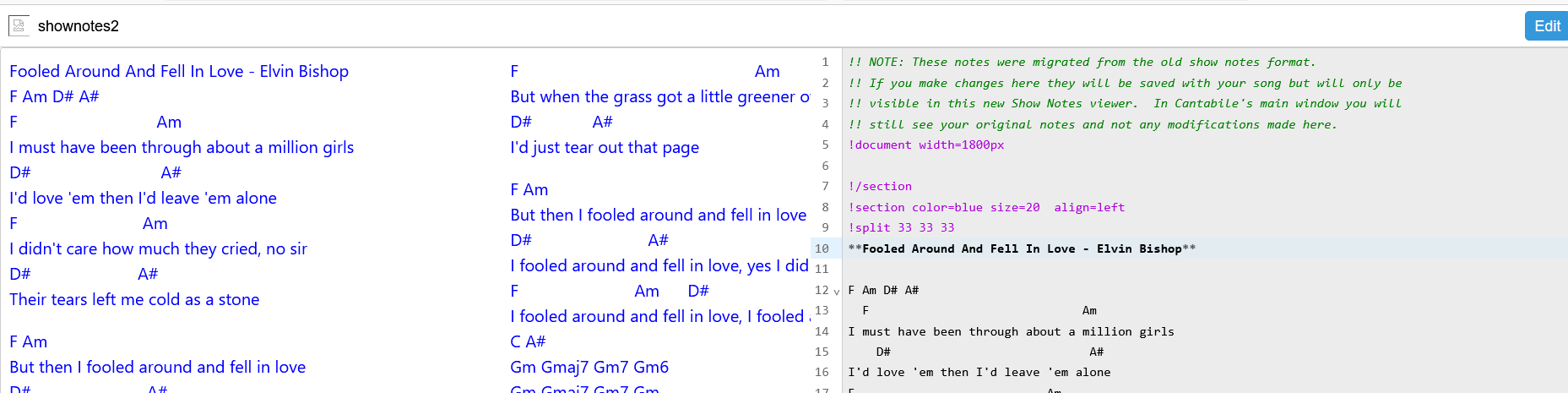
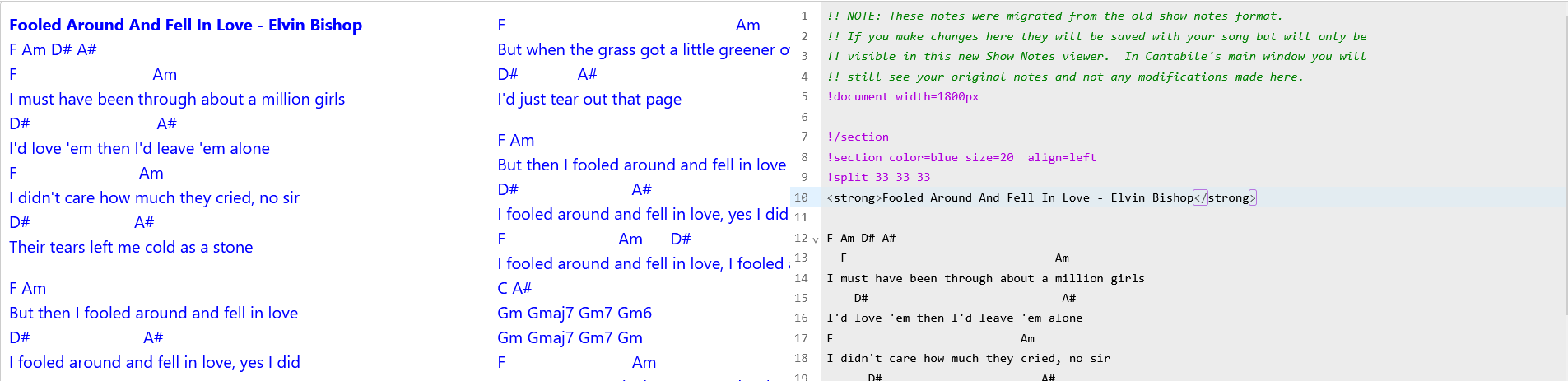
New question, I have been testing out the markup language and it shows examples of markup side by side with html equivalent syntax. In the editor window the markup language syntax for bold displays but on the web page it does not. ( e.g.**bold type**).
The html (<strong>bold type</strong>) syntax displays bold in the web page.
My question is whether the markup language is interchangeable with the html as far as what is displayed on the web page? This applies to all the markup syntax.
Dave
Oops, broke it fixing the $(strpart) bug yesterday. Fixed in 0.2.19. Also fixed the broken icon in the top left.
Thanks for the fast reply & fix Brad, I’ll get back to it. 
Is there support for html image syntax? i.e.
<img src="D:/Dave_Documents/Cantabile/Lyrics%20Chords/Magic%20Man.jpg" width="800" height="500">
It gives a placeholder but no image.
Hey Dave,
Due to browser security, you can’t reference local files from show notes. That’s why "D:" doesn’t work.
Instead what you can do is add “D:\Dave_Documents\Cantabile” to your asset path (Tools → Options → Miscellaneous → Network Server → Asset Search Path) and then access it via /assets/... You can add multiple paths to the asset search path by separating with a semicolon ;.
<img src="/assets/Lyrics%20Chords/Magic%20Man.jpg" width="800" height="500">
Note: for markdown images and !include images, the /assets/ prefix is added automatically to the url. For straight html, you’re on your own.
You can check the asset serving in a browser by going http://localhost:35007/assets/Lyrics%20Chords/Magic%20Man.jpg and your image should show up.
As mentioned in the docs, but just to reiterate… when using the /assets/ url prefix Cantabile’s network server looks first in the same directory as the current song file, and then each of the asset search paths in order.
Although you can’t reference anything on your local file system you can access any web server available on the machine. If you were super keen you could even write your own image/asset server. You should also be able to include content from a cantabile-media-server, local NAS etc…
eg: this will work to pull an image from Cantabile website:
!include https://www.cantabilesoftware.com/Files/headerDarkText.png
Brad
Thanks again, that straightened me out.
Hey @dave_dore, no problem. Looks like your digging into this… how are you finding it?
Hey Brad, I am liking it a lot. I used to do a bit of web page building decades ago and had a little java so the markdown is great and I find simpler and easy to use. I did need your reminder that the assets folder is part of the scheme when loading local image files from a local server. I have also been checking out the some of the html syntax that can be alternatively used. It covers any fringe special needs I think.
I was especially interested in the split function because I prefer a static screen for my songs that holds all the lyric and chord text in that screen. I used a word processor to create sized jpegs that fit the current Show notes window. It is fine but I missed not being able to edit on the spot and the current editor didn’t support columns. I also really wanted to be able to highlight harmony vocal parts in a different color. The current split and html span coloring check those boxes. The only thing that would speed up my programming on it would be the ability to define a section’s in width and height and then be to simply define the number of columns with the ratios being equal and not a required input, this avoids adding all the individual !split syntax being placed for each column and instead the proposed function would have what ever text I pasted in that section automatically distribute it self into the available columns defined at the top of the section from top to bottom and from left to right similar to how a word processor would do it. I’m not sure if that’s a do-able thing so it’s good to know it can be done with what is already going using the !split syntax. For me the important boxes are already checked. All in all this is way powerful in it’s scope and well thought out in how it can be networked to an entire group of players. I read about your queries regarding multiple pages for multiple players needing different notes that could be addressed and really liked the concept if it makes it into the plan. It’s all a major advancement IMO. Looking forward to the coming developments! 
Dave
New question @brad,
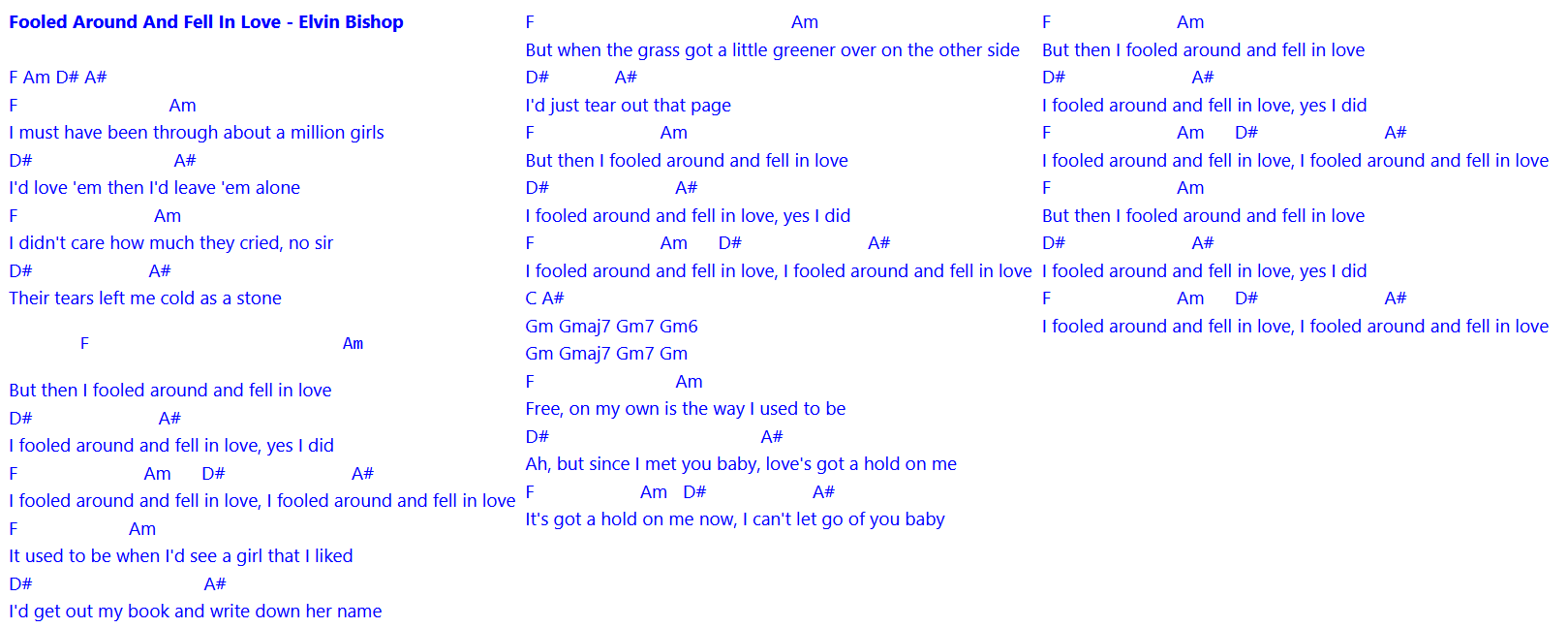
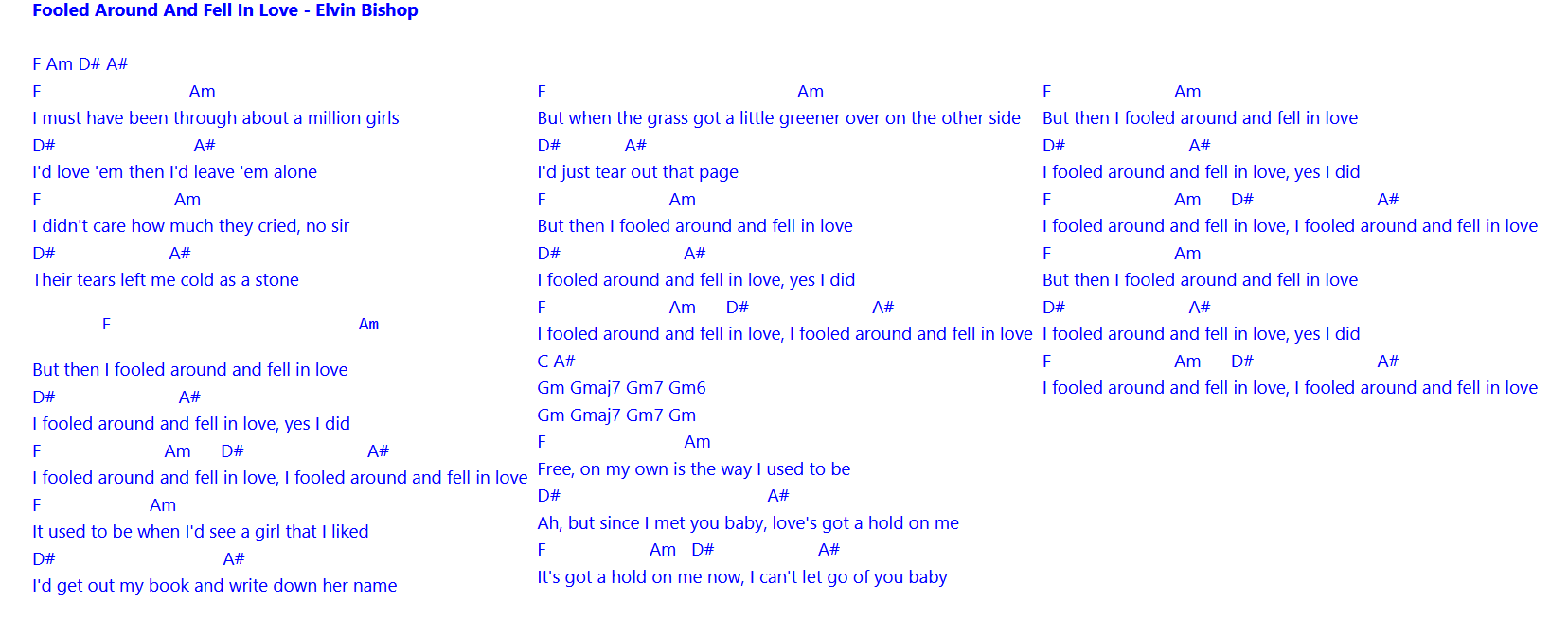
When using the !split directive I sometimes need to add white space or blank lines on the second column or third if used to align the separated text blocks.
e.g of columns needing white space added.
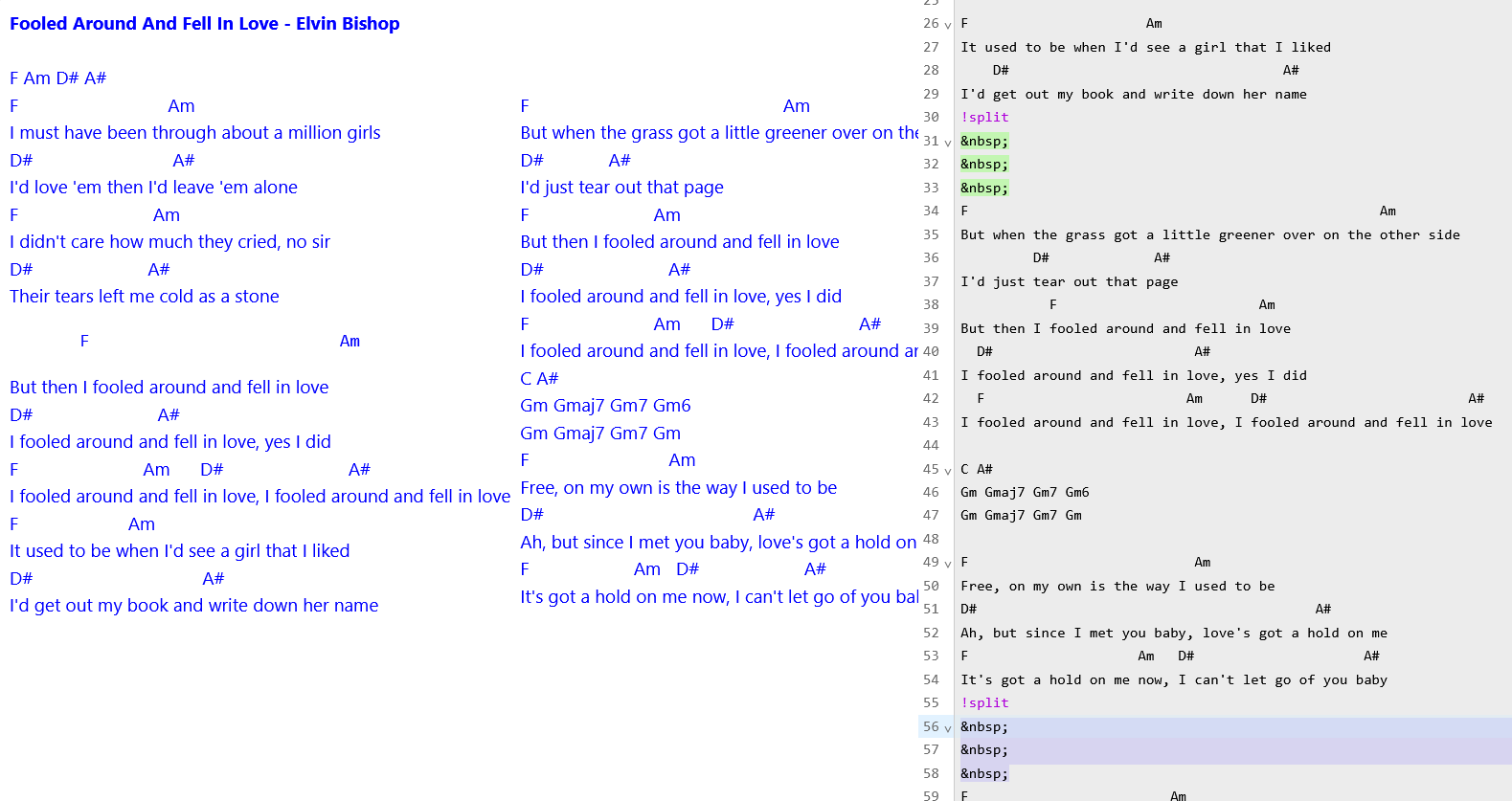
The only way I’ve found so far to add the space is using the the HTML entity on separate lines in the editor to add the space.
You can use 2 spaces at the end of a line of text to create a blank new line but only one is allowed and it doesn’t allow that at the beginning of a new text block in a split column so that method doesn’t help. Is the method I used the right way to go or is there a better way to go?
Dave
I thought I’d add how I use the system and ask a question -
I have two completely different environments - my development system, and my gig system.
In the development environment I use two monitors, one over my desk for normal mode, one over my keyboard for live mode. Normal mode displays my editing environment, live mode displays a .jpg with my notes on them. In the new system, if I understand correctly, I should be able to now have both active at the same time by running notes in a separate browser on the 2nd screen.
At gigs, I use a single monitor. Normally I just show notes (and preprogram the setlist with the order of songs I plan to play so I just press a “next song” key), but I do occasionally need to edit. Here running notes in a separate browser would be a distinct disadvantage as I would need to go out of full screen mode, switch applications to get to Cantabile for editing, do the edit, switch applications again to get the browser back on the screen, and then get the browser into full screen mode. Far too much to do if I only have a few seconds before the band starts the next song. Here using either the existing notes system or having an embedded browser is far superior.
Re notes for other bandmembers, I was planning to do this for our singer (send her song lyrics), but the original plan was to use the media server. How would doing it from notes be different?
This is probably a dumb question but for those of us who don’t know markdown, will we be able to use the “old” show notes method? I’m getting the impression you need to know that to use this new feature…? I definitely see the advantages for those who do use markdown, but I have enough on my plate already so learning markdown just isn’t in the cards for me. Thanks!
Tom
@dave_dore start the split after the heading.
Eg: with this, the top of column 1, 2, 3 will all be vertically aligned.
Fooled Around and Fell in Love - Elvin Bishop

!split 33 33 33
column 1
!split
column 2
!split
column 3
!/split
With the new show notes, the editor is available in the browser. Just hit the edit button in the full screen browser view, screen will split with text editor on the right. Make your change and close it.
I haven’t implemented this yet, but I’m thinking show notes will just have a drop down where you can create additional notes documents. Just create one for each member and type in what you need.
Depends if you want to use new features or not.
At least for the immediate future both old and new show notes will be available, but none of the new features will be available in the old notes. So if you just want to continue with the old notes you can continue as is and don’t need to worry about any of this stuff at all.
That said, don’t be scared by Markdown especially if your needs are modest. If you just want to display some simple text notes, it’s really just a text editor where you type what you want shown.
Also, there’s a migration path where old notes can be converted to new. So if you’re not sure about where to start with the new show notes, start with the old, then migrate that song to the new to see how the equivalent is done in Markdown.
How complex are your current notes?
Thanks for the quick reply Brad! Mostly it’s just simple text, and just a handful of songs also have an image or two. When I read through the discussion and saw html syntax etc it sounded pretty complicated, but I will give it a try. If I can easily create several simple text lines on a page each with different colors as we can now, plus a few images then it should be fine. Thanks!
Tom
For text it’s simple, just type/paste it in.
HTML is available, but it’s an advanced feature as a fallback for when you need something not supported by markdown. You can completely ignore HTML most of the time.
Simple text, just type it in:
When I find myself in times of trouble, Mother Mary comes to me
Speaking words of wisdom, let it be
The above will be joined and re-wrapped to fit the display width. If you want the lines wrapped as typed, put the text inside a section like so:
!section
Type your text here
!/section
For colored text, use a section with fg= foreground color and/or bg= background color
!section fg=white bg=red
To include an image just enter a line with !include <nameofimagefile> where you want the image. When displayed, the !include line will be replaced with the referenced image file:
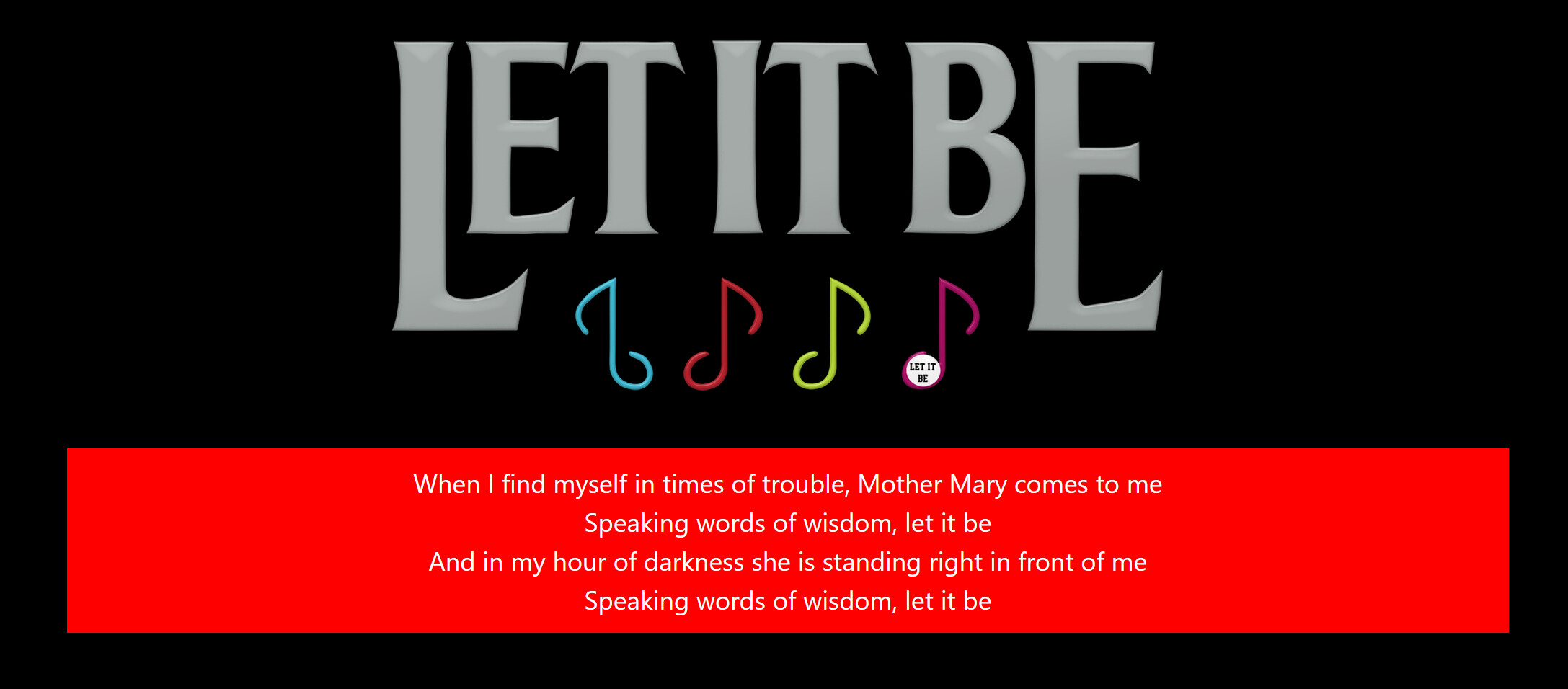
!include LetItbe.png
Putting all of the above together:
!include LetItBe.png

!section fg=white bg=red
When I find myself in times of trouble, Mother Mary comes to me
Speaking words of wisdom, let it be
And in my hour of darkness she is standing right in front of me
Speaking words of wisdom, let it be
!/section
gives:
I’m not sure I’m following exactly what you’re suggesting here. Can you post a snippet showingof the /!split syntax/structure you’re suggesting?
No worries, I have looked at the editor you are using and the wish list thing I wanted was an advanced feature usually found on a word processor where you can set the number of columns on a page and then when you paste standard text to the page it automatically fills the columns. In the model we have here the splits need to be defined and text must be pasted to each area that has been split. My feeling is that the feature I mentioned is a little too advanced for this editor so I was prepared to build up using what we have. I hope that explains it better.
OK that doesn’t seem too bad.. I think my feeble of old brain can wrap my head around that. Thanks Brad as always!
Tom