I noticed a problem with my MIOXL in my main rack not receiving MIDI last night (it is only connected via RTP), so wondering if I have now also been bitten by this update. I need to dig deeper…
Instead of searching through all PNP devices and catching MIDI devices by name, you could also use the new MIDI Console via the command-line to enumerate the MIDI port names. In PowerShell this would look like this
# capture MIDI ports listing
$midiPorts = midi enumerate legacy-winrt-api-endpoints

# format listing - extract from "table view" via RegEx
$results = foreach ($line in ($midiPorts -split "`n")) {
    if ($line -match "Port\s+\d* : (?<Name>.+?)\s+Message (?<Dir>Source|Destination)") {
        $label = if ($Matches.Dir -eq "Source") { "In" } else { "Out" }
        "$($label): $($Matches.Name.Trim())"
    }
}

# display results
$results
Results look like this:
In: Default App Loopback (A)
In: Default App Loopback (B)
In: Network Midi
In: loopMIDI
In: loopMIDI Port
In: loopMIDI Port 1
Out: Microsoft GS Wavetable Synthesizer
Out: Default App Loopback (A)
Out: Default App Loopback (B)
Out: Network Midi
Out: loopMIDI
Out: loopMIDI Port
Out: loopMIDI Port 1
You’ll need to have the MIDI SDK Runtime and Tools installed from the MS Github page for this to work.
1 Like
You are correct. I’ve re-consulted and we’ve come up with the following:
New ‘Capture’ script:
# 1. Define Paths
$FolderPath = "C:\Users\<your user name>\OneDrive\Documents\MIDI Check"
$MasterFile = "$FolderPath\midi_master.txt"
$PrevFile   = "$FolderPath\midi_master_prev.txt"
$ScanFile   = "$FolderPath\latest_midi_scan.txt"

Write-Host "Starting MIDI 2.0 Capture & Backup..." -ForegroundColor Cyan

# 2. Automatically backup the old Master List
if (Test-Path $MasterFile) {
    Copy-Item -Path $MasterFile -Destination $PrevFile -Force
    Write-Host "Old master list backed up to midi_master_prev.txt" -ForegroundColor Gray
}

# 3. Capture MIDI ports using the MIDI Console tool
$midiPorts = midi enumerate legacy-winrt-api-endpoints

# 4. Format listing and filter out known Windows noise
$results = foreach ($line in ($midiPorts -split "`n")) {
    if ($line -match "Port\s+\d* : (?<Name>.+?)\s+Message (?<Dir>Source|Destination)") {
        $name = $Matches.Name.Trim()

        # Filter: Skip generic Microsoft/Test ports
        if ($name -match "GS Wavetable|Service Test|Microsoft Streaming|Diagnostics") { continue }

        $label = if ($Matches.Dir -eq "Source") { "In" } else { "Out" }
        "$($label): $name"
    }
}

# 5. Save results
$results | Sort-Object -Unique | Out-File $MasterFile
$results | Sort-Object -Unique | Out-File $ScanFile

Clear-Host
Write-Host "--- MIDI 2.0 REFRESH COMPLETE ---" -ForegroundColor Green
Write-Host "Found $($results.Count) active endpoints."
Write-Host "Master list updated in OneDrive folder." -ForegroundColor Yellow

# 6. Buffer-safe 'Wait for input'
# Without Invoke-Item, focus stays here!
Write-Host "`n[Press any key to close]"
Start-Sleep -Milliseconds 500
$Host.UI.RawUI.FlushInputBuffer()
[void]$Host.UI.RawUI.ReadKey("NoEcho,IncludeKeyDown")
exit
New ‘Check’ script:
# 1. Define Paths
$MasterFile = "C:\Users\<your user name>\OneDrive\Documents\MIDI Check\midi_master.txt"

Write-Host "Checking Studio MIDI Status..." -ForegroundColor Cyan

# 2. Get Live Data from MIDI Console
$midiPorts = midi enumerate legacy-winrt-api-endpoints
$LiveDevices = foreach ($line in ($midiPorts -split "`n")) {
    if ($line -match "Port\s+\d* : (?<Name>.+?)\s+Message (?<Dir>Source|Destination)") {
        $label = if ($Matches.Dir -eq "Source") { "In" } else { "Out" }
        "$($label): $($Matches.Name.Trim())"
    }
}

# 3. Load Master List
if (Test-Path $MasterFile) {
    $MyGear = Get-Content $MasterFile | Where-Object { $_ -match "\S" } | ForEach-Object { $_.Trim() }
} else {
    Write-Host "ERROR: Master List not found at $MasterFile" -ForegroundColor Red
    pause; exit
}

# 4. Compare Master List against Live Devices
$MissingGear = New-Object System.Collections.Generic.List[string]

foreach ($desired in $MyGear) {
    if ($LiveDevices -notcontains $desired) {
        $MissingGear.Add($desired)
    }
}

# 5. Display Results
Clear-Host
if ($MissingGear.Count -gt 0) {
    Write-Host "--- STUDIO CHECK: ATTENTION REQUIRED ---" -ForegroundColor Yellow
    Write-Host "The following endpoints are missing from the MIDI stack:`n"
    foreach ($item in $MissingGear) {
        Write-Host "[X] $item" -ForegroundColor Red
    }
    Write-Host "`nTotal Missing: $($MissingGear.Count)" -ForegroundColor Red
} else {
    Write-Host "--- STUDIO CHECK: ALL SYSTEMS GO ---" -ForegroundColor Green
    Write-Host "Status: All $($MyGear.Count) MIDI 2.0 endpoints are active."
}

# 6. Buffer-safe 'Wait for input'
Write-Host "`n[Press any key to close]"
Start-Sleep -Milliseconds 500
$Host.UI.RawUI.FlushInputBuffer()
[void]$Host.UI.RawUI.ReadKey("NoEcho,IncludeKeyDown")
exit
‘Capture’ button:
cmd.exe /c powershell.exe -ExecutionPolicy Bypass -File "C:\Users\<your user name>\OneDrive\Documents\MIDI Check\capture_midi.ps1"
‘Check’ button:
cmd.exe /c powershell.exe -ExecutionPolicy Bypass -File "C:\Users\<your user name>\OneDrive\Documents\MIDI Check\check_midi.ps1"
1 Like
I’m experimenting with a new ‘Restart MIDI Services’ script that checks for the successful restart (and kills it if the service refuses to stop), waits for the enumeration to complete its initial pass and shows the ports found. I’ll give it a try-out for a few days, then upload it if all is well.
1 Like
My machine is telling me there’s a new Windows Update for 11. Dare l run that one? This is the stupidest timeline.
Like it or not, it’s heading your way at some point. Better to bite down on that bullet and sort the niggles out sooner rather than later, when it may be foistered upon you at an even more inopportune moment.
Of course the sensible thing to do is to wait until you have a gap in your schedule…
As I do not have gigs for a while, and because I really need to get on top of RtP MIDI working, (e.g. my “rack of classic rack units” only connects to my DAW PC via a MIO iConnectivity device over RTP) I decided to bite the bullet, and get the latest KSA via the Discord link that Torsten provided above, and I went for putting the PC in developer mode to try things out prior to these fixes being fully rolled out.
I also felt that whilst you guys are busy on fixes on the standard Windows channel, it might be useful for somebody to look ahead, so we know there is light at the end of the tunnel. From what I read up, it sounds like there is a 30 day incubation period before fixes are pushes out to Windows, and the fixes in the KSA will start being pushed out at the end of April.
It’s taken me a few hours of faffing about (endless reboots always take time), but I now have all of my MIDI devices in the studio working with my DAWPC on the new MIDI services updated via the KSA.
Here are a couple of things that had me scratching my head for a while
- For some reason the Windows MIDI Service was not set to autostart, so I had to set that in services.msc
- I had to uninstall the old Korg USB MIDI Driver as recommended by Korg and as per their instructions, as comms is now via the new MIDI stack
- I had to run midifixreg from the command line due to the age old faff of the problems with the Korg USB driver if you have a system with more than 10 midi devices. This command basically restores the MIDI registry settings to remove those sorts of hacks
- But I also had to manually remove the Korg oemxx.inf driver file as if I plugged my Kronos back in, the old drivers kept coming back even though I had run the uninstaller
- In Cantabile, I had to adjust the Kronos port names as they have changed
And everything appears to be working on my DAW PC, communicating to my iConnectivity in the classic rack and also communicating with my GIGRACK, although I have done nothing on that (although it has just done an update…). loopMIDI is also working locally, but I guess one step will be to try removing it and using the built in loopback.
However, I currently have no RtPMIDI to the laptop running my videos, so I guess the next step is to do the update on that laptop, and also my GIGPC to get it on the same baseline as the DAWPC.
Once all that is working, I may also get brave and move to the new 1.0 end point names to see how much damage that does! 
I’ll keep you posted.
Update before chilling out for Saturday night…
I now have all three PCs used in my music in developer mode with the KSA installed:
- DAWPC which is of course for recording, and I tend to set live things up on this PC as well
- GIGPC what goes out in my GIG rack (of course)
- VIDEOPC which runs Imaginando Visual Synthesizer and responds to MIDI from either DAWPC or GIGPC (whichever one I am running Cantabile nd my live set on)
All communications between the computers is via RtPMIDI. And as mentioned the connection between my classic rack (Yamaha heaven: TG77, EX5R, Motif Rack ES (inc PLG150-VL and PLG150-AN) and FS1r) is also RtPMIDI only.
My DAWPC connects to the main synths via USB MIDI (and the classic racks via RtPMIDI)
My GIGPC connects to the (same) synths that I use live via DIN MIDI (as I do not trust USB MIDI on stage anymore).
Whilst I probably need to check what a new day and cold reboot brings tomorrow, everything appears to be working fine on the new MIDI services.
Again on my GIGPC after installation, I had to go into services.msc and set Windows MIDI Service to start automatically. But on the laptop it was already set to automatic start. So that is an odd one…
I might also mess about with the switch in the MIDI Application to move to the new device names and see how different they are. In for a penny and all that…
Hi, all
After a cold start on a new day. It’s all still working.
I also changed my computers to use the new MIDI port names. It broke a few device mappings, but they were easy to fix.
For example, my Roland FC300 Foot pedal which is on a iConnectivity mioXL, where it is now adding the port number to the name I set in the mioXL configuration software. In the screen shots below the old port names are the ones showing as (disconnected).
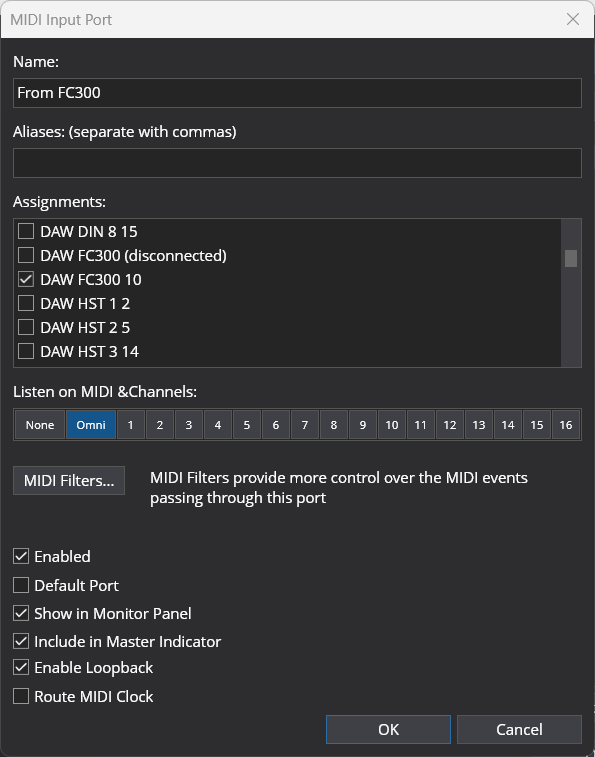
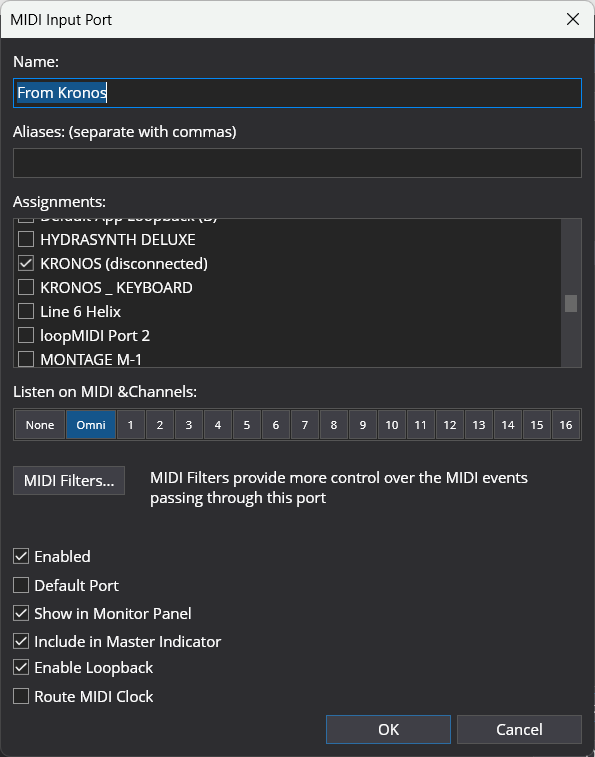
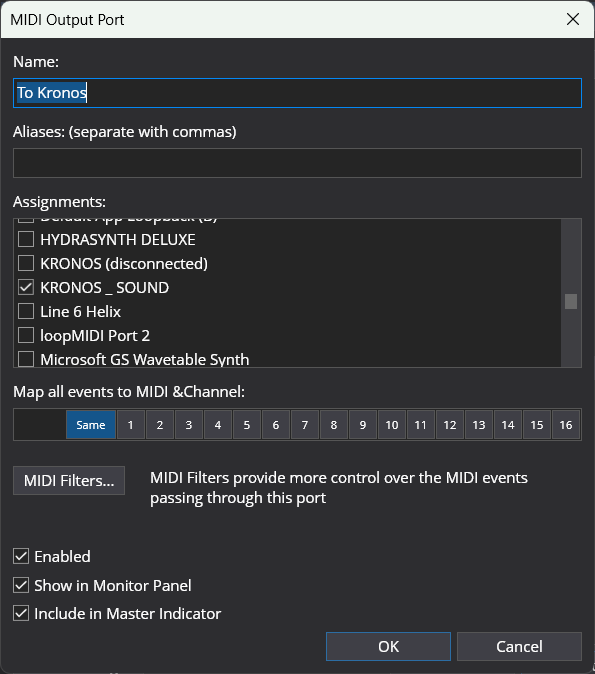
And my Korg Kronos, which used to called Kronos Keyboard for the Input and Kronos Sound for the output. When I upgraded yesterday, the ports were just called Kronos, so I had to remap to that name. But when I changed to the new port naming schema, you can see it has come back close to the names that the Korg USB MIDI driver (now removed) provided, so I had to change again.
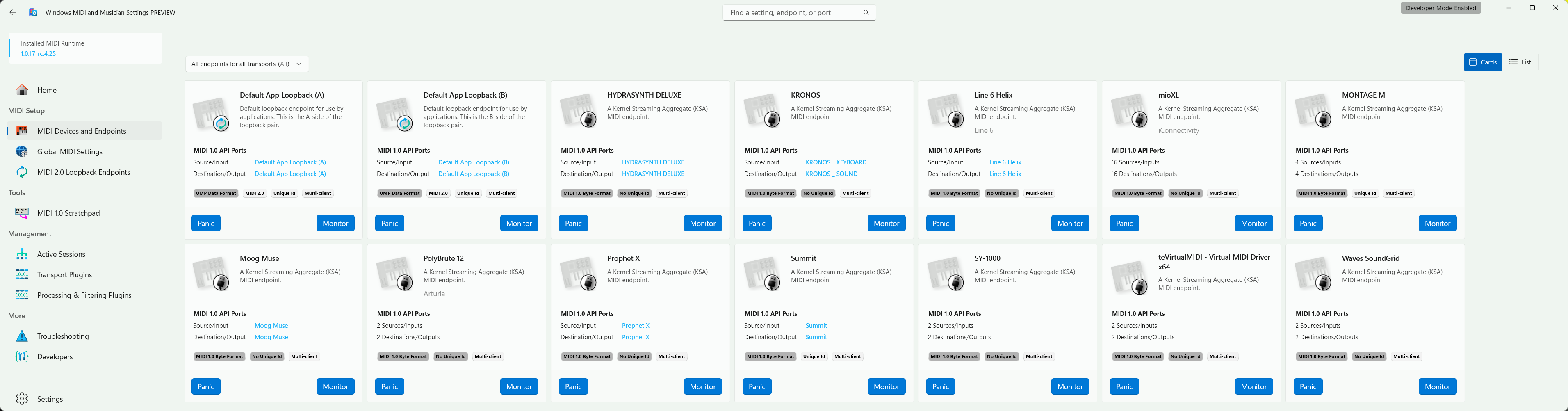
And this is the Windows MIDI view of my ports on my DAWPC, which is now starting to look like Apple’s CoreMIDI!
All in all, I’ve probably spent about four or five hours on getting the PCs into developer mode, applying the KSA and tinkering to set things up and check that everything is working as expected. As per above, the main activity has been port renaming.
So, in conclusion, I am content that everything is working as it should and once the changes are formally rolled out, I am confident I can take my PCs out of developer mode (a simple switch in settings) and all will be working.
I hope that helps build some confidence that it will all come good.
PS, I think the issue with the MIDI Services not starting by default is that after installation, you need to run the new MIDI Settings app and “Complete Configuration”.
3 Likes
Although the new MIDI stack seems to be behaving reasonably well now, I still often get missing ports unless I bounce the MIDI service after plugging into my USB hubs.
After a few iterations I’ve been running my new MIDI 2 stack ‘bounce’ for a few days now and it seems to do the job well, so here it is to share.
Here’s an example of the output it produces:
========================================
   REFRESHING MIDI 2.0 STACK (RC4)
========================================
[1/2] Resetting Service...
[2/2] Starting MIDI Service...
   Waiting for service to initialize...
   Waiting for service to initialize...
   Waiting for service to initialize...
   Waiting for service to initialize...
   Waiting for service to initialize...
   Waiting for service to initialize...
   Waiting for service to initialize...
   Waiting for service to initialize...
   Waiting for service to initialize...
   Waiting for service to initialize...
   Waiting for service to initialize...
   Waiting for service to initialize...
   Waiting for service to initialize...

========================================
   COMMENCING DEEP HARDWARE SCAN
========================================
[Stage 1/3] Initializing High-Speed USB Bus (20s)...
[Stage 2/3] Mapping KSA / MIDI 2.0 Handshakes (20s)...
[Stage 3/3] Finalizing Endpoint Map (20s)...
----------------------------------------
FINAL ENDPOINT MAP:
----------------------------------------

Microsoft Windows MIDI Services Console
SDK Release Candidate 4 (GitHub Preview)
1.0.17-rc.4.25

╭─────────────────────────────────────────┬───────────┬───────────────────┬──────────────╮
│ UMP Endpoints for Windows MIDI Services │ Transport │ MIDI 2.0 Protocol │ Manufacturer │
├─────────────────────────────────────────┼───────────┼───────────────────┼──────────────┤
│ 🎹 2600                                 │ KSA       │                   │              │
│ 🎹 A32 AD/DA Converter                  │ KSA       │                   │              │
│ 🎹 ARPODYSSEY-FS                        │ KS        │                   │ KORG INC.    │
│ 🎹 Cre8audioNiftyCASE                   │ KSA       │                   │              │
│ 🎹 DSI Tetra                            │ KSA       │                   │              │
│ 🔄️ Default App Loopback (A)             │ LOOP      │ Yes               │              │
│ 🔄️ Default App Loopback (B)             │ LOOP      │ Yes               │              │
│ 🎹 Elektron Analog Keys                 │ KSA       │                   │              │
│ 🎹 H4MIDI-WC                            │ KSA       │                   │              │
│ 🎹 HAMMOND XK-5                         │ KSA       │                   │              │
│ 🎹 Hydrasynth Deluxe                    │ KSA       │                   │              │
│ 🎹 Hydrasynth KB                        │ KSA       │                   │              │
│ 🎹 INTEGRA-7                            │ KSA       │                   │ Roland       │
│ 🎹 LIVE 49                              │ KSA       │                   │              │
│ 🎹 Line 6 HX Stomp XL                   │ KSA       │                   │ Line 6       │
│ 🎹 Line 6 Helix                         │ KSA       │                   │ Line 6       │
│ 🔄️ Loop Cubase                          │ LOOP      │ Yes               │              │
│ 🔄️ Loop Stream Deck                     │ LOOP      │ Yes               │              │
│ 🎹 MODEL D                              │ KSA       │                   │              │
│ 🎹 MicroMonsta 2 A                      │ KSA       │                   │              │
│ 🎹 MicroMonsta 2 B                      │ KSA       │                   │              │
│ 🎹 Morningstar MC8                      │ KSA       │                   │              │
│ 🎹 Osmose                               │ KSA       │                   │              │
│ 🎹 PC4                                  │ KSA       │                   │              │
│ 🎹 Peak                                 │ KSA       │                   │              │
│ 🎹 RME ARC                              │ KSA       │                   │              │
│ 🎹 RME MADIface XT USB 3.0              │ KSA       │                   │ RME          │
│ 🎹 SYSTEM-8                             │ KSA       │                   │ Roland       │
│ 🎹 Seaboard RISE 25                     │ KSA       │                   │ ROLI Ltd.    │
│ 🎹 Seaboard RISE 49                     │ KSA       │                   │ ROLI Ltd.    │
│ 🎹 Seaboard RISE 49                     │ KSA       │                   │ ROLI Ltd.    │
│ 🎹 Slim Phatty                          │ KSA       │                   │              │
│ 🎹 Summit                               │ KSA       │                   │              │
│ 🎹 TR-8S                                │ KSA       │                   │ Roland       │
│ 🎹 Toro                                 │ KSA       │                   │              │
│ 🎹 Vocoder-VC340                        │ KSA       │                   │              │
│ 🎹 VoiceLive 3                          │ KSA       │                   │              │
│ 🎹 X-Touch                              │ KSA       │                   │              │
╰─────────────────────────────────────────┴───────────┴───────────────────┴──────────────╯
----------------------------------------

MIDI 2.0 Stack Refresh Complete.
All discovered endpoints should now be active.

Press any key to continue . . .
Here’s the ‘Restart MIDI Services.cmd’ command script:
@echo off
setlocal enabledelayedexpansion

:: ======================================================================
:: MASTER MIDI 2.0 REFRESH SCRIPT (UNIVERSAL BUILD)
:: Optimized for Windows MIDI Services RC4
:: Protocol: Deep Scan for Multi-Interface Studio Environments
:: ======================================================================

:: Explicit path to the 2026 MIDI 2.0 console tool
set "MIDI_CMD=C:\Program Files\Windows MIDI Services\Tools\Console\midi.exe"

echo ========================================
echo    REFRESHING MIDI 2.0 STACK (RC4)
echo ========================================

:: 1. FORCE STOP
:: Ensures the service and any hung kernel handles are fully released
echo [1/2] Resetting Service...
sc stop midisrv >nul 2>&1
timeout /t 2 /nobreak >nul
taskkill /F /FI "SERVICES eq midisrv" /T >nul 2>&1
timeout /t 2 /nobreak >nul

:: 2. START SERVICE
echo [2/2] Starting MIDI Service...
sc start midisrv >nul 2>&1

:wait_start
timeout /t 2 /nobreak >nul
sc query midisrv | find "RUNNING" >nul
if errorlevel 1 (
    echo    Waiting for service to initialize...
    goto :wait_start
)

:: 3. DEEP HARDWARE SCAN
:: Staged discovery allows for USB enumeration, KSA handshakes,
:: and DIN port mapping to complete across all connected interfaces.
echo.
echo ========================================
echo    COMMENCING DEEP HARDWARE SCAN
echo ========================================
echo [Stage 1/3] Initializing High-Speed USB Bus (20s)...
timeout /t 20 /nobreak >nul

echo [Stage 2/3] Mapping KSA / MIDI 2.0 Handshakes (20s)...
timeout /t 20 /nobreak >nul

echo [Stage 3/3] Finalizing Endpoint Map (20s)...
timeout /t 20 /nobreak >nul

echo ----------------------------------------
echo FINAL ENDPOINT MAP:
echo ----------------------------------------

:: Final call to generate the device table
"%MIDI_CMD%" list endpoints

echo ----------------------------------------
echo.
echo MIDI 2.0 Stack Refresh Complete.
echo All discovered endpoints should now be active.
echo.
pause
…and here’s the Stream Deck ‘Open’ button App/File command to invoke it:
powershell -Command "Start-Process 'C:\Users\<your user name>\OneDrive\Documents\Batch Files\Restart MIDI Services.cmd' -Verb RunAs"
It takes around a minute to run end-to-end, but this is to ensure that, as far as possible, all MIDI ports have been found before it reports back with the list.
Hi All,
I just came back from conversing with someone at Microsoft in the MIDI area. There is good news and bad news:
The good news is that the official fix that addresses MIDI ports installed after startup (LOOPmidi, RTPmidi, etc.) are going to be released next week.
There are a bunch of caveats, though – i.e., the bad news:
-
The fix is going into the Windows Preview updates first. If, like me, you do not have the ‘accept Preview updates’ switch turned on, it will be a good deal longer before you receive the update (see below).
-
Once the Preview update is installed, Windows performs an algorithm-based release of individual bug fixes over a FOUR WEEK period. That means that even though one might install the update in the 4th week of April, Windows may not decide to enable it until the 4th week of May.
 (This is so that MS can stop the updates early if their compatibility testing missed something.)
 -
MS will not divulge how the algorithm works. The decisions are based on all of the bug fixes in a given release, not MIDI alone, and MIDI cannot be proiritized.
-
It is not possible to volunteer for early adoption, other than to install the patch that has already been discussed in this thread.
-
If one wants to dive in early, Microsoft recommends that the patch be removed before upgrading, and – if necessary – reinstalled later.
-
If a fix survives the 4-week ‘beta gauntlet’ (my terminology), then it will be released with the mandatory updates in the 2nd week of June.
So, it would seem that an official fix for RTPmidi, etc. is 1-4 weeks away for the those willing to use Preview updates; and 6 weeks away for the rest of us. I am considering pausing my Windows updates for 8 weeks and living with the existing patch, assuming that this is still an option in Windows 11. (It used to be.)
Thoughts?
UPDATE: Windows 11 still allows update pausing, but 5 weeks is the maximum. So, I’m going to have to do a little more work: either check to see if the Previews were successful and turn them on in 5 weeks; or turn the pause back on when it expires. Thanks, Microsoft, may I have another?
1 Like
Useful info, thanks. So far the KSA patch is working fine across my three machines.
I would say based on what you say the options are"
- Be an early KSA adopter if you are happy with the risk (I am as I have no scheduled gigs until August)
- Go the route that @The_Elf and others have adopted if you cannot tolerate that risk
- Or if your system is still working, pause your updates until you know the fix is in the main release.
Which one is best is probably a personal choice.
1 Like
@Derek One comment about your first choice: Upgrading to the early updates installs all fixes, but the algorithm decides when they become active. So, if one follows the MS-approved methods – 1) uninstall the current patch, and then 2) update Windows – it is still possible to update early and break the MIDI on a given PC. It would seem that one has a 1:4 chance of being a successful KSA adopter in the 4th week of April, a 2:4 chance if waiting to update in early May, etc.
Fair point, but now I know what to do, it’s a five minute job to reapply the KSA.
I know its a bit old post but forcthise who are interested: i had solved the issues but problems again 3wks ago. I decided to install the Ms midi sdk which is/was rc4. I also completely removed all Korg drivers. From then on no issues with midi1 devices annymore and with a new option to rename a midi device. Handy when yoy have 2 identical devices which are named devicex(1) and devicex(2) by default..
Re-naming devices doesn’t always work, as I found with my Roli Seaboards. Re-naming one re-named them both. In fact at one point re-naming them broke a lot of my system, since it corrupted the names of other unrelated MIDI devices. Use with care.
The last couple of updates seem to have helped greatly, but I still have trouble getting Windows to see all of my devices unless I use a utility to bounce MIDI services, my Stream Deck’s MIDI plug-in and TotalMix.
Loopback ports now work fine, and I have removed my reliance on LoopMIDI altogether.
rtpMIDI has been fine on my system, even from the first arrival of the MIDI 2 stack
1 Like
Hi All,
Ok, here we go again… 
I decided to wait until June to make sure the updates were fine (see threads above). Since we are now in the 2nd week of June, it seemed like a safe point to dip into the water. Apparently not.
Everything I read (until this week) said, “Make sure you uninstall the MIDI hack before proceeding with the update,” so that’s what I did. At the end of the updates, I have a PC that refuses to connect to ANY MIDI ports: the USB connections to my Nord Stage and Studiologic SL73, or the virtual ports that loopMIDI and rtpMIDI create. Device Manager says the hardware ports are installed correctly and working. rtpMIDI says I have a connect between my PCs. But Cantabile (and Cakewalk) say that I have no active MIDI ports. Cantabile says the ports are all “disconnected.”
The latest info from MS says, “OK, I know we said to uninstall any workarounds before upgrading, but that can cause intermediate issues. Here are 3-5 different directions that your problems may have taken, and suggested remedies.” 
Has anyone else already gone through this? As of now, I have a Cantabile setup that works perfectly from an audio perspective – plugins will play from a virtual keyboard, or from the internal sounds of the Nord Stage – but no MIDI connection whatsoever. Any pointers would be greatly appreciated.
Maybe the MIDI Service is not running for some reason.
Make sure you install the MIDI Settings utility to at least provide you with basic information. Try bouncing the MIDI Service once your system is fully up and running from a boot.
The new loop ports work fine, but you will still need rtpMIDI.
Of course, before you made any risky changes to your system, you did make an image backup to which you can recover…
I got it working by installing all available updates and security patches, then running Windows’ own System > Recovery > Fix problems using Windows Update process. This last step takes 15-30 minutes and 3-4 reboots. I was really holding my breath, but it worked like a champ, and provided me with a PC that was (mostly) set up exactly the same as before.  (This was suggested in a couple of threads by Peter Brown of MS in various forums.) If I had to guess what happened, the MIDI stack got corrupted or turned off, but it’s running now.
I have downloaded the MIDI Settings, etc. package, but haven’t used it yet; just working with loopMIDI and rtpMIDI for now.
And yes, I had backups for everything, but thankfully didn’t need them!
There are additional pieces that I’ve yet to test:
- Windows native multi-client/loopback vs. loopMIDI (I give Cantabile my USB ports, and use loopMIDI for a window into my recording DAW.)
- Removing Clavia’s USB MIDI driver and seeing if the Nord Stage 3 USB MIDI is class compliant (I’m betting that it’s not)
I’ve tried removing the KSA a few times in the last week when updates have come through on my DAWPC, figuring that based on the update cycle given above, it must be being pushed out now…
However removing the KSA kills all MIDI.
With the KSA I see all my MIDI devices as endpoints. Without the KSA all I see as endpoints are LoopMIDI and RtPMIDI.
So the KSA goes back on, and all is good again…