Hi Brad - about to go to bed, will install 4351 in the morning and report back.
Thanks.
Hi Brad - about to go to bed, will install 4351 in the morning and report back.
Thanks.
Hi Dave,
Maybe I can lend a hand here. If I understand this correctly, you replaced your Scarlett with a MOTU Micro Lite. Not seeing your cabling, did you plug your devices into the MOTU exactly like you did to the Scarlett? (in from device A to out on device b and so forth). If the Scarlett is out of the picture that you need to remove its ports from Cantabile.(I see from the screenshot that they are still there and showing as in use/active/checked…remove them totally. Once removed you may find that if you open a song that some of the connections are no longer there. For me the easiest way to visualize this is in the routing screen, but works as well in the table view too. I would almost bet that you are not getting output as the ports you previously used no longer exist and those routes need to be re-mapped to the new ports.
I ran into something similar to this when I was forced to remember that anytime you change a USB port, it will register as a different port, hence my mappings would have to change or I could plug everything in back the way it was and all was good again…
Hope this helps…
Matt
Brad - just emailed you the new + old logs (on 2 separate emails). The new ones were created on the 4351 version. I tried to do some due diligence and checked mini ports, created/tested new songs, looked at midi monitor pre/post filter settings, etc. and can report the following:
Virtually all results were exactly the same as before with regard to Cantabile monitor indicator lights, midi port setting, etc., also including the Midi Lite in/out indicator lights. I do realize this might have been expected.
The only possibly interesting change, albeit a minor one, is that in the routing view, the connector lines change from blue to green when run from the input to the ouput - before update install they would change from blue to red…
Since loading the trial version, I must now have the computer on-line to open Cantabile - which I’ve tried to avoid in the past due to problems with constant pop-up windows wanting to update, etc. - but it occurred to me that this may have created a problem with regard to subscription/licensing, etc. Just wondering how best to proceed going forward. I’d like to get back to normal, stay off-line with my music computer and live happily ever after…but I do not want to run afoul with the good people at Cantabile. What do you reccomend?
Hi Matt - thanks for the suggestion, any/all help is welcome and appreciated. I’m far from an expert, but did discuss a similar query from Derek. I cannot honestly say that I plugged into the exact, same USB ort when I swapped out the interface. Your point about the software seeking/not finding the unit at the same USB port is valid.
Here is the log before upgrading to V4351
oftware\Cantabile 4.0\Topten.GuiKit.dll’
00000395 110 [09188:2]: MidiDeviceManager - Found MIDI Device: input : e-drum
00000395 0 [09188:2]: MidiDeviceManager - Found MIDI Device: input : Open Labs Midi Driver
00000395 0 [09188:2]: MidiDeviceManager - Found MIDI Device: input : Open Labs Midi Driver 2
00000395 0 [09188:2]: MidiDeviceManager - Found MIDI Device: input : Open Labs Midi Driver 3
00000395 0 [09188:2]: MidiDeviceManager - Found MIDI Device: input : Open Labs Midi Driver 4
00000395 0 [09188:2]: MidiDeviceManager - Found MIDI Device: input : micro lite: Port 1
00000395 0 [09188:2]: MidiDeviceManager - Found MIDI Device: input : micro lite: Port 2
00000395 0 [09188:2]: MidiDeviceManager - Found MIDI Device: input : micro lite: Port 3
00000395 0 [09188:2]: MidiDeviceManager - Found MIDI Device: input : micro lite: Port 4
00000395 0 [09188:2]: MidiDeviceManager - Found MIDI Device: input : micro lite: Port 5
00000395 0 [09188:2]: MidiDeviceManager - Found MIDI Device: input : MOTU M Series MIDI In
00000395 0 [09188:2]: MidiDeviceManager - Found MIDI Device: output: Microsoft GS Wavetable Synth
00000395 0 [09188:2]: MidiDeviceManager - Found MIDI Device: output: e-drum
00000395 0 [09188:2]: MidiDeviceManager - Found MIDI Device: output: micro lite: Port 1
00000395 0 [09188:2]: MidiDeviceManager - Found MIDI Device: output: micro lite: Port 2
00000395 0 [09188:2]: MidiDeviceManager - Found MIDI Device: output: micro lite: Port 3
00000395 0 [09188:2]: MidiDeviceManager - Found MIDI Device: output: micro lite: Port 4
00000395 0 [09188:2]: MidiDeviceManager - Found MIDI Device: output: micro lite: Port 5
00000395 0 [09188:2]: MidiDeviceManager - Found MIDI Device: output: MOTU M Series MIDI Out
00000723 328 [09188:2]: Running as Cantabile Performer
Here is a part of the log from after install of V4351
04221033 0 [09776:2]: scanned output device: ‘micro lite: Port 5’
04221034 1 [09776:2]: scanned output device: ‘MOTU M Series MIDI Out’
04221034 0 [09776:2]: MidiDeviceManager - list: 0: input : Open Labs Midi Driver
04221034 0 [09776:2]: MidiDeviceManager - list: 1: input : Open Labs Midi Driver 2
04221034 0 [09776:2]: MidiDeviceManager - list: 2: input : Open Labs Midi Driver 3
04221034 0 [09776:2]: MidiDeviceManager - list: 3: input : Open Labs Midi Driver 4
04221034 0 [09776:2]: MidiDeviceManager - list: 4: input : micro lite: Port 1
04221034 0 [09776:2]: MidiDeviceManager - list: 5: input : micro lite: Port 2
04221034 0 [09776:2]: MidiDeviceManager - list: 6: input : micro lite: Port 3
04221034 0 [09776:2]: MidiDeviceManager - list: 7: input : micro lite: Port 4
04221034 0 [09776:2]: MidiDeviceManager - list: 8: input : micro lite: Port 5
04221034 0 [09776:2]: MidiDeviceManager - list: 9: input : MOTU M Series MIDI In
04221034 0 [09776:2]: MidiDeviceManager - list: 10: output: Microsoft GS Wavetable Synth
04221034 0 [09776:2]: MidiDeviceManager - list: 11: output: micro lite: Port 1
04221034 0 [09776:2]: MidiDeviceManager - list: 12: output: micro lite: Port 2
04221034 0 [09776:2]: MidiDeviceManager - list: 13: output: micro lite: Port 3
04221034 0 [09776:2]: MidiDeviceManager - list: 14: output: micro lite: Port 4
04221034 0 [09776:2]: MidiDeviceManager - list: 15: output: micro lite: Port 5
04221034 0 [09776:2]: MidiDeviceManager - list: 16: output: MOTU M Series MIDI Out
04221034 0 [09776:2]: MidiDeviceManager - Matching device found: input : Open Labs Midi Driver → input : Open Labs Midi Driver
If I understand correctly, from what I see, Cantabile is recognizing the relevant devices. Further if the very long log you can see the input midi notes when the ksys are played. I’m not a coder, but do not see any error/failure notifications as I would expect as a layman.
Any further suggestions welcome.
Matt - further clarification to avoid confusion:
I replaced the Scarlett A/D audio interface with a MOTU M4
I also have a MOTU Micro Lite midi router (5 IN ports/5 OUT ports)
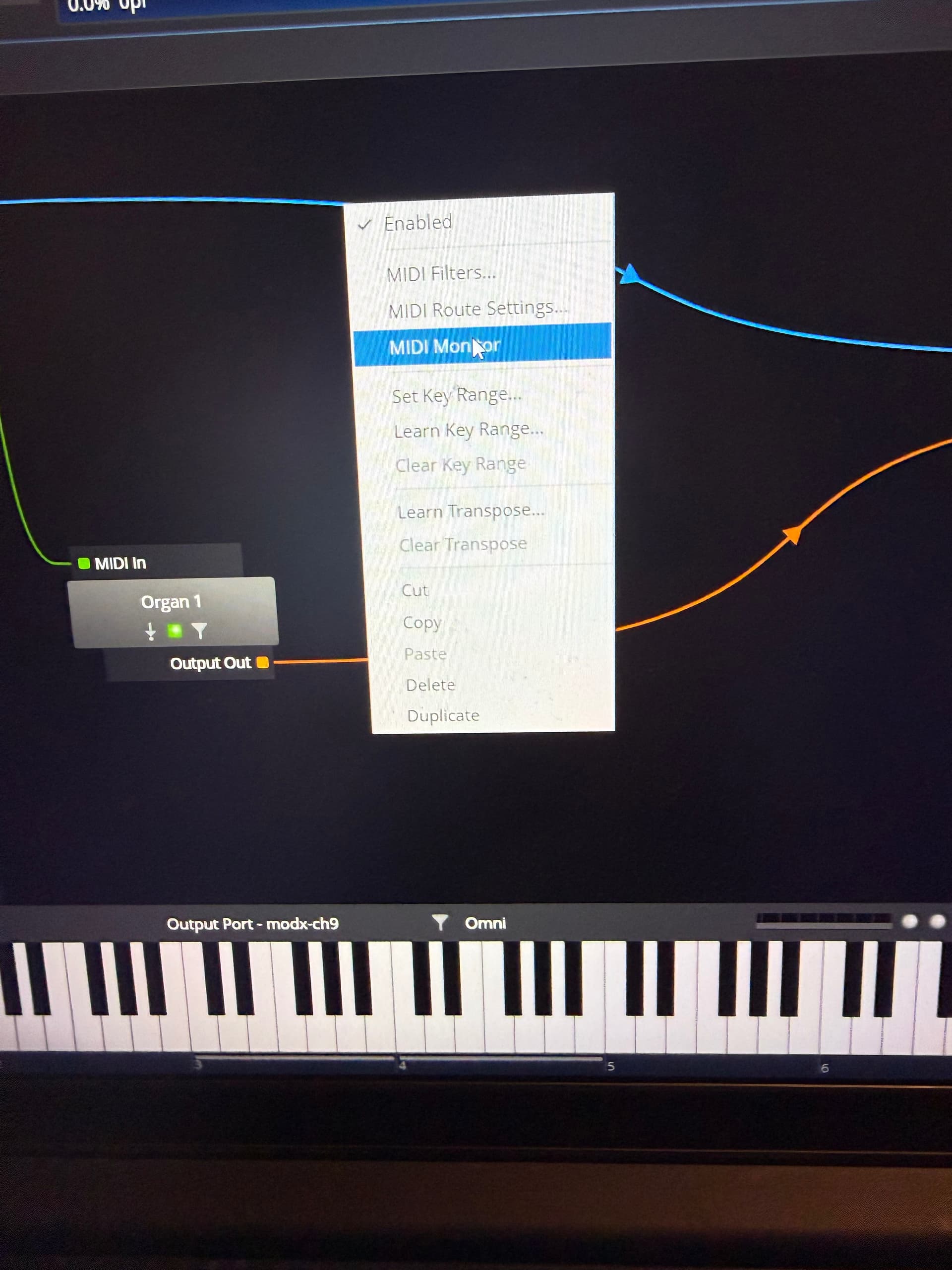
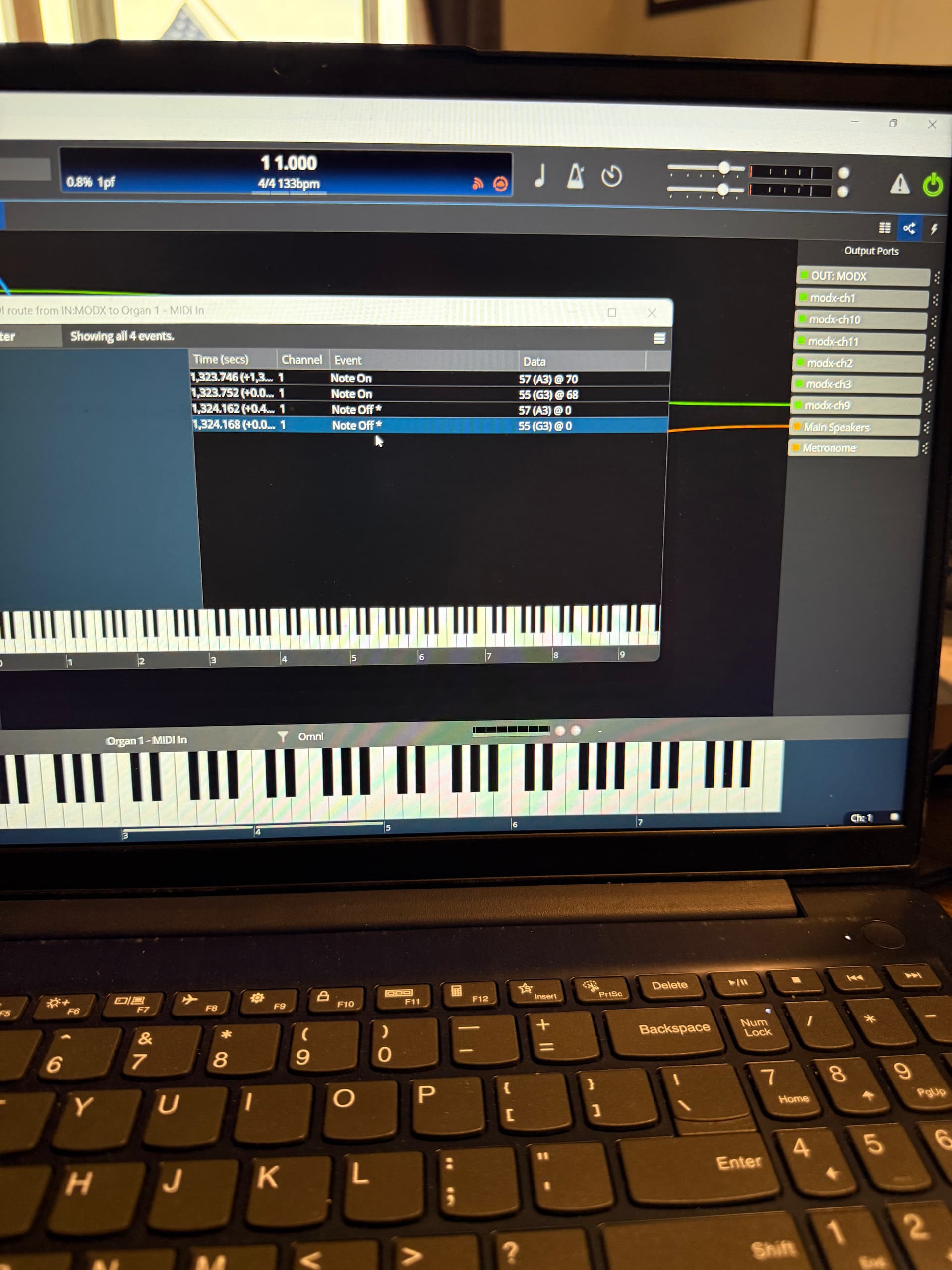
ok - so it looks like it found all the ports. Now the question is do you have all of the ins and outs plugged into the right things? One way to check in Cantabile is to open midi monitor on a given route:
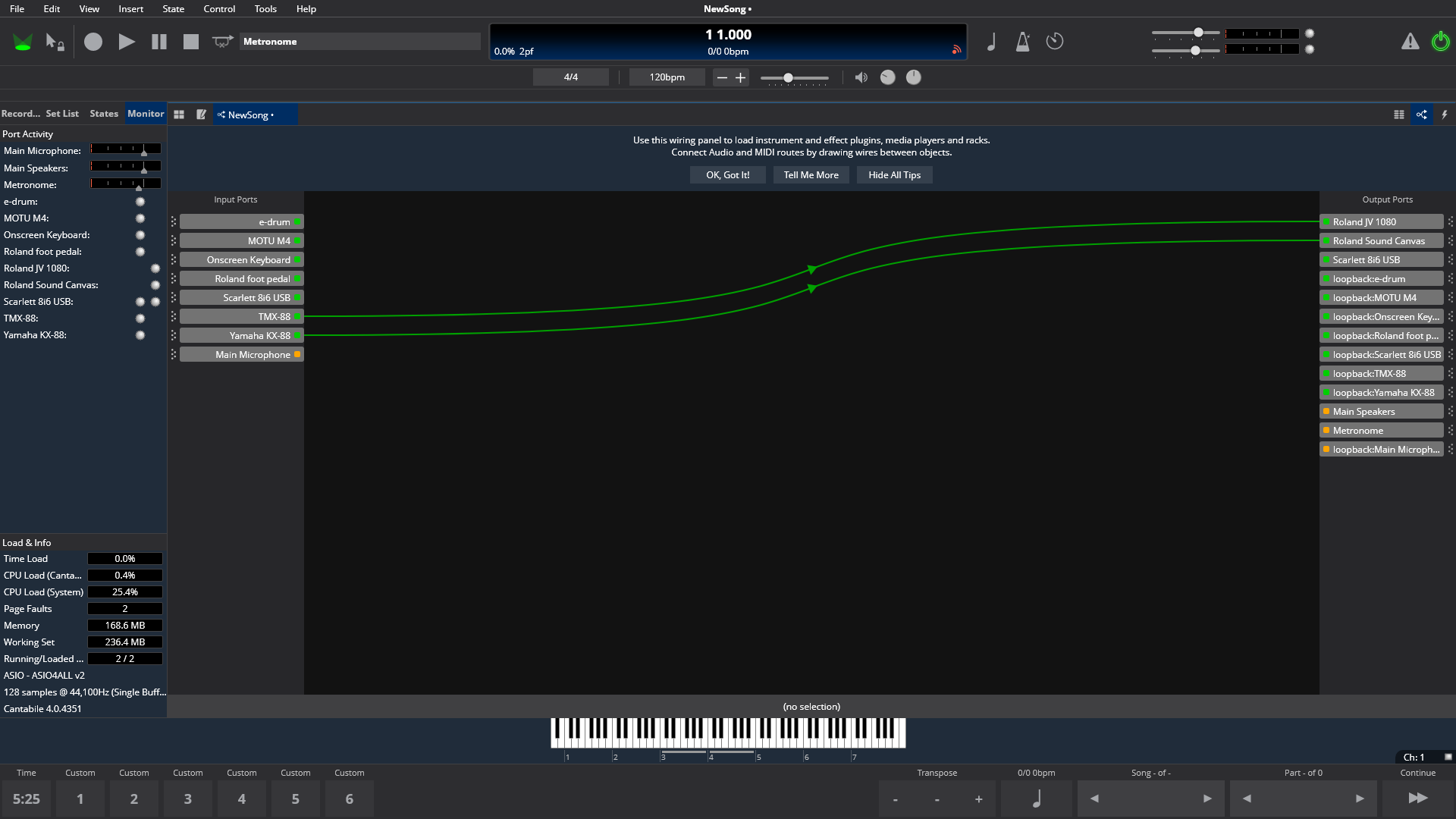
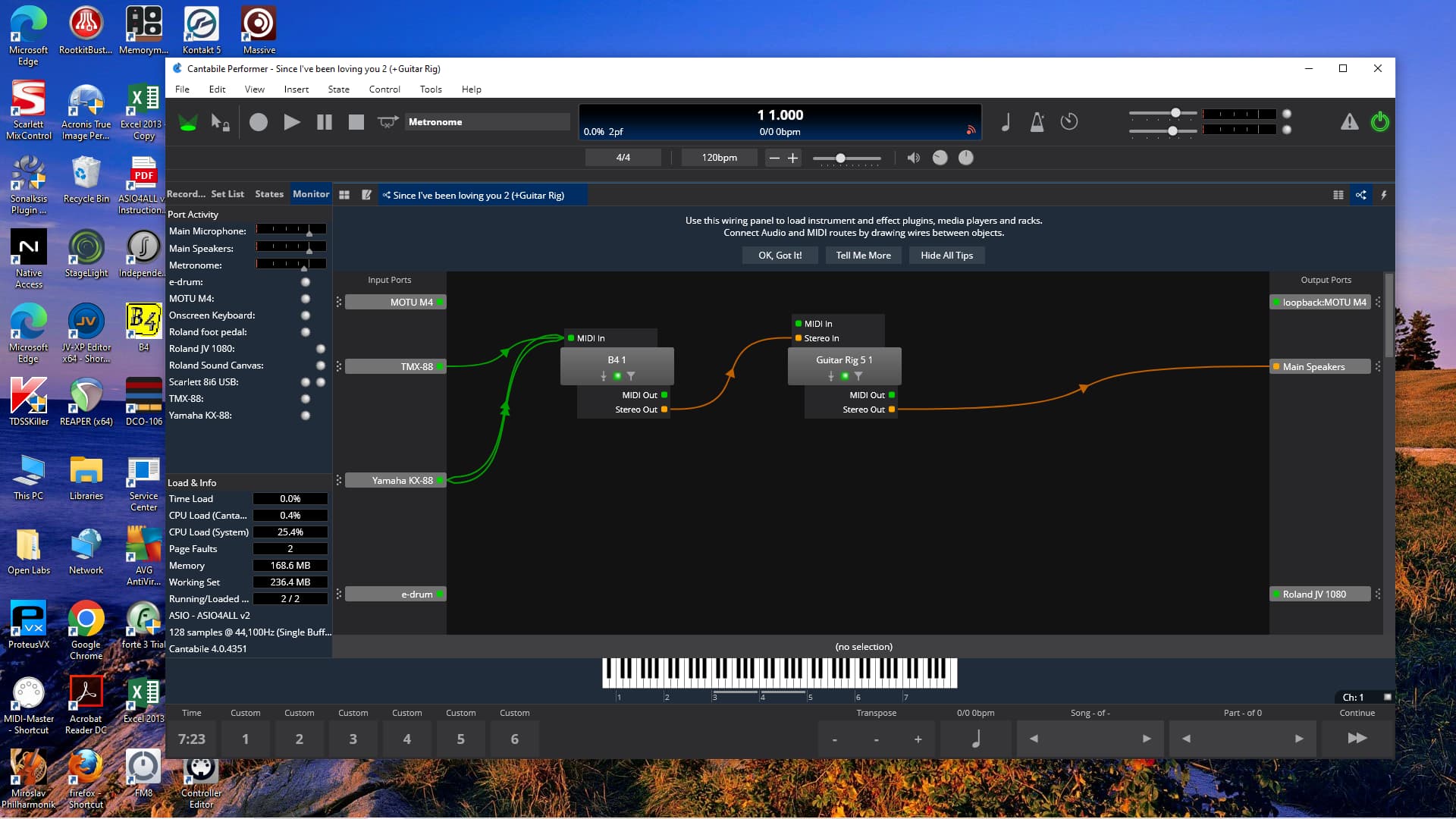
I prefer this screen a lot of times:
Just a small thing, l find that l need to assign midi to Channel 1 on some VSTis. Not all of them seem to need that, but some are not set for OMNI. The notes above got really dense, really quickly, so l can’t say l didn’t miss this, but when l have a midi signal not triggering an expected soft synth, l’ve learned to look for this, first. Also, some midi paths seem to get disabled when the VSTi has “Event inputs” as opposed to “Midi inputs”. Has a VSTi been updated, and this input changed on the update? Just another thing l’ve seen.
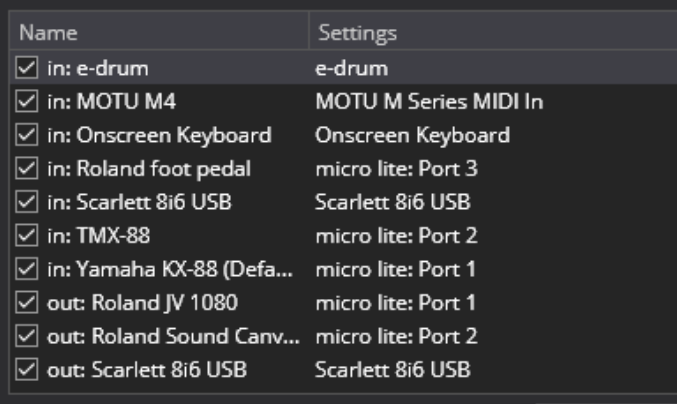
So I had a look at the latest log and it’s showing midi input on micro lite: Port 2 which according to this screen shot means the input will be coming in via the “TMX88” port not “Yamaha KX88” port.
This might also be a big clue. If you switch the the routing table view, it often gives more information/clues about issues here. Can you post a screen shot of that?
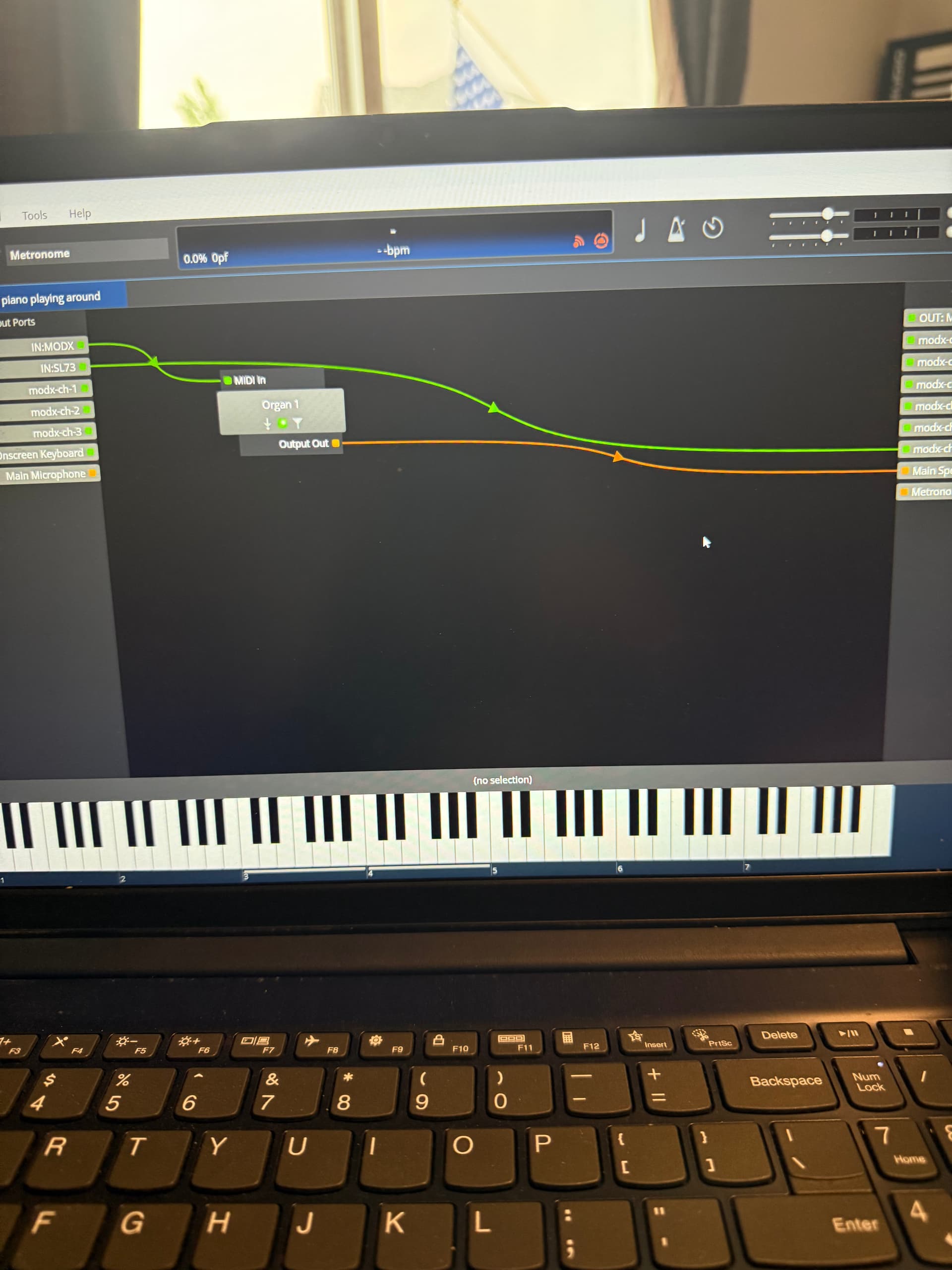
Note: you were running 4062 which I think was before the last major update to the routing diagram where these line colors changed. Later builds they stay same color, (green = MIDI orange = audio) and they become dashed if there’s an error with the route.
Yes, this is almost certainly just a display change in the routing diagram as mentioned above.
Probably best to stick with the latest trial 4351 until we figure out the issues (just because it’s got better logging and the routing display will match what everyone else is seeing). Once the problem is worked out you can go back to 4062 and shut off the internet connection again.
To sum up I think there might be two issues here:
Hi Matt - yes, I am aware of the midi monitors - they can be checked for an input/keyboard by right-clicking on the item at 1) the left- side window when monitor option is selected, also by 2) right clicking on the item named in Table View and 3) right-clicking on the item on Routing/patching view, as well as the “cable/patch cord” graphic connector line.
All have been checked and no events occur. If you read above, you’ll see this was done earlier.
Is the set-up/rig sending midi signals - aside from Cantabile? Yes, as stated above I have midi connectivity on Midi Master - a bare bones midi patching program. Either keyboard will trigger either sound module on this program. Also, both IN/OUT indicator lights illuminate on Midi Lite, the midi routing unit, when running Midi Master.
Is Cantabile receiving midi signals? I would say yes based upon the midi logs showing midi on events/signals and the fact the the solitary midi indicator light on the “Input Ports” line brightens whenever a note is played on either keyboard, but not below on the individual item 2 indicator lights (IN/OUT).
So it seems the issue is an internal routing issue - hopefully Brad will find it.
Hi Brad - you write: 1. The micro-lite to port map might not be what you think it is. (check what’s plugged to what port and how it’s mapped).
Response: the Micro Lite has always had/still has midi lite channel #1 assigned to the KX-88 keyboard and channel #2 assigned to the TMX 88
The midi cables are plugged into the corresponding receptacles/plugs consistent with this.
Cantabile has performed well with the status quo for many years, so I’m not sure what to check.
You write: 2. There are routing errors causing disabled routes (check the table view and make sure all routes are enabled and not in error state)
Response: not sure how this might happen. For testing purposes, I open a new song, go to Routing view and draw a line from either keyboard to either sound module. When I did this on the previous version, the line color would change from blue to red after a second or two…on the new version it turns green…not sure how there might be another disabled route. If this method is incorrect, please advise.
In Table View the only status indicator I am aware of is the “check-mark” to the immediate left of the input device/named keyboard. Is there another way to check route status?
Please let me know if I am missing anything or can help further and thanks.
Hi Vassaux - thanks for jumping in. The problem seems to be related to midi routing aside and apart from VST complications. The problem is happening with no VST’s involved.
Brad - for good or ill, when I ran the log tests I played notes on both keyboards. Perhaps this caused some confusion, sorry.
I’m stumped. Can you please confirm:
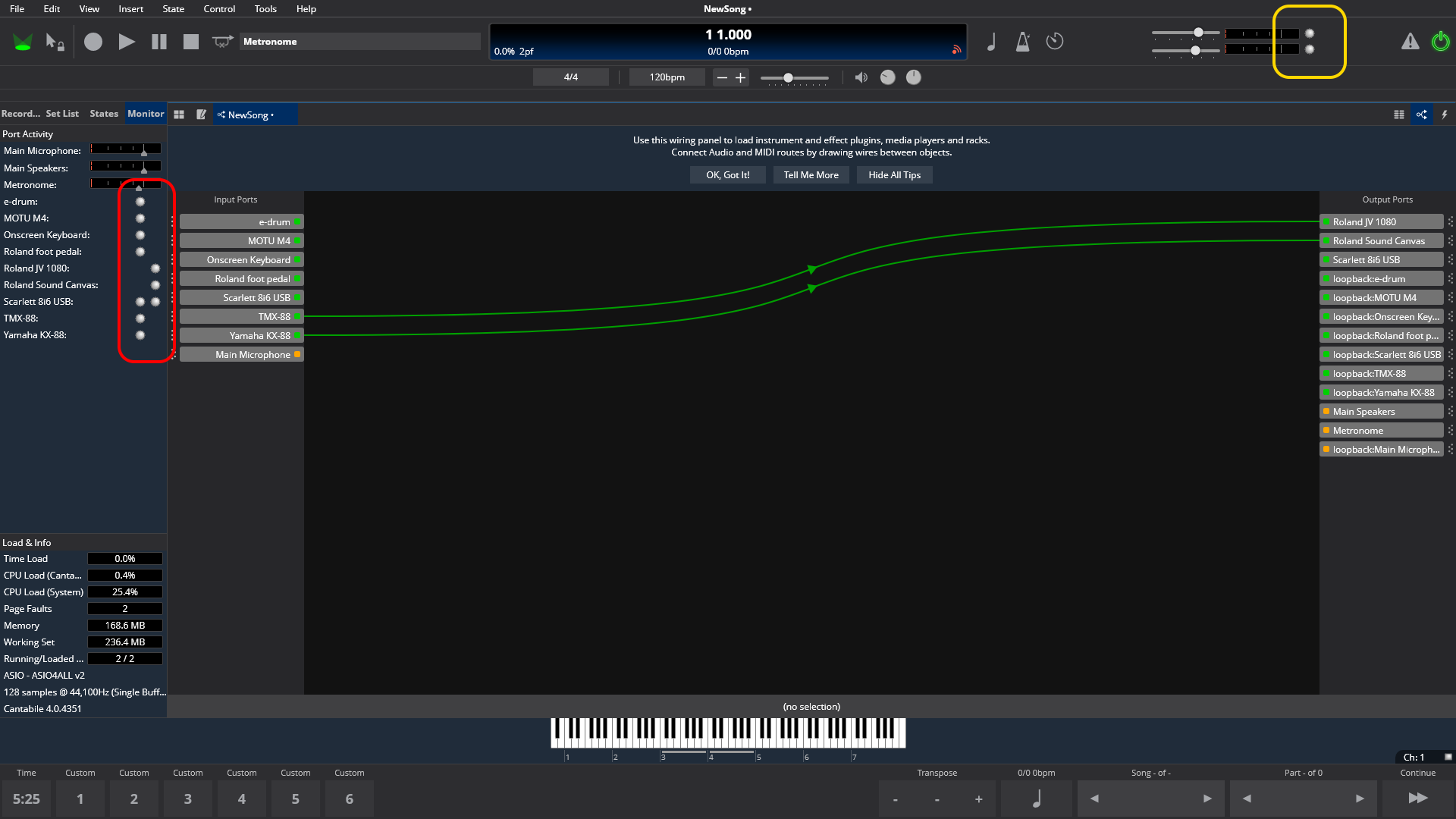
Brad, no. Indicators in yellow box do not light up, either one. Same with all lights in the yellow box - nothing lights up there.
The only light that shows any activity is the solitary light on the “Input Ports” line on table view, right below the word “Indicators” it goes from dull green to bright green when either keyboard is played.
Very weird, not sure how that can happen.
Can I get you to try with a fresh, clean second config - see here for instructions (this won’t affect your current setup)
Then run it, set audio driver to the “Null” driver. In MIDI Ports, right click Main Keyboard and map to micro-lite port 1 or 2. Don’t bother setting up plugin paths etc…
Play on the keyboard attached to that port and see if any of the above indicators light up.
Brad - correction, which I think you already guessed: I meant to say:
Indicators in yellow box do not light up, either one. Same with all lights in the RED box - nothing lights up there, either.
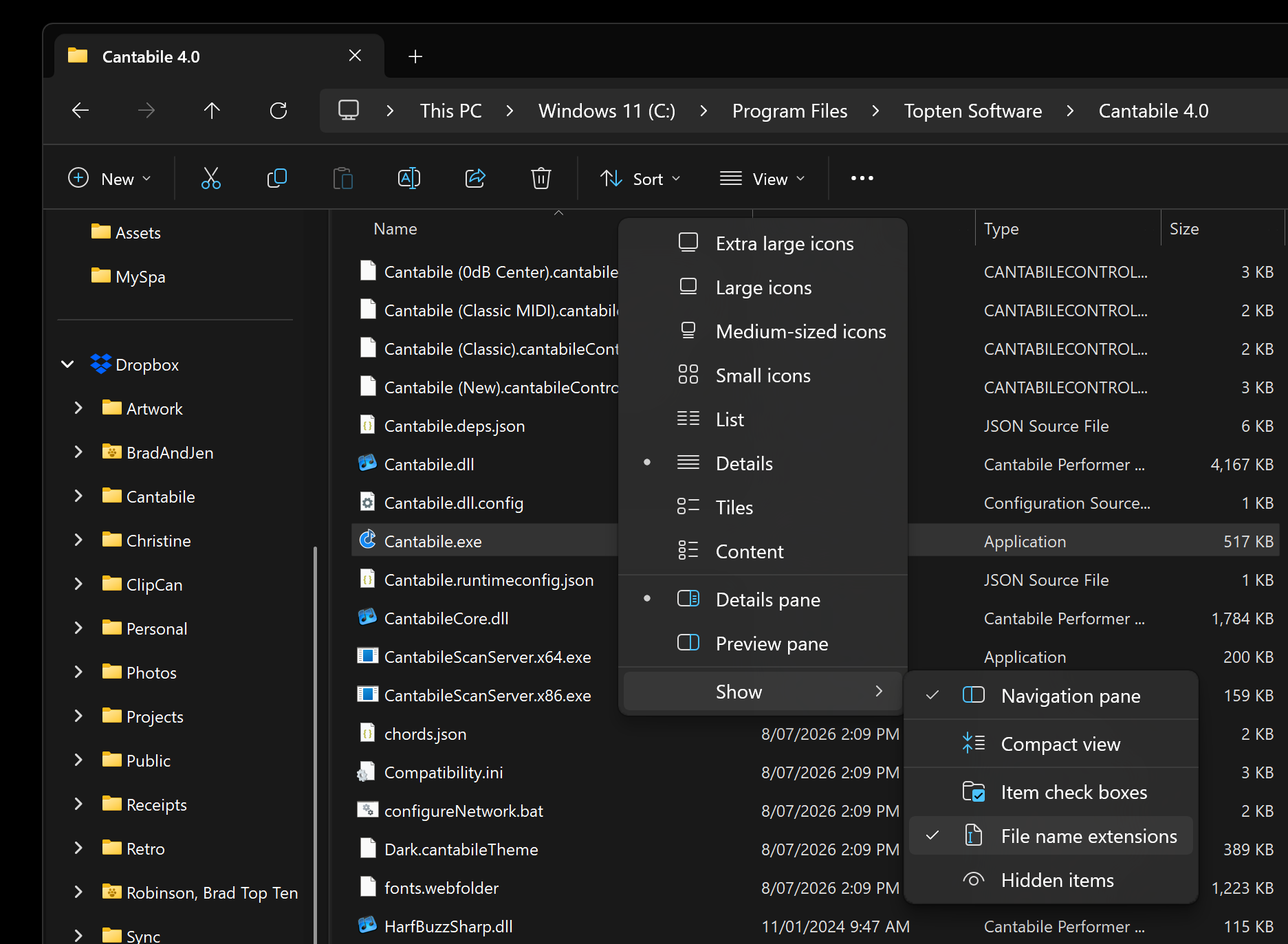
I’m guessing you want me to install a second, clean Cantabile 4.0 version. Under Cantabile 4.0 there is no file with an “exe.” extension. There is a Cantabile “DLL file” and a Cantabile “Application” file…the instructions on the link are asking to insert the exe. file, what do I do? Sorry, not a computer expert…
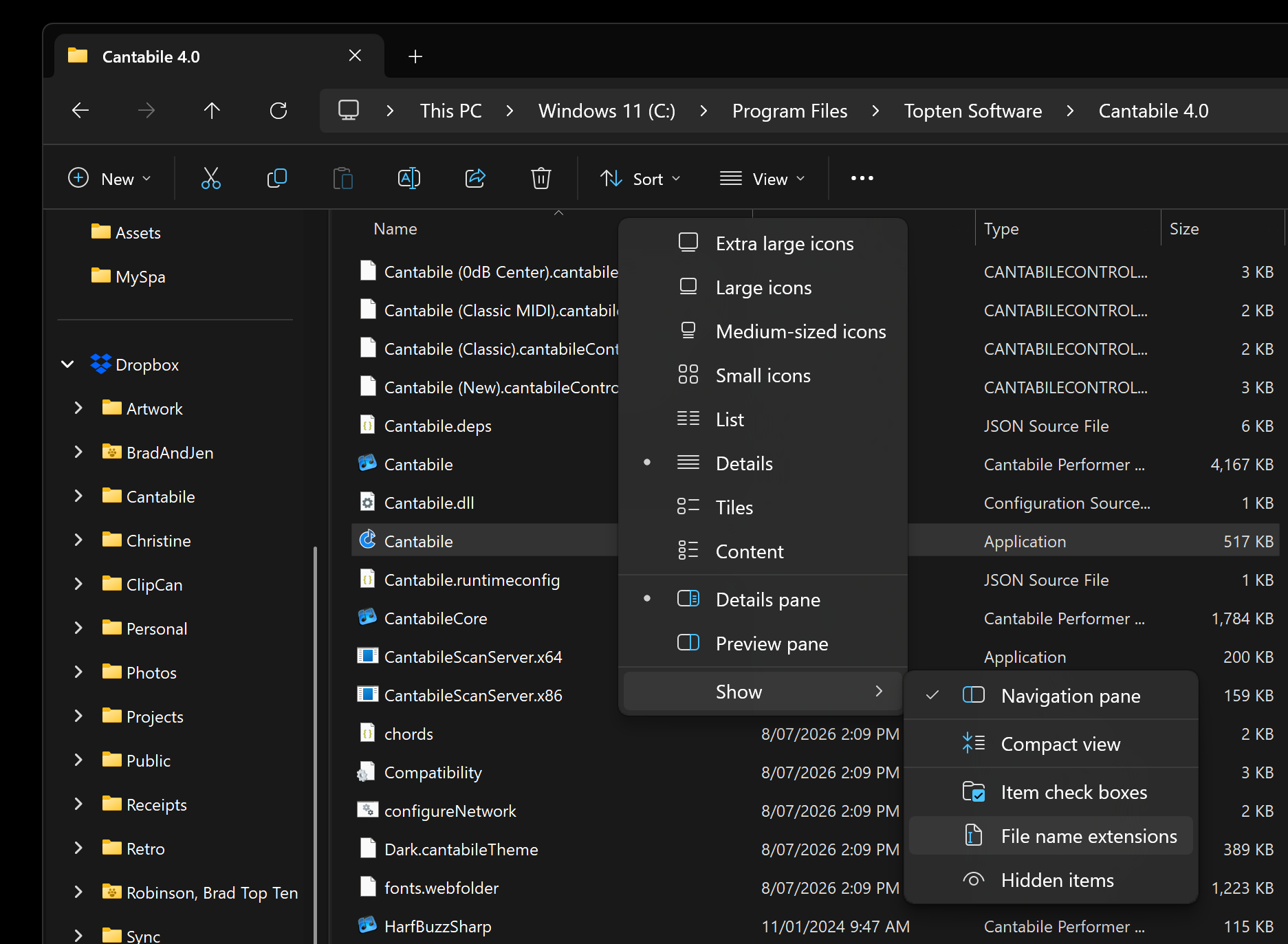
You probably have Explorer configured to hide file extensions. Look for the file “Cantabile” with type “Application”, or turn “File name extensions” on so you can see the “.exe”
In Windows 11 this is in the view menu. For Windows 10, see here.
File extensions hidden:
File extensions shown:
You’re not installing again, just creating a new separate set of configuration options that can be run independently without messing up your existing configuration.