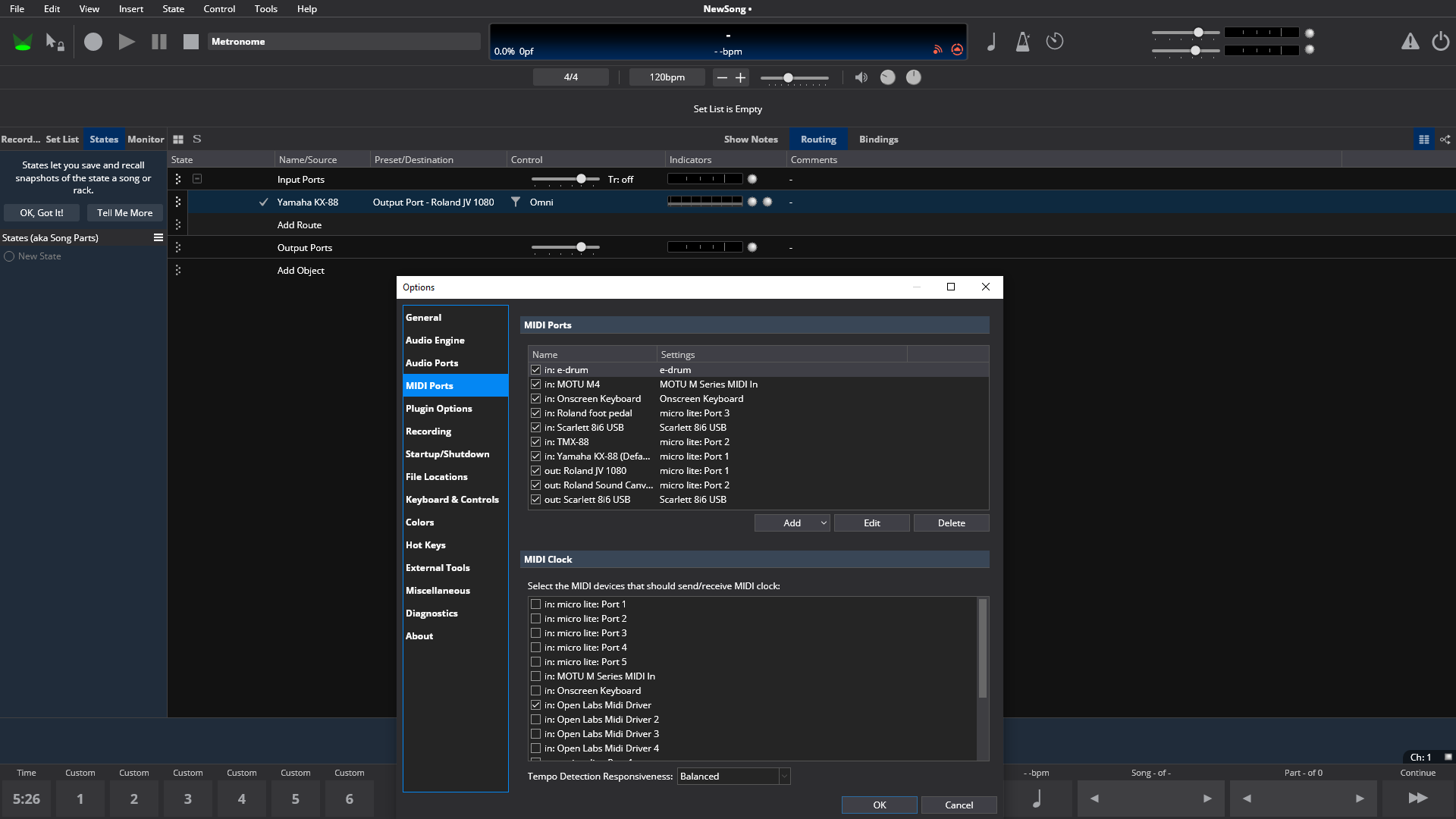
To clarify, the indicator light at top (Input Ports - Table View) shows midi IN activity/signal, but the keyboards being played (and listed below) are not indicating any midi in/out activity for their individual midi monitor and not triggering the sound/patch. So it seems Cantabile is sensing a midi signal but not routing it further. All midi IN/OUT ports are checked in the Options/MIDI ports window.
This is a new symptom, following installing a new audio interface.
I used other software (Midi Master) to verify MIDI functionality and it does work.
Can you post some screen shots showing your setup.
eg: do you actually have MIDI routes connecting the input ports to something? Are both input and output indicators on those routes flashing? Is the MIDI activity indicator at the target object flash? etc…
Hi Brad, thanks for jumping in. I’m not sure how to do a screenshot, but can say that Cantabile has worked fine for many years, and this problem coincided with my A/D interface failing and installing the replacement (not sure if relevant). All my external in/out devices (2 Roland sound modules, keyboards, etc.) still show up in the Midi input/output list at Tools/Options/Midi ports - the same as before. I tried unchecking all the inputs, then re-checked them, restarted both Cantabile and the computer, etc. - the easiest possible fixes that occurred to me. I forgot to mention earlier that, although the green indicator light at top (Input Ports - Table View) shows midi IN activity/signal, when I look at the MIDI Monitor window/panel no events happen when either keyboard are played. This is happening in all existing songs and when I create a new song and connect the input (on either keyboard) to the sound modules (either one). The result is the same - the indicator light at top (Input Ports - Table View) gets brighter when I hit a note on the keyboard, but that keyboard, listed below on “Input Ports” shows no light signal for either the midi in or out and does not trigger the sound module (either one). Hope this answers your questions, I have Cantabile on a separate computer that is rarely on-line but will go the screenshot route if needed.
Thanks much.
Stupid question, but have you remapped what MIDI ports Cantabile is using after changing your interface?
E.g if I had an AN1x MIDI port in Cantabile mapped to vendor 1 interface, and I then remove the vendor 1 interface and replace it with a vendor 2 interface, then I need to update my AN1x MIDI port mapping to vendor 2 interface
Hi Derek, thanks for jumping in. I’m not particularly computer savvy, but have been able to install/manage Cantabile and prior, simpler midi patching software successfully. With regard to your question about the interface (presumably the A/D audio interface), my understanding is that it is separate from midi functions. Although the old Focusrite Scarlett 8i6 and the new MOTU M4 have MIDI in/out ports neither unit was ever connected - no midi cables were/are connected to them. Not even sure what they are for, perhaps for changing mixing perameters/levels?
So, at no time then or now were they sending or receiving midi signals. Interestingly, they both do appear on the Tool/Option/MIDI Ports window - I’ve tried checking and unchecking them anyway, to see if any improvement, but no luck. The M4 is working, I can play audio recordings and it sounds great.
Not sure what remapping entails - do you mean to delete the item/input and reinstall it? I would assume that Cantabile either detects the object or doesn’t, but in this case I assume it is detecting the new M4 because I added it to the MIDI list..
One more possible clue; I cannot employ the on-screen keyboard either. It appears on the Midi Port list and is checked, but will not trigger/send any signal when connected to either sound module.
Sorry for the delay, am writing from Los Angeles and just woke up and had coffee…thanks again for your help and any suggestions, Dave
Further note: in Routing view all the input to output graphic connection lines immediately turn from blue to red when creating a new song and are red on all existing songs. Sorry, just noticed this, although it might be obvious to others.
More info: I still have Cantabile v2 installed and fired it up after a very long rest. It works fine, with all midi functioning properly - sorry, should have checked this sooner.
So midi is functioning fine on V2 and other software (Midi Master), but not on Cantabile V4.
Dumb question; if I delete all items at Tools/Options/Midi Ports will Cantabile V4, during a restart, automatically go out and find/reacquire any/all available midi ports, which I can then check or not, as needed? Perhaps this is the remapping Derek was referring to…I hesitate to do this without advice from this forum.
It’s a bit hard to track everything that’s going on here, so lets start simple.
From your screen shot you’ve got micro lite port 1 mapped to Yamaha KX-88 input port.
Is your keyboard actually connected to micro lite port 1?
In Cantabile’s monitor panel (View → Side Panel → Monitor) does the Yamaha KX-88 MIDI input indicator light up when playing notes on the keyboard “connected to micro lite port 1”?
If yes to point 2, do the MIDI in/out activity indicators on the MIDI route in the background of your screen shot also light up?
If no to point 2, here’s some things to check:
Check audio engine is running (green power indicator at top right)
Disable any MIDI filters (Tools → Options → MIDI Ports → double click Yamaha KX-88 port → MIDI filters)
Make sure no other MIDI related software is running and restart Cantabile.
Thanks Brad - 1) KX-88 is connected via midi cable to micro lite 1, also TMX-88 is connected to micro lite 2 via midi cables.
The MOTU micro lite midi routing unit has activity indicator lights for 5 ins and 5 outs and both 1 and 2 IN illuminate when I play those keyboards, but not OUT.
2) Side panel midi indicator lights do not illuminate for 1 or 2 when played, nor do either IN or OUT midi activity lights at individual keyboard listed under Input Ports. The upper solitary light in line with Input Ports does brighten for both keyboards when they are played - as mentioned eralier.
Trying to keep this brief, but since yesterday a series of events happened which should be mentioned. As of last night I was able to play Cantabile V2 and also Midi Master was working. This morning windows crashed and I reset settings to an earlier date. Now Cantabile V2 is not passing along midi info, but Midi Master still does.
Hrm, not sure. Maybe a log will show something, try this:
Start Cantabile
Go to Tools → Options → Diagnostics
Make sure Write Log File and Log MIDI In Events and Log MIDI Device Scans and all checked
Close Options
Play some notes on your KX88.
Let Cantabile sit for 30 seconds or so (Device scans run every 10 seconds so this should log at least a couple).
From the Tools menu, choose Open Settings Folder
Close Cantabile (this is important)
From the folder opened in step 7 send me log.txt, log-previous.txt and settings.json
Also, when you play notes on your KX88 does the microlite computer I/O indicator light up?
Also, note that only one program can access a MIDI port at a time. Make absolutely sure nothing else is accessing the MIDI ports when you start Cantabile’s audio engine. For diagnostics it would be useful to try Cantabile immediately after rebooting before you start any other programs. It’s possible something from before has been left running in the background with the port claimed.
You ask: when you play notes on your KX88 does the microlite computer I/O indicator light up?
Answer: on Cantabile, currently, only the IN indicator on micro lite illuminates - on either/both keyboard(s) being played.
Note: on Midi Master both IN and OUT indicators illuminate - for both keyboards.
I am mindful that running 2 programs simultaneously can create resource conflicts. I’m confident I’ve avoided that as the source of the problem.
Log files you requested: I played arpeggios on both keyboards for a few seconds, hope I didn’t overdo it. Can redo if too much
(later)..Have run the requested logs but am fighting with computer about being unable to upload the format. Will try to work through this and forward asap, need to get to bed now, should have to you tomorrow morning, local time.
Brad - just occurred to me that the restriction po-up message for uploading/copying pasting to the forum is a forum -created restriction. Any easy workaround?
Thanks for sending the logs. I took a look and can’t see any issues opening midi ports and I can definitely see MIDI input events coming from the device. So, this looks like a routing issue in Cantabile itself.
Can you now please check if the MIDI monitor is showing any input activity:
Bring up the side panel monitor (View → Side Panel → Monitor)
Right click on the Yamaha KX-88 port and choose MIDI Monitor → Input Port
Play some notes - they should show in the monitor.
Assuming they do, close the monitor and then right click on the route from that same port and choose MIDI Monitor.
Play some notes - they should show in this monitor too.
If not, in the Monitor window switch from Post MIDI Filter to Pre MIDI Filter and see if anything shows up then.
Brad - no events in either pre or post midi filter setting for midi monitor.
Note: the green solitary indicator light at Input Ports line continues to get brighter when a note is played
I’m at a bit of a loss as to what’s happening here.
I don’t know how the MIDI activity indicator in the input ports slot can light up but none of the ports in the side panel? (unless perhaps you’ve configured ports to not appear in the side panel).
Unfortunately the current builds don’t log which device received the MIDI events when logging. Are/can you run a recent build if I fix that?