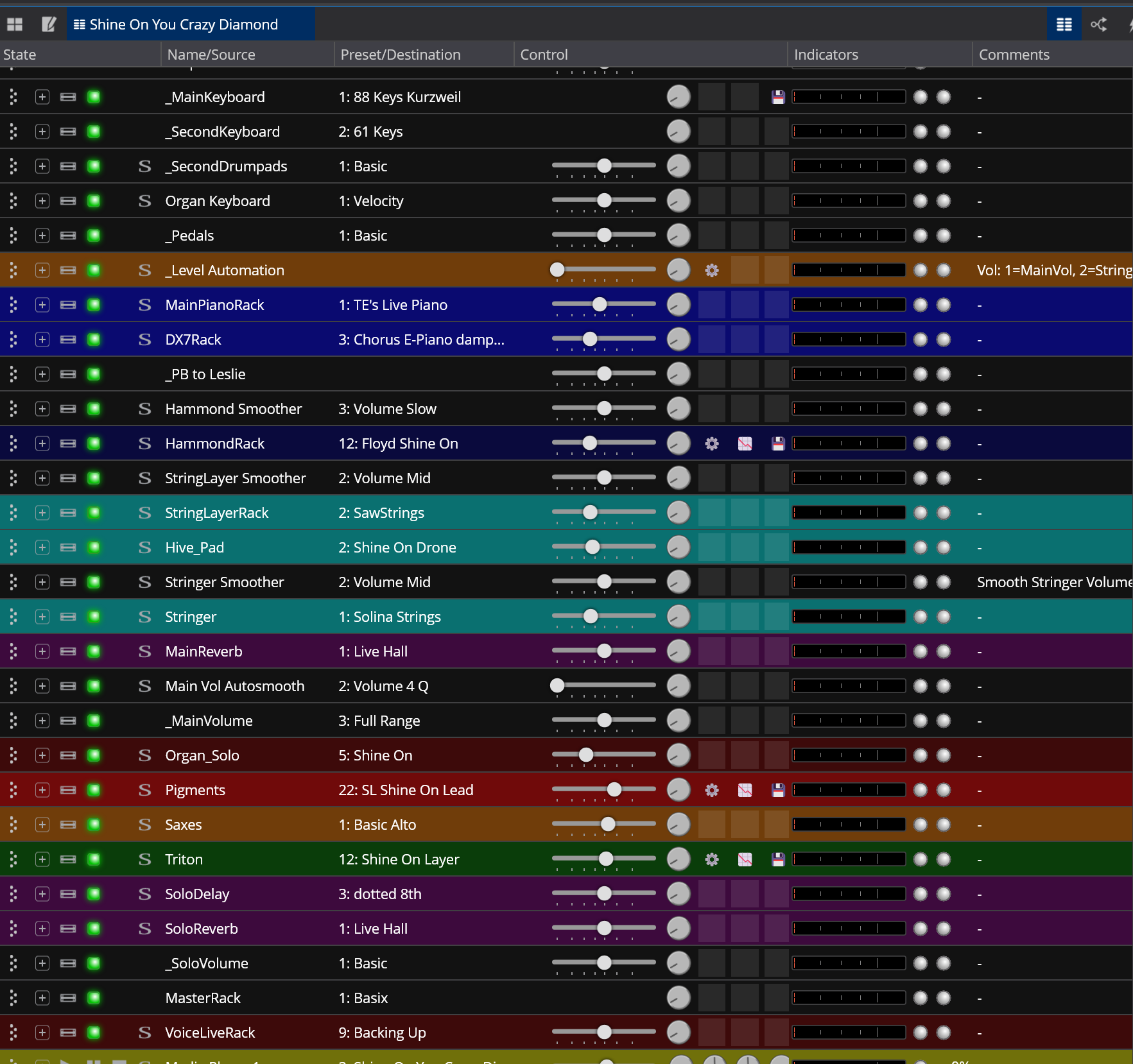
I’m currently refining my live setup and I’d love to hear how other users approach set list organization and overall rig architecture in Cantabile.
Coming from Brainspawn Forte, my natural inclination would be to build a single “monolithic” rig file (essentially one giant Song in Cantabile terms). However, I suspect that adopting Cantabile’s native Set List\Song\States hierarchy is much more efficient—avoiding the need to load one massive “blob” of plugins at the start of a gig and keeping individual song files much lighter.
I’m curious about which structural workflow you prefer for live performances:
Native Hierarchy (Set List\rSong\States):
Do you strictly map each track on your set list to an individual .cantabileSong file, reserving States exclusively for instrumental variations/sections within that specific song (e.g., Intro, Verse, Solo)?
Consolidated / Single-Song Hierarchy:
Or do you lean towards a consolidated approach—treating a main Song almost like a global Rack/Rig—and using States both to switch between songs and to manage sound changes within them?
I can see pros and cons to both approaches regarding pre-loading times, RAM/CPU management, flexibility and reliability.
How are you currently handling this in your gigs? Have you transitioned from one method to another over time, and what drove that decision?
In my main group there are no backing tracks but a great number number of special instruments and patches and a requirement from me of being able to manage each song in a contained way. I found that using song files for each song worked best for me. I basically use each song as a full keyboard & patch snapshot for that song. Doing it this way I have in each song file
a practice version of the song in a media player
my specific instruments & patches and pedal setups
my show notes for live display of chords and lyrics
I then build set list files for the event I’m playing from the large pool of songs I’ve made over the past years. I use the pre-load feature for the set list loading so my patch and instrument changes are as fast as possible. The only note to add is that when I’m doing songs the merge together like medleys I combine the instruments and patches in one song and use song states to switch between them. This prevents cut off notes or audio between layered song switches. I don’t have song states for verse, chorus etc .. because I prefer to keep it simpler and learn the changes to memory or refer to my notes to navigate the piece. I might add that my instrument changes are modest compared to some of the folks at work here, they will hopefully offer up more detail on the subject of song state changes. I hope this helps.
I’m very much a Set List/Song/State type. Having the ability to simply restructure a set is vital for all the bands I work with so I have each “track” saved as a “Song”. I don’t use too many Song States (a few that require Verse chorus) type structures but I have (almost) all my synths in racks with mostly corresponding rack states for each song so the rack itself is only loaded up once and just use rack states to manage the VSTis.
Some of these VSTi Racks I have routed to a loopback audio port so the rack sends directly to the Background Rack where I have some “safety” limiters for each Bus (one for Drum Stems, one for Instrument Stems, one for synth VSTis). This allows tails or even sustained notes to carry between songs regardless of the order of the set (occasionally I will need to create another Rack to cater for times where the same instrument is being used to transition).
I have general time-based FX (reverb and delay) in the background rack too so I use additional routes within the VST Rack also sent via loopback ports to these general FX. However sometimes I need specific Distortions/Saturation and fancy delays which I include in the rack and just use states to mute the routing when not needed.
I also use a lot of media players so the use of songs is just a lot simpler (for me) to manage Backing Stems and MIDI sending notes to a sampler for Click and Cues for In Ear Monitors.
In the background rack I receive the iinputs of all 3 buses sent from all songs/racks (via the loopback ports) and have the limiter on each and a HOFA 4UMeter fader at the end of the chain so I can change the balance for the room quite quickly for the whole set.
It works for me!
edit And just to add, I came from Forte too so originally I had the monolithic type approach, then switched to setlists/songs (and loaded all my required VSTs, Media Players for each song for simplicity in setlist structuring) and now use Racks almost exclusively for managing VSTs in the main so I could reduce the amount of plugins being loaded (in a full setlist of ~100 songs going down from ~400 plugins to under 150, obviously I never play a FULL set of 100 songs but to give an idea of the reduction) an using Rack States changed my life and using loopback ports meant I could pretty much choose which VSTs could sustain between songs.
I figured that the “1 Song = 1 Track” approach would be the most efficient workflow, and I immediately realized how crucial the Pre-load feature is for making it work smoothly. Your suggestion to use just one Song for medleys (and song states to switch between them) is also extremely valuable—it makes total sense for preserving continuity between connected songs.
Hunter, thank you so much for this detailed layout!
Coming from Forte myself, your journey hits the spot. The transition from the “monolithic” approach to a Set List / Song / States workflow with global FX and safety limiters in the Background Rack makes complete sense. Moving shared VSTs into Linked Racks to cut down the active plugin count is a brilliant suggestion.
I’m definitely going to adopt your Background Rack routing for global FX to keep reverb and delay tails seamless. However, I’m forced to avoid loopback ports for the main instrument paths and Master Rack: on my setup (Dell Latitude 7420 running at a 192-sample buffer to keep the Time Load safe), an extra 192-sample round trip would introduce just enough latency to mess with my playing feel. Direct outputs for the keys are a must for me!
The loopback ports are only as I use the same rack (on occasion) with different instances of a VST and hold/sustain a note, so using “normal” rack outputs/routing will work fine in general for transition of tails (just not always sustained notes as even through the rack exists in each song, Cantabile seems to rebuild the routes for the (Outer)rack routes (hence why I use loopback ports WITHIN the rack - probably not ideal for some setups) so if you hold a note/sustain you can get a small audio drop (tails are fine).
Yes, that makes total sense. Thanks for clarifying the difference between decay tails and held/sustained notes during a Song switch.
Since I plan to use Song States within a single Song for medleys - where seamless note-holding is required - Cantabile (hopefully) won’t need to rebuild the routes dynamically, (hopefully) avoiding any audio drops
For standard song changes between setlist items, I’ll naturally be changing tracks after stopping, so letting the FX tails fade via the Background Rack while keeping direct outputs for the VSTis I think remains the ideal setup for my setup.
That will absolutely work… And more like Dave’s approach for songs. There are a lot of different user setups that will do things differently but the good thing is you can use the best bits from all of them. There is no real “right” way just what works for your use case Cantabile is wonderful for the amount of flexibility!!!
I take a mixed solution to my Setlists. I have a large set of “generic” songs which include preset patches to my VG800 which can emulate electric, acoustic, basses, banjos, etc. I apply them to songs which just need basic guitar tones.
The VG800 can generate midi out using my hex pickups to drive virtual instruments. Again I have generic songs with states of VG800 tones, and virtual soft instruments, and the two mixed together.
If a song needs special tones which cannot rely on the generic tones, I build those songs into the setlist with the appropriate states.
I currently use Chords.Wiki as my lyric/chord depository and it launches a midi Program Change to the generic or special song I setup in my setlist.
Using this method I keep the setlist specific to the venue and don’t try and change them too much. Works for me!
I am firmly in the setlist / song / state camp; with a bit of a twist: I have one - alphabetically ordered - “master setlist” containing all active songs for a band / project. This setlist is pre-loaded, so I have all songs directly accessible. The actual set lists for specific gigs / rehearsals I manage using LivePrompter and I select the correct song in Cantabile using MIDI program changes.
Within songs, I go a bit overboard with song states, owing to the fact that I also control lights with Cantabile, so even if the sound doesn’t change, I still have state changes to switch lighting scenes.
The key to this type of setup IMHO is having the right granularity of shared racks across songs - I started out with few “big” racks, but over time I have become more granular. Typically I treat my racks like physical instruments, so I have a DX7 rack, a Triton rack, a couple of Hammond racks, etc. Then, I throw together what the actual song requires and wire things up. A bit like Lego for musicians. Far easier than managing a couple of super-massive monolithic racks that become more complex all the time…
This makes it quite a number of racks that need to be pre-loaded, but I take care avoiding CPU and memory hogs for live use, and I clean out things on a regular basis, so my setup is still pretty efficient.
The “Lego approach” with granular, instrument-specific Linked Racks makes total sense. Moving away from monolithic structures into smaller, reusable building blocks seems to be the sweet spot for keeping things manageable and clean.
I too was thinking of a set of “generic” song templates with pre-configured states for standard tones—it seems like a clever way to keep things light. However, I’ll likely stick with the “one track-one song” approach to keep each song’s identity, routing, and specific tweaks clearly isolated and predictable.
It’s really interesting to see how both you and Torsten use external chord/lyric managers to fire MIDI Program Changes into Cantabile. That seems like the ultimate way to keep Cantabile’s setlist completely stable while letting the gig’s running order be driven dynamically.
On my end, regarding song and state stepping within setlists, I’m still weighing my options between using a smartphone running TouchOSC, a tablet, or just a simple hardware numeric keypad for quick, tactile control.
Starting from the top level … I have a folder for each of my bands, e.g. C:\Cantabile Projects\Tribute Band, C:\Cantabile Projects\Cover Band, etc. Then each of these folders includes setlists, folders for Song_files, Racks, etc. (Each band also uses a different configuration with distinct configuration files, which is another whole level.) To create a setlist for a gig, i make a copy of the master setlist for that band, pull the songs for that show’s setlist to the top of the list, and preload only the songs for that show’s setlist, leaving the other songs available for audibles or requests.
Personally, i’ve found song states to just add another level of complication when chasing down some unwanted behaviour. Instead, i use bindings to conditional MIDI routes to change sounds.
In each project, i have a linked Output_Rack which i include in every song, providing mixing, effects, volume pedal control, etc. Since this is a discrete rack it avoids the use of loopbacks that would be required if putting these functions in the background rack.
Haha, fair point! Shine On You Crazy Diamond is definitely the ultimate benchmark for rack stress-testing!
Looking at your Song setup (aside from being deeply envious of your mastery of Cantabile!), a thousand questions come to mind—don’t worry, I won’t list them all But I’d love to ask just two quick ones:
The Smoother Racks: I assume they’re used to prevent abrupt volume jumps or clicks when switching between states. Would you mind giving a quick overview of how you build/configure them?
Performance & Latency: With so many active racks loaded at once in a single song, are you still able to maintain a low audio buffer size for tight live playability?
I love the color-coding system by the way—it actually makes that impressive wall of racks surprisingly readable.
I primarily use what you call the Native approach, but I guess you could call it a hybrid approach.. I also have a song that has many different tones and sounds, each in its own song state, which is generic so to speak, so if there’s a request or some other kind of a curveball I can just quickly grab a sound from that.
A couple of other things I do that make my setlist really work for me are…
-A custom button on the bottom row to sort the list alphabetically, and next to that another button to return it to its normal order.
-I color code certain songs, in addition to having my racks color coded… I play a few different instruments so the color coding is separated by instrument… Nice to be able to take a peek at what’s next. But you can use the color coding anyway you wish of course.
-I also have a shortcut on my desktop that brings me right to my Cantabile song folder… I use a touch screen so I can have any song loaded within about 5-10seconds using that method, even if it wasn’t on any set list. It’s a last resort but it works.
Like most here, I also have all my Song States set so that I can edit a sound only for that song, but the underlying rack state (essentially a preset) is not changed. Very handy.
To answer your last question, I don’t have any latency or other problems and I’m running at 44.1 and 64 on and i-7 1260p with a Presonas Quantum 2626 thunderbolt 3.
Enjoy Cantabile… The learning curve is relatively extensive but it is well worth it. And when you want to do something that you can’t figure out just post it here and you’ll have an answer.
Tom
Thanks Tom for the clear picture of your setup. I love the idea of a “generic” fallback song loaded with quick-access patches: a true swiss army knife that covers basic keyboard needs! I’m considering putting such a song in every setlist just to be ready for any scenario.
I have to say, I’m genuinely impressed (and a bit jealous!) by your 64-sample buffer performance at 44.1 kHz. I’m currently running a Dell Latitude 7420 (i7-1185G7) with a USB interface at 192 samples, and while overall CPU load is low, I still see occasional Time Load spikes on heavier racks. Seeing your stability with the PreSonus Quantum 2626 over Thunderbolt 3 really highlights the massive difference a dedicated PCIe/TB bus makes for live playability. Definitely making me reconsider my hardware roadmap!
I find it important especially in rehearsals to be able to just explore new ideas quickly. I found I don’t really need a full “swiss army knife”, but rather get by with a couple of quick basic setups. I have four “keyboard” rehearsal songs, all based on one basic sound on my lower keyboard, and a range of four additional options on my upper.
Lower keyboard determines the song to be loaded: Grand Piano, Wurly, Rhodes
Upper keyboard gives me 4 options in song states: Rock Organ, Blues Organ, Sax, Brass
The fourth song is a two-manual Hammond organ between lower and upper keyboard.
Plus, I have a guitar amp song for when I play guitar, with song states from clean through to high-gain.
That gets me through most rehearsals when I don’t have the time to actually prepare a dedicated Cantabile song for new material.
When I really need to get more complex on-the-fly, I have my “custom overlay” project, but TBH, I’ve only needed it very few times so far…