Hi Ray,
I’m glad it helped.
The reason the values are not coded in as you mentioned is because the 2 logic flows are are separated in Cantabile. One is performance oriented and the other is display oriented. The display oriented functions are generic in nature and don’t follow the calibration or ranges you might set in the bindings. So as you said it’s one for the wish list since the coding would need some changes. 
In the mean time you can set the pop slider range like so for the -19.6 ~ 6.0 db range you have in the binding to (45 ~ 121)
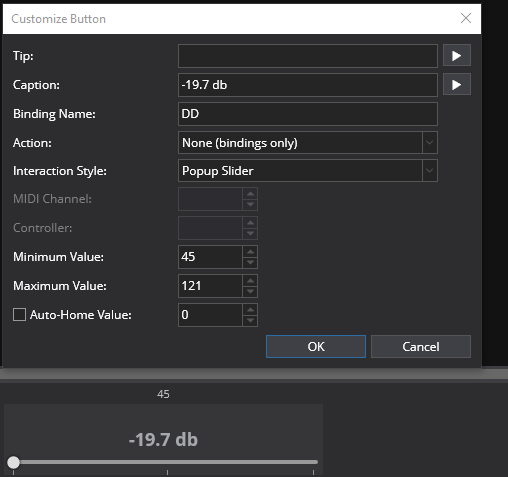
and do the same in the binding mapping source range
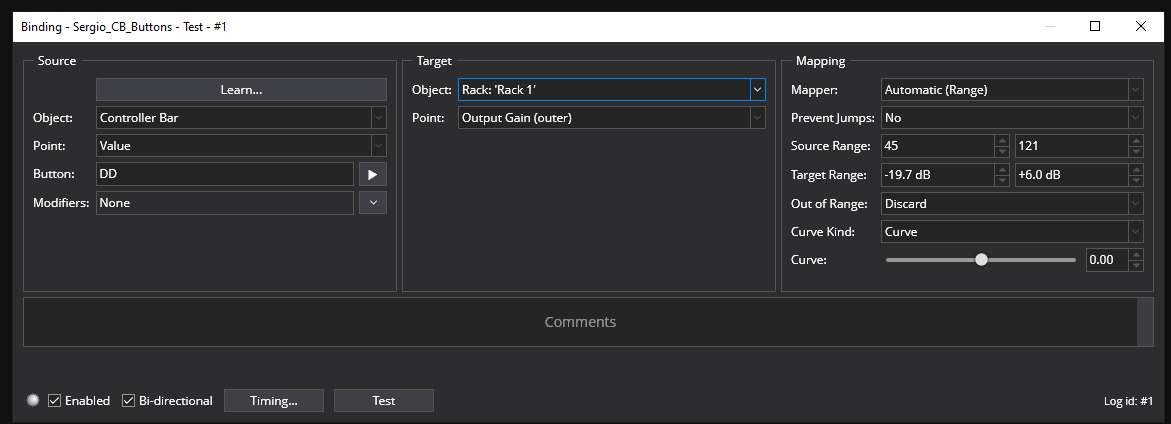
That will calibrate the 2 sliders and maintain the correct db readout. I had to find those values by experimenting with the slider value (which defaults to 0 ~ 127) The value readout that is built in to the slider is helpful for finding those numbers to set the range.
Yes, it can be done but it is rather complex. You have to edit the Theme file to do it. The Theme is located in the Topten Software/Cantabile folder in the Programs folder. Here are a link to help explain it and get you started if you want to edit the theme file to your spec.
After you unzip the theme file into a folder for editing you want to open main.gtl file in a text editor and locate the controller bar fonts you want to change. Save your results & make sure you that the same theme folder is selected in Options. So as you can see it’s for ambitious types due to all the moves needed to get there.
Dave