I’ve been using RTPMidi to change lyrics on a prompter as l changed songs on Cantabile. This worked for over a year, then suddenly stopped. I don’t think the problem is in Cantabile, it actually seems to be RTPMidi based, since l can’t get a port to appear on my Cantabile machine, which seems to be correctly set up. Looking to see if anybody else has had an issue. Thanks! Chris
See this thread:
1 Like
Thank you Torsten! Actually, this has not helped. I have green lights on both ends of the connection, in RTPMidi, but nothing is communicating. I see the port in my Win 11 PC, and it shows connected in Cantabile, but the Prompter PC does not respond to program changes. I rant the net stop and net start on the Win 11 machine. I also cannot ping the Prompter PC from the Cantabile PC. I have yet to hear anything back from Tobias at RTPMidi. Thanks for your help, I’m kind of at a loss.
That sounds suspicious - is something broken with your network connection? I assume you mean the actual “ping …” command on the Windows command line - correct?
If ping doesn’t find the other machine, that says that the underlying IP connection doesn’t communicate - how should rtpMIDI work then? Maybe something has changed in your network settings - some firewall issue?
Not sure what you mean with “green lights” - what does your rtpMIDI session look like? Do both PCs actually show the other PC in the “Participants” box; and is there a “latency” value shown?
Just to be sure: you need to restart the MIDI function BEFORE starting the application that uses MIDI. If you do this while Cantabile / Liveprompter is active, this won’t work.
Also: are the rtpMIDI ports now really visible on both machines? I’d suggest using a tool like MIDI-Ox to check.
Have you checked the rtpMIDI connection with a different tool than LivePrompter, e.g. Midi-OX? Just to check that data is actually coming through?
In general: you’re speaking of “the Win11 machine”; which machine is that; the Cantabile or the LP machine? What OS is the other machine running?
With more precise information, it will be easier to help you…
Sorry, my Cantabile machine is Win 11, my Prompter machine is Win 10 Pro.
I got to the point last night that l realized l hadn’t seen any activity on the Prompter machine, and that l really couldn’t with the way l was set up. I found a quick midi monitor, put it on the Prompter machine, selected my rtpmidi port, and sent off a Program Change from the Cantabile machine, and saw that the package was received. So it seems my data is being sent, and l need to concentrate on the Prompter machine. I expect it’s just going back and confirming how l enter the Program Change in the Cantabile binding. I’ve (foolishly) changed the port name, so all of my songs will need a new one, that’s gonna take a minute. Thank you all for your patience, l’ll he doing more this evening.
One other thing l have seen, when l use Angry IP Scanner, the Cantabile computer will show up with 0ms delay, but the Prompter computer takes 1800ms or more.
Okay, I put together some time to work on this, again. I have put some time into making the RTP-Midi connection to work, but that has been a dead end, so far. Can’t ping the Prompter PC. It may just be timing out on the Ping, something I did see, before.
Next, I pulled out a Mio that I have, a USB to Midi adapter, and placed that on the Prompter PC. I used MidiEnum to identify that interface. I have added that designation to my LivePrompter.ini file. all other settings remain, omni in, and AllonPC. I still get no action from the message sent from my Cantabile machine. I used a software called MidiView to check the signal arriving from my Cantabile set up. When I send from Cantabile, I get the info arriving at my Prompter PC.
At this point, I think my problem is inside the Prompter PC, getting it to accept the Program Change to load the song. I’m not sure how to proceed, but I have reread the instructions for building the interface. Thanks! cv
Does that mean you are using the old LivePrompter “classic” version that uses ini files?
That version isn’t supported anymore - the new version (LivePrompter 2) has been out for a long time now…
You should really look at the new version - it also incudes integrated MIDI Diagnostics, which could probably help you here.
Thank you, Torsten! I was using the original version, (if it ain’t broke, don’t fix it). Now it’s time to fix it, l think. I appreciate your time!
Not sure if you are aware, but for the “classic” version, there is a diagnostic tool:
Thank you, Torsten! The trouble shooter kept pointing to the same things, it was a syntax error in the Midi lines. Still deciding if l want to change to the new version, l like that l can call up any song in our list, without jumping setlists. Thank you, again! Chris
I assume you mean MidiChangeToAllOnPC=yes?
LivePrompter 2 actually has an improved functionality on this:
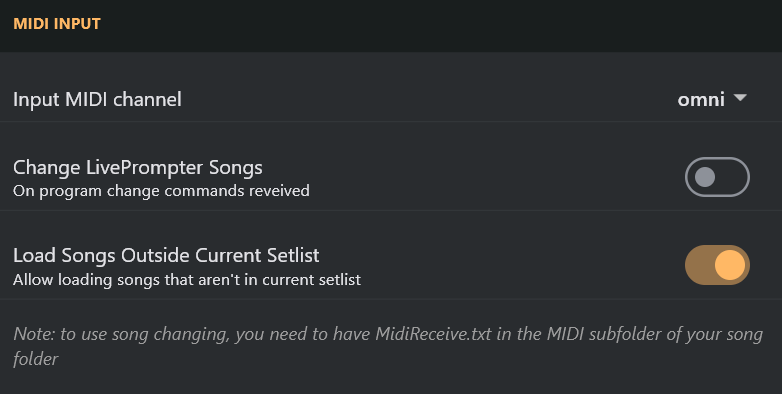
Activating this option lets you load songs outside the setlist WITHOUT leaving the currently loaded setlist.
There are only few things you are losing with the new version
- the sidebar (splitting the song window into a scrolling and a non-scrolling area
- the two-window model (LP 2 is everything in one windows)
- the option to have multiple multi-monitor configurations
Everything else is in LP 2 - plus a number of new enhancements that won’t come to LP “classic”.
Cheers,
Torsten