After some time not using Cantabile, I reactivated my subscription and installed the latest version (Performer 4.0 build 4335). I started using it and it worked flawlessly, until I activated the WebUI.
Background:
I created the WebUI back in 2019/20 with VUE.js against C3. There was a small issue which I reported on the forum (Web UI JavaScript API not working as expected). After a fix in build 3641 it did behave properly.
I start the WebUI as an ‘External Tool’ using the command “C:\Program Files (x86)\Google\Chrome\Application\chrome.exe” --app=http://localhost:35007". The UI shows up and displays as expected.
The issue is that whenever the WebUI is activ and I switch the song, Cantabile stalls and becomes unresponsive. I have to kill it through the task manager. It doesn’t matter if I switch the song from the WebUI or from within the App.
My questions are:
Have there been changes to the JavaScript API that make my WebUI incompatible?
If yes, what are the changes and do I need to rewrite the code or just recompile?
I created a minimized set list (2 songs) for testing, activated verbose logging and did some test runs. But there is no logging for the web server part.
I’m not aware of any issues here. The Javascript API had a couple of minor updates, but Cantabile’s network API itself hasn’t changed.
fwiw, I’ve been using the built-in web ui today with no issues
Are you using Cantabile’s built-in webui, or your own? If your own, does the built-in one have the same issue.
The only other thing I can think is if there’s a binding somewhere that’s causing things to behave weirdly. Perhaps turn on Tools → Diagnostics → Console Logger and Log Bindings and see if anything fires immediately before the hang.
Thank you for the quick response. I developed my own WebUI and it uses the built-in web server with a Root.webfolder in the ‘Resources’ folder.
To follow your suggestions, first I did the ‘Verify’ check on all my set lists and found some missing binding sources in a few songs (not the ones I used for switching) but also in the instrument rack used. I cleaned up all the indicated routings and bindings. All set lists are now ‘verified’ ok.
After the cleanup, I did the same tests again with the log settings proposed.
But Cantabile still locks up when switching songs. The logs show the same behaviour at the point before finalizing the ‘Setting active song’ sequence.
The last action logged is ‘Rack deactivated’ (the instrument rack used in the previous song I assume).
The next expected steps (as seen in the log when the WebUI is not active) would be
‘Finished committing re-route’ and
‘Unloading rack’ (the previous song).
But they do not appear in the log when the WebUI is active.
I really can’t think of anything off hand related to the network API that would cause a hang - aside from a bug or some unintended or unconsidered interaction that I’m unaware of.
First step will be to try with the stock Web UI.
If it doesn’t happen with the stock web ui, perhaps try isolating parts of your web ui to see what’s triggering it.
If it does happen with the stock web ui, you might need to disable bindings in Cantabile until you find the cultprit.
Either way, once we understand the root cause, I should be able to reproduce it here and get it fixed.
I just tried with the stock Web UI. There are no issues with it.
Need to install the vue.js devtools in Chrome to debug the web app. This will take some time, because I also need to ‘recover’ my vue knowledege. Haven’t used it for years now.
Will report back when I find something I can’t solve myself.
ok interesting. I’m curious to know what your code is doing to cause a hang in Cantabile - it really shouldn’t be able to do this, so anything you can do to narrow it down would be useful.
Unrelated to this issue, but perhaps you’ll find interesting: Cantabile’s Web UI uses Vue2. But that’s kind of obsolete now and Vue3 is the current thing. But I didn’t really like it - felt too complex, too much plumbing, so I wrote this - codeonlyjs.org , which I use in various small web projects, and will eventually port Cantabile’s WebUI to it.
While inspecting my code base, I found a comment I placed during development:
// set indices "0,0" instead of [0,0] due to bug in cantabile !"
this is where I dispatch watchers for binding points on “global.indexedMediaPlayer”
The API defines “indices” for binding points on “global.indexedMediaPlayer” as
	"indicies":
	[
		"Rack",
		"Media Player"
	],
But in 2020 it did not work with a table of integers, I had to use a string instead to get it working.
Actually that was your recommended workaround when i reported it here (see above link).
Now, my question is, has this API been corrected/changed in some way, that I need to pass the indices as an array/table again?
This is relevant, because I was able to narrow down my issue to be related to the Metronome/MediaPlayer configuration in the songs that I cannot switch to in my WebUI.
I have two groups of songs in all of my setlists.
Group 1 contains all songs that I can switch to from any other song without issues.
Group 2 contains all songs that I can not switch to from any other song when my WebUI is active.
The main difference is in the song configuration “metronome”.“masterTransportId”.
All group 1 songs have it set to “mediaPlayer.Media Player 1” while all group 2 songs have the it set to “metronome”
I verified that by changing ‘Master Transport’ in Cantabile from ‘Metronome’ to ‘Media Player 1’ for a group 2 song that already had a media player.
After the change was saved, I was able to switch to that song from any other song.
Most of my group 2 songs do not have media players inserted, so I inserted a media player anyway but without any media files attached and changed ‘Master Transport’ from ‘Metronome’ to ‘Media Player 1’. This allowed me to switch properly as well.
This is just my “workaround” for the time until finding the root cause.
I must clarify here that I did not interact with my WebUI for those tests. That means from the WebUI
no bindings have been invoked
no end point data have been changed
And the WebUI always reacts properly to changes in Cantabile wether it hangs or not, it displays
the selected song name, the show notes, time signature and tempo settings, recorder states etc.
Even if Cantabile hangs, the WebUI is still responsive to actions that do not interact with Cantabile, like:
I don’t think anything has changed in relation to those bindings (passing text vs array) since you last looked at it, except that it looks like you’re using the old binding system (as does the default web-ui). The better way to do that now would be to use .bindings4 - not .binding but the API has changed.
Probably the quickest way to get this sorted is if you can put together a minimal example of this whole issue so I can reproduce it here? ie: your web ui code and a couple of songs in a set list.
I’m quite concerned about this hang and would like to get to the bottom of it.
Hi @brad,
Yes, my WebUI is still based on the Javascript API from araound April 2020. As such it uses the binding points from the end point ‘Bindings’ beside some other end points. I have seen that there is this new end point ‘Bindings4’.
Over the weekend I was able to set up the development environment for Vue-CLI again.I also made myself familiar again with the code base (fortunately I did make a repository on GitHub back in 2020). I can now continue work on the project where I left off.
After the issue is resolved, I will probably make the shift to ‘Bindings4’ and the new API.It’s not a big steps, from what I see (BTW: the link for retrieving the list of available binding points in the documentation for ‘Bindings4’ is the same as for ‘Bindings’, caused some confusion at first). I also have to clean up some code in that process.
I created that minimal example through the following steps
A new clean installation of latest Cantabile (build 4337) on my dev machine
No MIDI device attached, just the onscreen keyboard
No fancy Audio device attached, just the default WASAPI Out driver (Main Speakers) selected
Created a new ‘Song1’ with a piano plugin inserted, connected to the onscreen keyboard and ‘Main Speakers’
Cloned the song as ‘Song2’
Created a new Set List ‘DevSet 1’ and added both songs to the list
Dropped the latest release of my WebUI into the ‘Resources’ folder
This is sufficient to reproduce the issue.
starting Cantabile
starting the WebUI
switching from the initially loaded Song1 to Song2 causes a hang
add more copies of that song, insert a ‘Media Player’ and assign it to the master transport, to have a working example that doesn’t hang the application
You can download the release from my GitHub repository, as well as a short ‘Quick Guide’. The repository is still ‘Private’ but I sent you an invitation to join. There is also the unchanged source code.
Unzip the release into your ‘Resources’ folder. You should see an uncompressed ‘Root.webfolder’ in there.
The main differences with Bindings4, is the parameters to the query, watch and invoke methods are much more structured.
They each take:
bindableId - this is the object that owns the binding point
bindingPointId - id of the binding point itself
bindableParams - parameters for the bindable
bindingPointParams - parameters for the binding point.
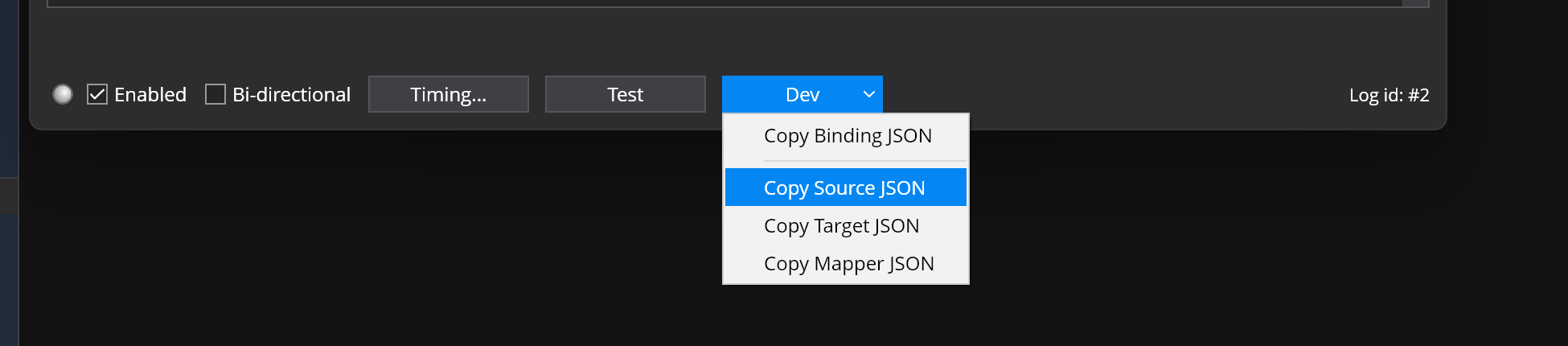
Also, in the latest build of Cantabile in the binding point window there’s a new “Dev” drop down menu with commands to copy parts of an existing binding in json format. This should make it much easier to figure out what needs to be passed.
Hi @brad
I now migrated the “indexedMediaPlayer” from ‘Bindings’ to ‘Bindings4’ as my model piece.
I did choose “indexedMediaPlayer” because I never got it working with ‘Bindings’.
The watched source bindings (e.g. ‘selectedFileName’) did never callback when triggered (e.g. by selecting another media file).
EDIT: After a good night sleep, I just discovered my fault. I used strings (“0”) instead of numbers (0) for the indexes, a remnant from the old calls to ‘Bindings’. All is functioning properly now. Just ignore what follows.
Now with ‘Bindings4’ I experience the same behaviour.
For example I did set up a watcher in Vue witch is translated to the following call in Bindings4 (verified in the debugger):
There is no error serverside and a Binding4Watcher is returned. But that callback function is never called when I switch between media files.
When I insert the same source binding in my background rack with target ‘Execute Command’, ‘Write Log Message’ $(SelectedMediaFileDisplayName) it logs the media file name when switching between media files.
I have migrated my WebUI to the latest versions of Vue/Vite. With the help of some online migration guide it was much less effort than I thought.
Now I am in the process of making it more userfriendly and add a few more features, like switching setlists. Is this even possible through the JavaScript API? I could not find an endpoint method or binding point for this.
Currently there’s no api for switching set list - primarily because at the time I was writing the api I didn’t want to make it sensitive paths on the host machine.
One solution might be to allow loading a set list by name, but the set list must be in the set lists folder (as specified in Tools → Options → File Locations → Set Lists) or a sub-directory there of.