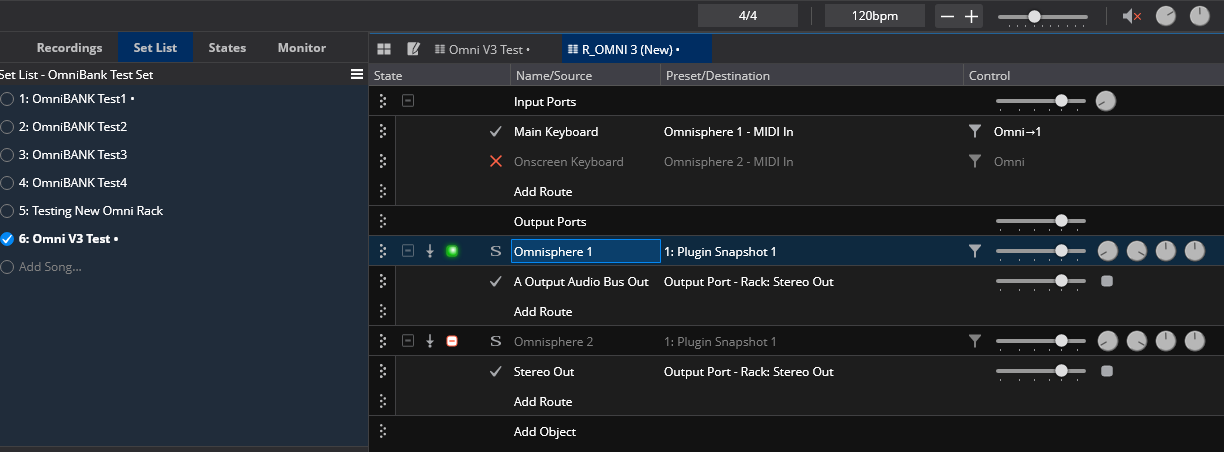
Hi folks. I decided to test upgrading Omnisphere 2 to Omnisphere 3 using some existing test Omnisphere racks which were built with Omnisphere 2.
I can see that the Multis loaded fine (Cantabile seemed to replace the VST fine) but I cannot play the instruments as I’m getting this “0 Input Event Bus” as the MIDI Destination. For the life of me I can’t figure out how to get MIDI to the instance of Omnisphere.
I can work around by saving the multi, replacing the plugin with Omnisphere VST3 again and then loading the Multi but I find this a bit of a worry when I do this on my live laptop.
Anyone have any ideas what this “0 Input Event Bus” is and if there is anyway I can fix the MIDI route?
EDIT: I should probably add when I play a note I see the MIDI In activity flash green on Omnisphere as the image below shows BUT if I use the MIDI Monitor on the Omnisphere I only see this “O Input Event Bus” and no note information (or anything else for that matter e.g. tested with a Program Change too)
Hi Hunter, I may be wrong but in my experience when I replace the plugin in a rack I lose all the state settings and have to start over. Have you been able to do this with other racks/plugins?
Hi Dave. Oh that’s curious. When I use the “Replace Plugin” (right click menu option) on a plugin in a rack, for me the state usually retains its routing, filters, bindings and settings (e.g. MIDI Channels and Keyrange etc) but not the “blob” settings of the plugin (so if I’ve used “Selected Program” or “Entire Bank” these patches will be gone). Have I misunderstood what you meant by losing all state settings?
So in my example of the workaround to “fix” the strange “0 Input Event Bus” by using the replace plugin, everything in the state worked as expected other than the patch/sound (hence saving the patch/multi in Omnisphere first so I could reload that after replacing the plugin). BUT I will test this out to confirm that is true but 90% sure this has always been the case.
Oddly I tested another old song which used Omnishpere (and would have certainly been the VST2 version) which was a plugin at Song level (not in a rack) and the song worked; loading the VST3 version (presumably converted/selected by Cantabile automatically), the correct patch/“blob” and routes/MIDI Settings etc.
I will export some other songs from my live laptop (which only has VST2 version of Omnisphere 2 as the were very old songs) and bring them into the test laptop and test again as some of these are in racks/some not and see what happens. But I’m confused why this test rack has suddenly presented this “0 Input Event Bus” - its like when the Omnisphere was updated it lost the information that it had MIDI inputs. So for me this work around appears to work but will test further and report back!
I just ran into this too, and I think I know why it’s happening.
When O2 first started supporting VST3 format, they named the VST3’s input port “0 Input Event Bus” instead of “Midi In”. But O3 names it “Midi In” on both the VST2 and VST3 versions. When you upgrade to O3, the Spectrasonics installer doesn’t delete O2; it replaces it with a stub plugin that loads O3 under the hood. That way whenever you load an old song into any DAW, it’s supposed to transparently work because the DAW tries to load O2, which loads the stub plugin, which loads O3. So the DAW doesn’t even know it’s actually loading O3; it just thinks O2 loaded same as always.
But that backfires when you have an old song that uses the old VST3 version of O2. Your DAW has routes connected to something called “0 Input Event Bus”, which no longer actually exists, but your DAW thinks it exists because it thinks it loaded the old VST3 version of O2. So you’ll see data flowing over the route, but it goes to a nonexistent port inside the plugin.
What I’ve been doing to fix it:
Save your multi within the broken Omnisphere instance, including any host automation or midi assignments.
Without deleting the broken Omnisphere instance from your song, add a fresh O3 instance to your song, and load the multi you saved into it (including loading any host automation and midi assignments).
Go through all your Cantabile routes and bindings, changing their source/targets from the broken Omnisphere instance to the new one.
Only once you’ve thoroughly transferred all your routes and bindings, you can safely delete the broken Omnisphere instance from the song.
This should only be necessary for songs that use the early VST3 versions of O2. Songs that use the VST2 version of O2 or that have a new enough VST3 shouldn’t require any migration steps.
Aaaaah… That was the step I was missing. That will make things much easier! Thank you @Hamlen and thank you for the likely reason this is happening. That eases the worries about migrating the live rig. Much appreciated!
I do indeed have some old versions that use the VST2 version as I’ve used O2 for years and only added a VST3 version for new songs post the update that included VST3 so that makes sense why these were working.