Guess it’s processor-related. On my desktop/rack newer PC, the loading time is the same for the dongle and the local license. The difference on laptops is likely greater. I’ll verify when I update the spare PC.
1 Like
Let us know. I got those results on my Win 10. I have a somewhat stable Win 11, but haven’t tried anything iLok on it yet…it is still in building phase.
Sure Corky, I’ll do.
I did some testing and noticed the following:
-
2023 desktop (i7-13700K): ilok dongle / PC / cloud, no visible differences. Works smoothly all the time. - Win 10, integrated GPU.
-
2018 laptop (i7-8550U): No problem with the dongle, some flickering and lag with ilok license on PC or cloud. - Win 10, integrated GPU.
-
2015 laptop (i5-5300U): No problems with the dongle. Heavy video issues and some audio dropout with the iLok license on PC or cloud. - Win 10, GTX 970 GPU.
1 Like
To resurrect an old conversation…
I revisited the UAD non-iLok activation and the process went much better this time. I had uninstalled all of UAConnect and UAD Plugins in May, but some of the UAD Christmas sales piqued my interest again (I also have many UAD plugins hooked to my Win7 DAW with UAD Hardware DSP Accelerators). The Cantabile Laptop is Win10 and the Surfing Desktop is Win11. The Cantabile Laptop had to be momentarily internet connected, but no problems. Downloading seemed slow, but the process finally completed. I had to stop/start downloads a few times?
There is one Activation on the Win11 Desktop and one Activation on the Cantabile Win10 Laptop with one (and final) activation left for a Backup Laptop.
There are two comments/questions to make and hopefully someone can answer.
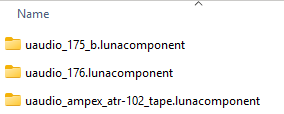
1 - There are 2.6GB of Luna-Related files in c:\Program\Common Files\Universal Audio… Has anyone deleted these files without issue? I’m going to try but if someone screams stop…
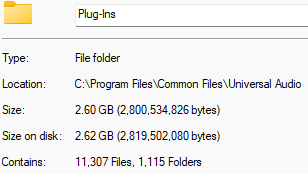
All the folders are *.lunacomponent and I’m not using Luna. The normal UAD VST3 files are in the VST3 folder as expected.
2 - I read on a forum that once users are getting their UAD VSTs were they want them, they are deleting UAConnect with the understanding that any future UAD changes would require the reinstallation of UAConnect. So far, I’ve just taken UAConnect out of Startup, but I could delete, too. Has anyone successfully deleted UAConnect with no repercussions?
You can rename “UA Connect.exe” by adding several random characters after “exe” and its like its gone as far as any of their plugins trying to launch it (which they do upon opening them). But if you want to check for updates you just name it back to the original name, do any updates with UA Connect, close it, and then rename it with the extra characters again to make it disappear. No need to uninstall it.
3 Likes
FYI. The 2.62 GB c:\Program\Common Files\Universal Audio\Plug-Ins Folder was cut/pasted to another drive. After that move, none of the UAD plugins would load in Cantabile. From the blurred failed plugin faceplate, an “info” button could be pressed. This opened UAConnect which showed that all UAD Plugins needed to be downloaded again. I moved the 2.62 GB folder back and all started working in Cantabile. I guess that 2.62 GB is here to stay…
Sorry to re-visit this thread, but I never had a problem with the Waterfall B3 on my Win 10.
When I was recently loading up my Win 11 to be a backup ( yes…I still HATE Win 11) I loaded the Waterfall B3, and the problems began.
Many weeks of misery later, and the GUI is still blurry, and unusable.
I read every “fix” available, and I now have many new settings and fix downloads, filling up my ssd. Why would a long known developer force customers to download
space- taking fixes that doesn’t work. Yes…the forums are full of mad customers. AND why doesn’t UAD fix it in an update, instead of leaving it to the owners to fix it.
Did you ever have any luck with the WebView2? I still have blurry GUI after loading it on WIN 11.
Just raging 

Corky
1 Like
My notes to install have a successful UAD Native Installation:
- Download and install latest WebView2 (188MB)
- Download and install latest UAD Connect (393MB)
- Connect to Internet after installing UAD Connect
- Login to www.uaudio.com
- Access and Redeem Native Plugins
- Leave VST3 plugins in default locations
- https://help.uaudio.com/hc/en-us/articles/13178401374612-Getting-Started-with-UA-Connect
- https://help.uaudio.com/hc/en-us/articles/5085235532052-UA-Connect-with-Native-UAD-Plug-Ins
- Sign into iLok
- Must Activate EVERY individual plugin
- Takes forever to download
I remember getting so pissed during this trial and error process I stopped several times and swore to never use UAD or iLok again. Since the initial installation, I’ve purchased a few more plugins and installing those was a PITA.
Just ridiculous.
I tried everything you listed, but not in that order. I will give it a try.
I had success when Waterfall 1st appeared and used an ilok dongle, and moved to machine ilok a year ago as others on this thread. Win 10 did very well. So, I thought Win 11 was just being a PITA as usual, until I saw many others with the same problems.
Many thanks, and will hopfully return with a successful install.
FWIW, the desktop connected to WWW is Win11 and I don’t remember this being much of a problem. This issue was the Win10 Cantabile Performance Laptop that is not normally connected to WWW. Getting that one working with Native UAD was two steps forward, three steps back. I remember ordering a batch of UAD plugins after getting the laptop working the first time and having to unauthorize and reauthorize everything again. It was just about a total reinstall.
I will say that once the UAD plugins are authorized they have remained stable. But I dread to revisit the process if I purchased another UAD native plugin.
1 Like