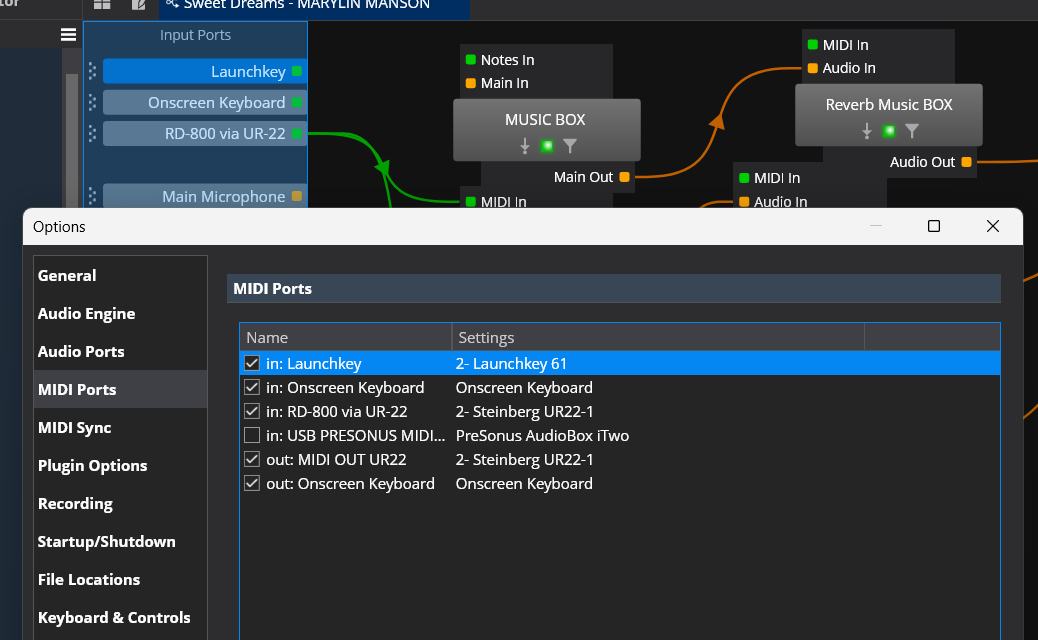
Hello, I had the bad idea of deleting one of my MIDI input ports, my Launchkey 61, and I wanted to restore the situation using the ‘add’ button. Since then, all my settings related to my Launchkey have disappeared, as well as my bindings. It now shows ‘2-Launchkey 61’ as if it were a new MIDI device, whereas previously, the settings were ‘Launchkey 61’ from memory. All the sessions and setlists I open now no longer contain any links between this MIDI port and my VST instruments. Do you have a solution to restore the old configuration and get everything back to normal? I tried to see if there were any restore points in Windows, but I don’t have any for this date, nor for the Cantabile files.
Does anyone have a solution other than reprogramming everything?
Check this forum for “Aliases.” I believe that if you enter your old input as an Alias, the situation will be corrected. Please research and backup your system.
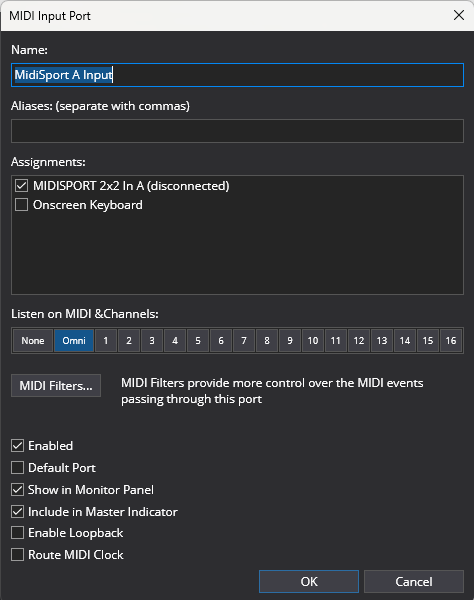
I would backup sytem, then change the midi input name of “2-Launchkey 61” to “Launchkey 61” with aliases of “2-Lauchkey 61” and “Launchkey 61.” I bet @brad or @dave_dore (or other super users) will chime in.
Any midi input can be checked and assigned to the “Lauchkey 61” as long as it’s plugged in at the time of assignment.
Hopefully one of our resident experts has an easy fix. I did something similar a few years back so I’m trying to now recall how I fixed it… so you might want to wait before trying my possible solution. Also try searching the forum here for solutions. You’re not the first to do this.
The fact that it created a 2nd iteration is good though, and suggests that Cantabile probably “knows” you had a previous port. If it were me and I’d run out of other ideas, I’d:
Backup everything for Cantabile (songs rack etc) Plus the TopTen Software file in Users/Roaming/Local.
Disconnect the Launchkey, restart PC. Open Cantabile.
Reconnect Launchkey
Try to create a new midi port again. If your original port name shows up you should be good.
Just had another thought… when creating the Port Try to force the original Launchkey name, but more importantly if you can’t then enter the original name in the Aliases field. That’s what Aliases are for… when you have alternate names for the same port (like on 2 PCs or whatever). Pretty sure that’s how I fixed my issue. Just my .02
Tom
Guys, thank you for everything. I found and rewrote the old name ‘USB Launckey 61’ and everything is back to normal.
A thousand thanks. I recovered dozens of hours of work in one second. Phew!
The important thing for Cantabile to reconnect your songs/racks/bindings is that the port name is correct. The underlying device that it’s connected to doesn’t matter.
In your case the old port probably wasn’t called “LaunchKey” as it is now.
If you load one of your songs/racks that’s not connecting properly and switch to the table view (it’s hard to see in the diagram view) it will show you the port name on any routes that use it.
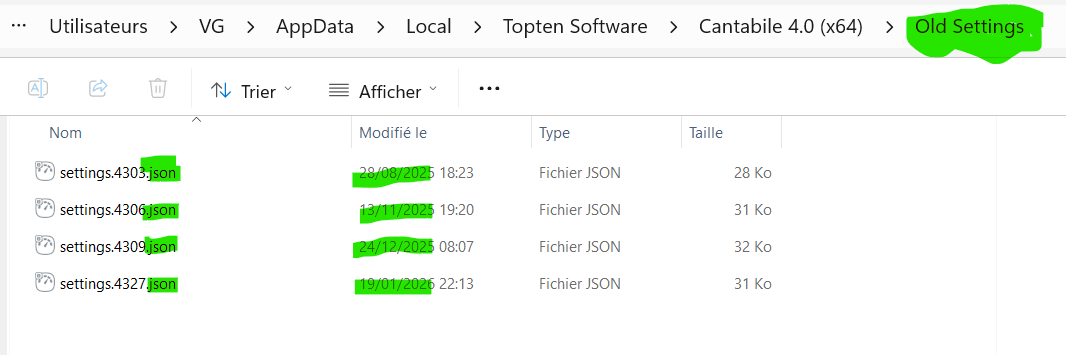
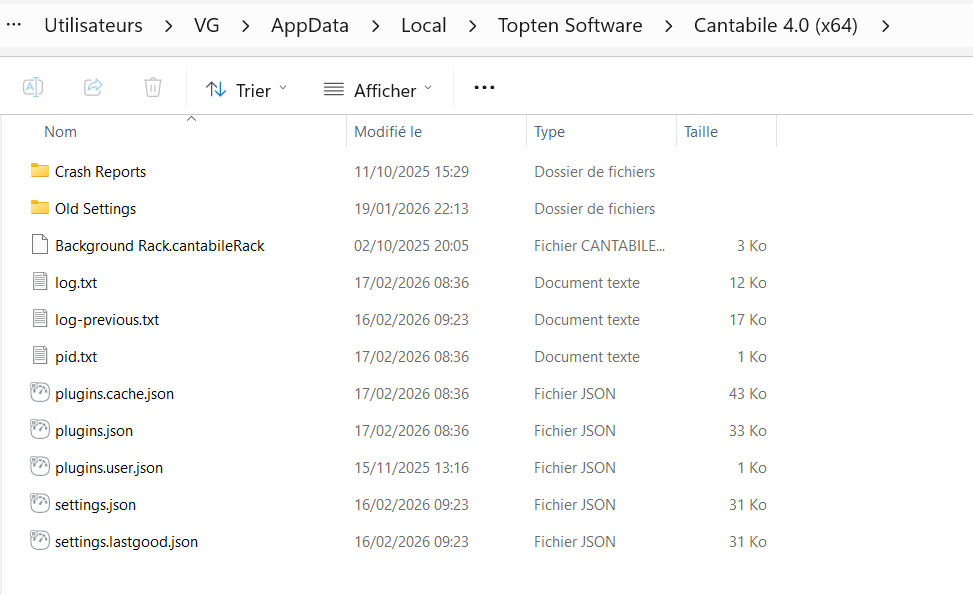
Alternatively if you look in your settings folder (Tools → Open Settings Folder) there’s probably an old settings.json file there that will have the correct name in it.
I’d had that happen a couple times. One thing I found was , as mentioned elsewhere, consistent naming. Also, because I gig with this…and it works great however…make sure you always plug the USB’s into exactly the same ports on the same hub, computer, etc. otherwise you end up with newly named ports to have to rename, then have to check the bindings to re connect them….
Hi Brad,
Thank you for your help. I tried to find a ‘.txt’ file in the hope of finding the correct name of my USB device, which I wrote down in the old status, but I couldn’t find it among these files. I went to “Tools → Open Settings Folder” and saw these files and folders. In the old settings, I found the files you mentioned. What is the procedure to retrieve the old settings? Next time, can I just copy and paste and replace the new ‘settings.json’ with the old ‘setting.4309.json’, for example? Thank you again for this tip!
Thank you for this information.
I didn’t understand why when I reversed my USB sound card (UR22) and my keyboard (Launchkey), only my sound card worked.
I also bought a USB hub to connect my MiniNOva keyboard, a USB stick, and my UR22 to my laptop, but it didn’t work. Even when I only connect the Launchkey to the USB hub, it still doesn’t work (maybe a power supply issue?). Yet I have a fairly powerful Zbook… I don’t understand why it doesn’t work.
Thank you for this information . I’m interested Could you confirm your MODX7+ and SL73 use their own power supply ?
I bought thos model and it doesn’t work in my setup : Thomann 4+1 Port USB 3.0 Hub – Thomann France (it’s true that I didn’t test in using a dedicate power supply for my Launchkey)
The MODX has its own discreet power supply. The Sl 73 uses USB power through the same cable - only has one USB-c port. You might want to make sure you are plugged into a usb 3 port (a blue one) as they put out more power as I recall…I have a cheap powered USB hub that did not work for me as well…the unpowered hub seemed to work best…
Yes, you can rename your settings.XXXX.json file to settings.json to go back to those settings. Obviously anything you changes since then will be lost but it should otherwise work.
You could also save your current settings.json, rename one of the other ones to settings.json, start Cantabile and check the port name, close Cantabile and then put your current settings.json file back.
In general, I would reeeeeally recommend to NOT use hardware names for port names in Cantabile. Hardware gets changed over time, but your song configs should keep working.
I recommend using “logical” names for your Cantabile MIDI ports, like “Main Keyboard”, “Second Keyboard”, “Faderbox”, “Drum Pad” etc. When you buy a new controller for your main Keyboard, simply change the assignment between the logical MIDI port (“Main Keyboard”) and the underlying hardware MIDI port.
Also, I’ve had issues with Windows renaming MIDI hardware ports when plugging in MIDI devices - like shown above, a device “MIDI interface” suddenly was named “2-MIDI Interface” or “3-MIDI Interface”. That seems to happen with some hardware, especially when changing the USB port they get plugged into. In that case, there’s no need to change the name of the Cantabile MIDI port; rather assign the Cantabile port to the “new” hardware port name as well as the old one, and Cantabile will recognize both under the same “logical” MIDI port, with no need to change anything around your song files
Things become difficult when numbers keep counting up, but that’s a different story; wrestling with Windows MIDI is sometimes a chore…



 . I’m interested
  Could you confirm your MODX7+ and SL73 use their own power supply ?