Rack States triggered by Program Change MIDI Messages

Greetings! I am VERY new here (less than a week - purchased Cantabile Performer 4 within the week).

I will get right to it. I’ve looked through a lot of docs and videos, but my questions related to Rack States and transitioning between them based on Program Change (with Banks) Messages have not yet been answered.

I’ve set up about 7 rack states. This works (I get sound from the intended rack when I select the state). I also created a Binding that accepts Sostenuto pedal MIDI from my Yamaha Clavinova CLP-555 and transitions between the states using the “Next State” paradigm.

I am now trying to map my Yamaha Program buttons (“Piano 1”, “Piano 2”, “Clavinova Tone”, “Strings”, etc.) to specific individual rack states. This works - to a point. When all the Program Changes come over Bank 1 (112 on Yamaha), simply setting up the Program Numbers to correspond with the Yamaha’s Program Numbers works fine - even though there are a few irregularities (like “CLAVINOVA TONE” sending Program Number 89!). But they do work when the Program Numbers on the states match the Program Numbers on the Yamaha.

The problem comes with Yamaha buttons sending the SAME set of Program Numbers on a different Bank (113) for different instruments. I have tried many options to set this up (Bindings, external Mappings in BOME MIDI Translator Pro, etc.), all to no avail.

If someone wouldn’t mind offering direct help on the problem, I would love it. But I also know that those that KNOW may also be in the set of those that HAVE LITTLE TIME!

Therefore, are there any Docs, Videos, etc. that you may be able to point me too that allow a deep dive into Rack States or Discussion of selection of Rack States via MIDI messages, etc. I haven’t seen much, so far, since most of the focus is on Song States, rather than Rack States, at least in what I’ve uncovered.

I will greatly appreciate any help that is offered! I really don’t want to move forward until this is resolved.

Thank you!

Cheers,
George Somers

Hi George and Welcome to the Forum! :slight_smile:

If you could I have a question or 2.

First, when you send the different bank numbers are you still wanting the same PG number as used in Bank 1 or a whole different value. (No matter the bank you want the same PG number?)

How many rack states are you seeking to map to PG changes on the Clavinova?

Cheers,

Dave

Dave,

Thank you for giving my problem some of your time. Much appreciated!

I apologize for my Reply’s length, but I wanted to give you the big picture, in case I was missing something really elementary!

Some Background:

The Yamaha Clavinova CLP-555 Program buttons are:
“Piano 1” / “Piano 2” / “Clavinova Tone” / “E. Piano 1” / “E. Piano 2” / “Harpsichord” / “Strings” / “Pipe Organ 1” / “Pipe Organ 2”
These 7 Program buttons send MIDI out with Program Change numbers, respectively:
1 / 2 / 89 / 6 / 5 / 7 / 49 / 20 / 17
There is one other Yamaha button, named “VARIATION” which can be On or Off. When On, the 9 Program Change numbers shown in the previous line are sent with a Bank number of 112. When Off, the 9 Program Change number are sent with a Bank number of 113.

These are my ORIGINAL Cantabile Rack States (that mapped 7 of the 9 Yamaha Program Buttons):
1: German D Steinway
89: American D Steinway
2: Bosendorfer 290 Imperial
6: Fazioli F308
7: Blanchet Harpsichord
20: Rieger Organ
5: Celesta

The State Program Numbers in the left column are what the Yamaha Clavinova CLP-555 sends natively when the corresponding Program button is pressed.

The 7 Rack states all responded correctly to a simple Binding:
Object: MIDI Ports / Point: Yamaha Clavinova CLP-555 (in) /Event: Program Change / Program: Any / Ch: 1
Object: Song / Point: Load State by Program

When I pressed the Yamaha Program button that sends 89 (“Clavinova Tone”), the 2nd state in the list, “89: American D Steinway” was selected and the sound was that of the American D library.

As another example, when I pressed the Yamaha Program button that sends 20 (“Pipe Organ 1”), the 6th state in the list, “20: Rieger Organ” was selected and the sound was that of the Rieger Organ.

This all worked nicely. Rather than continue to map all 9 of the Yamaha Program buttons, I decided to bring the Yamaha’s “Variation” button into the picture, which would afford (potentially) 18 different instruments responding to the 9 Yamaha Program buttons Plus the 2 banks (9 for “VARIATION” button ON + 9 for “VARIATION” button OFF)

This was my next group of Cantabile Rack States (that mapped the same 7 of the 9 Yamaha Program Buttons in the first example) PLUS One New State: Cantabile Rack State “1: Chimes”, added at the end of the original list.
1: German D Steinway
89: American D Steinway
2: Bosendorfer 290 Imperial
6: Fazioli F308
7: Blanchet Harpsichord
20: Rieger Organ
5: Celesta
1: Chimes

Without any further Bindings (or BOME MIDI Translator Pro translations), I discovered that the pre-existing states still worked correctly, but the “Piano 1” Program button press, did not select the “1: Chimes” state, when the Variation button was ON (which would have changed the Bank to 113). I realized quickly that this was what would be expected since the original States were all reacting in a Bank Change-agnostic fashion. Whether the VARIAION button was ON (Bank 112) or OFF (Bank 113), the same Program Change would be sent. The end result for the NEW state was that it was selecting the German D Steinway, even though VARIATION was ON (Bank 113).

This is when my adventure began. Over the next 2 days I tried every imaginable piece of trickery that I could come up with to cause the Chimes to be Selected when the Yamaha button for “PIANO 1” was pressed with the VARIATION key ON. I brought BOME MIDI Translator Pro into the picture by feeding the keyboard MIDI to it before sending it out to Cantabile. In short, no matter what combination of Clavinova State numbering I tried, and what combination of Cantabile Bindings I attempted, in addition to all kinds of different BOME MIDI Translations, I could never get it to work correctly. That’s when I sent my message on the Cantabile forum.

These are my CURRENT Cantabile Rack States:
0.112.1: German D Steinway
0.112.89: American D Steinway
0.112.2: Bosendorfer 290 Imperial
0.112.6: Fazioli F308
0.112.7: Blanchet Harpsichord
0.112.20: Rieger Organ
0.112.5: Celesta
0.113.1: Chimes

I show this, not as an example of what got close (nothing DID get close), but an example of one of the multitude of different numbering approaches I attempted in Cantabile.

I will also add that my first Cantabile Binding was successful: it allows me to select a state with the Yamaha’s Sostenuto pedal, by pressing the pedal and round-robining through the states on every press. Nice, but not nearly as useful as employing the Program buttons on the keyboard.

Thank you so much!

Cheers,
George

OK George,

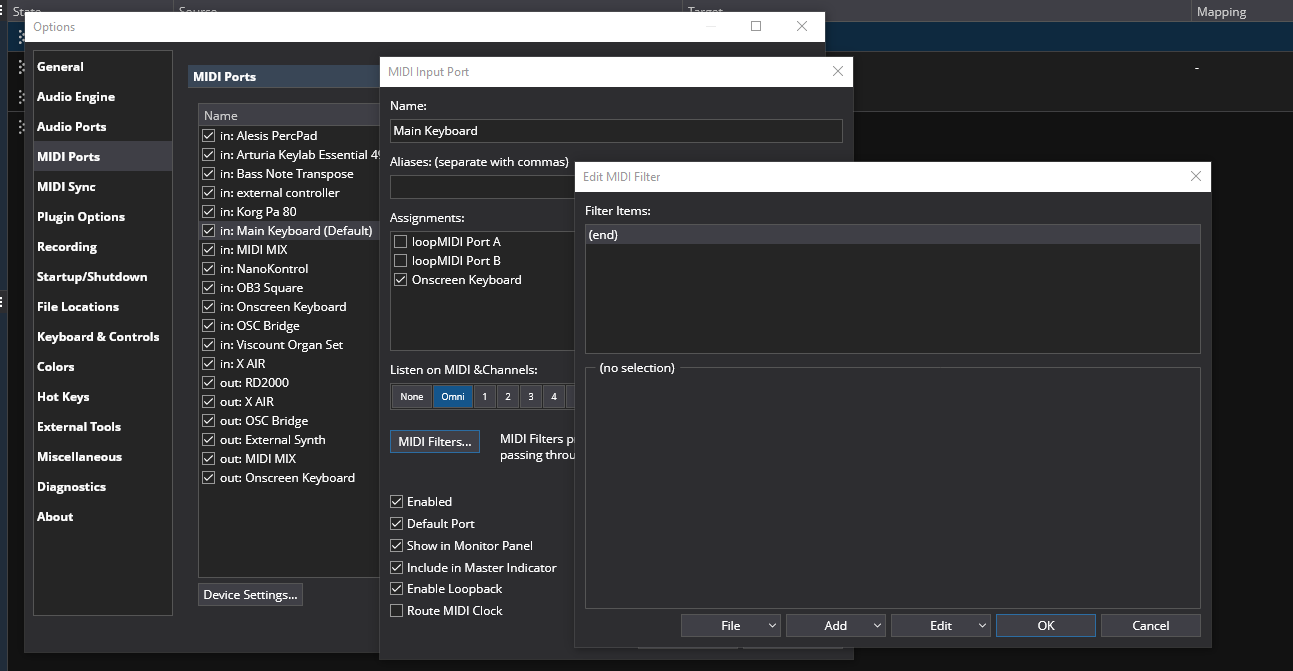
Thanks for the details. The binding you chose to change rack states only supports simple PG changes. In my opinion your next best move would be to try a series of program remap filters on the Main Clavinova input port in Options>MIDI Ports shown first below this or make specific bindings in your rack to the rack states shown near the end of this post.

using filters

Using the Main MIDI port in Options>MIDI Ports makes the remaps available to all songs. Your current Bank (112) pg and the VARIATION (113) program changes would be intercepted by the filters and remapped to what ever simple rack state pg number you arbitrarily assign.

I would set my rack states in order 0 or 1 to 17 or 18 depending on your pg mapping choice in Options but you can set them any way that makes best sense to you. I would then go to the Options>MIDI Port setup and open the Clavinova or Main Keyboard input (depending on how you set yours up) for editing. Click on the MIDI Filters for the window to add them.

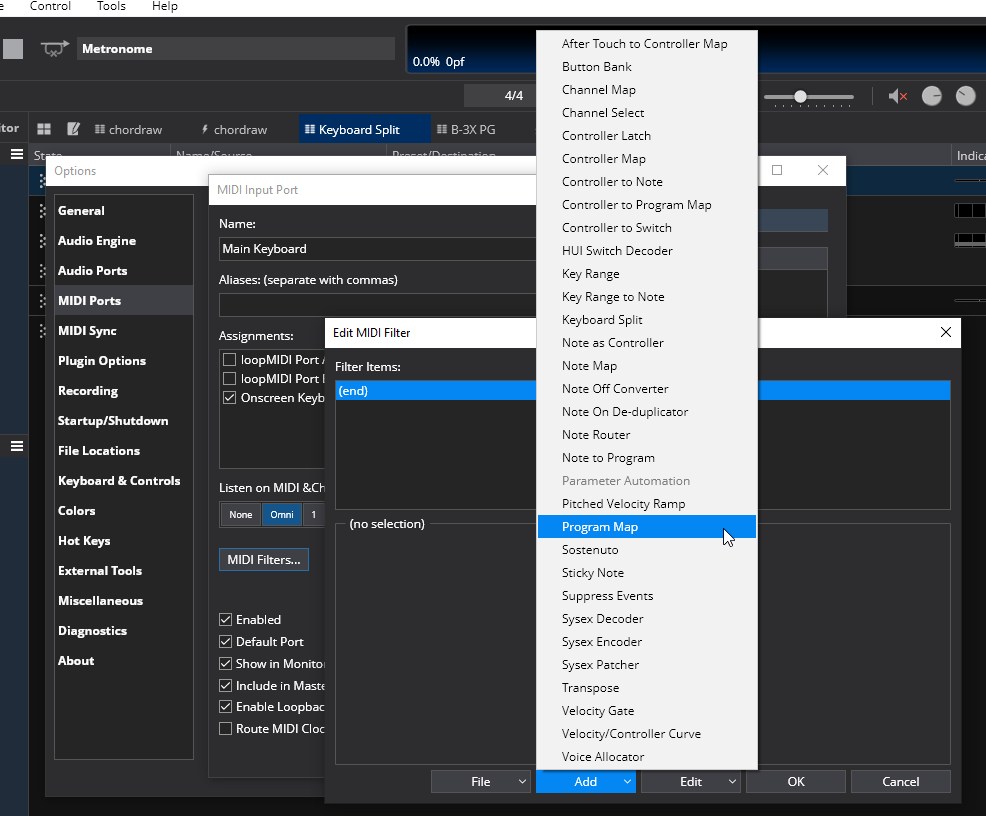
Click on Add and select Program Map

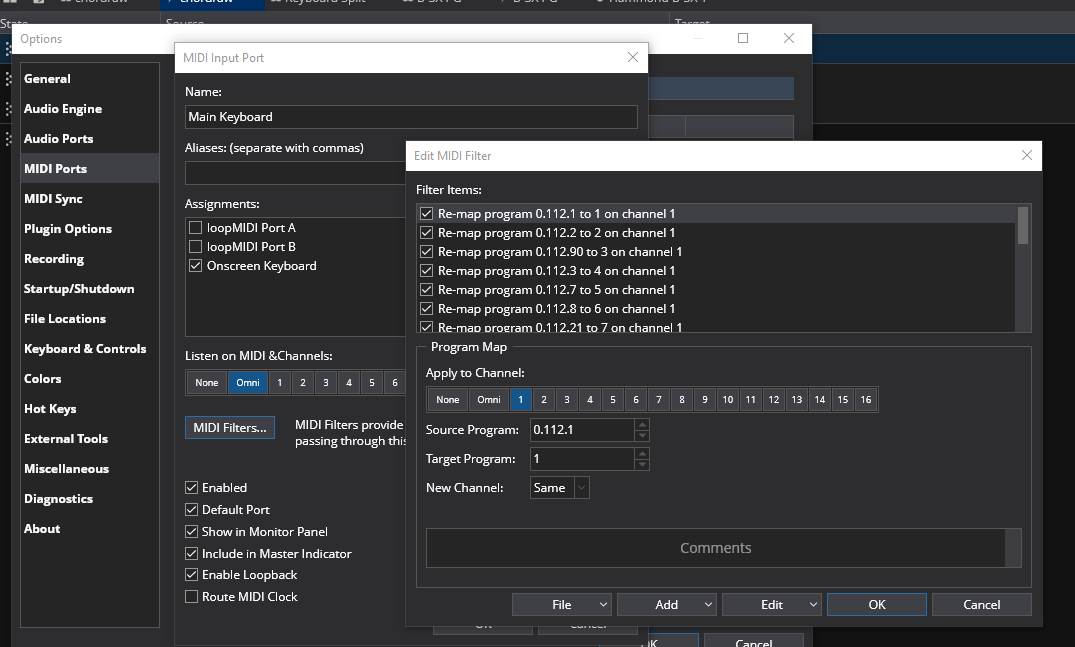
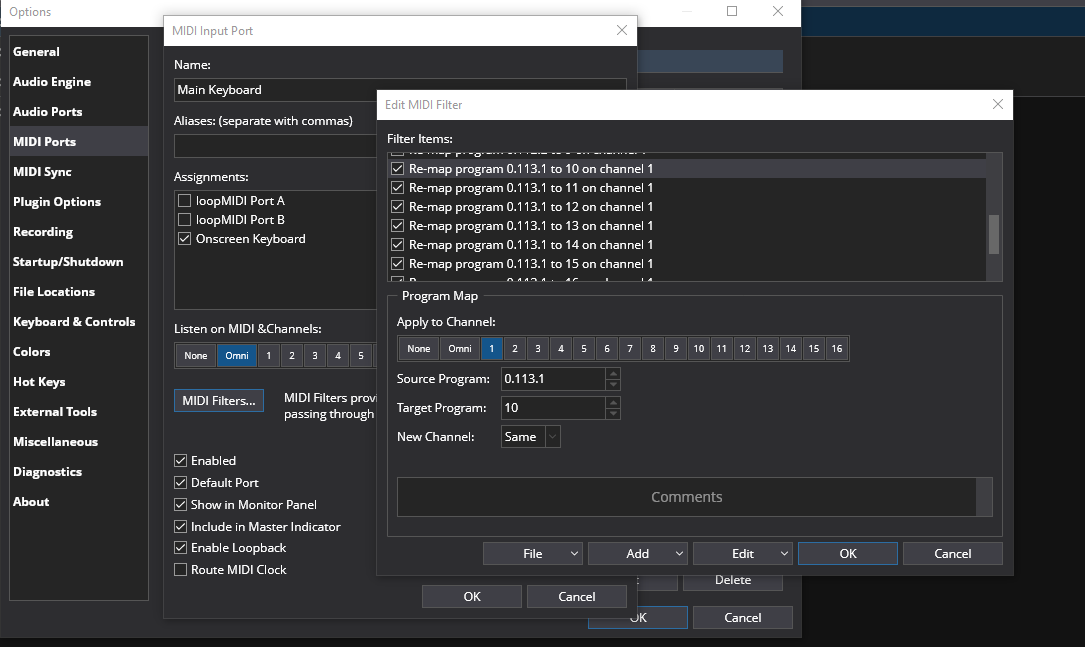
Then create the 18 filters. I took a minute and created a series of 18 filters that should take your banked pg numbers and remap them to simple 1 through 18 pg numbers for your 18 rack states in my example.

9 filters for bank 112

9 filters for bank 113

note: I didn’t complete the filter editing because I didn’t know what values you might have for them.

As shown in the Program Map edit area for each filter it is easy to edit for the source and target pg numbers so you can map any way you want. I used your original source numbers posted as sources for the first 7 states and the 10th (113.1) .

Your binding in the rack for the PG to state changes would remain the same.

using specific bindings

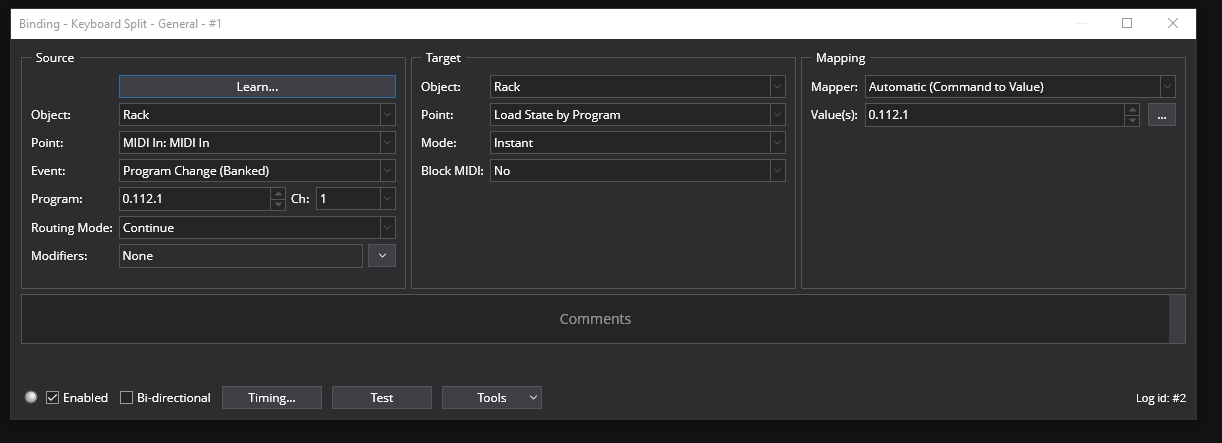
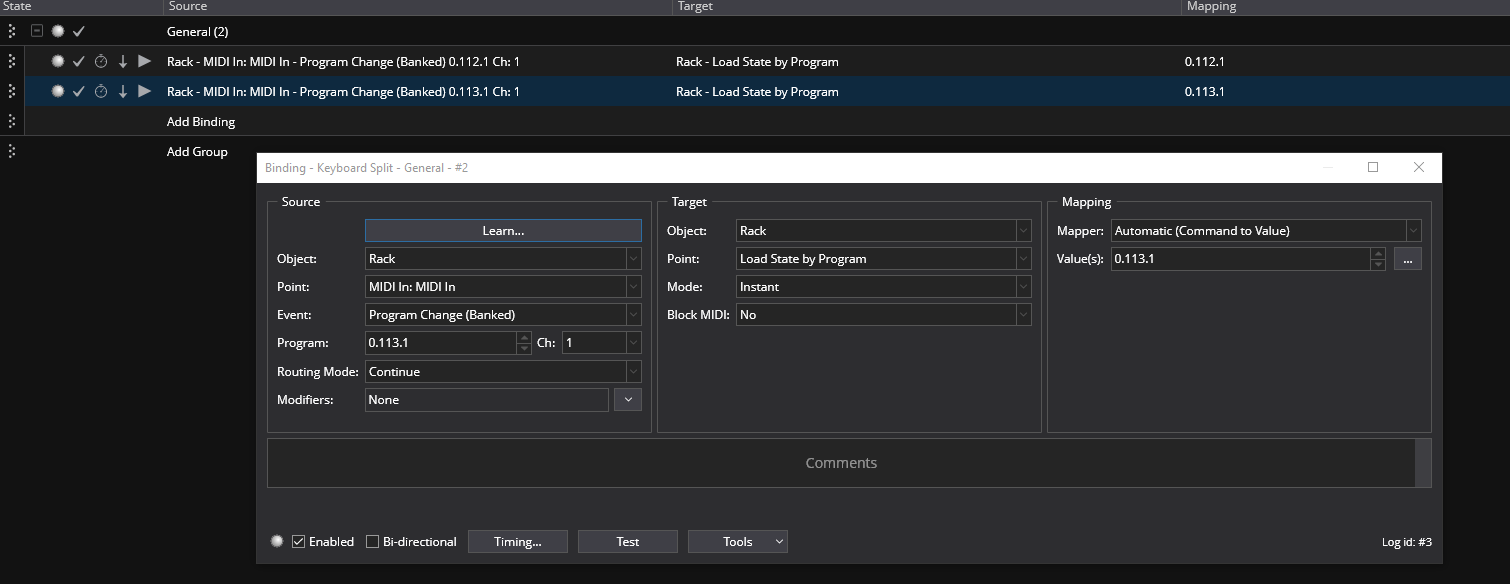
Another way to go would be to use this type of binding in you racks to map your Banked PG change messages to your banked program numbers on your rack states

for 0.112.1

for 0.113.1

you would need a binding for every program change you wanted to map.

So that it an explanation of what I would try in your situation. Hope this helps you get it all going. :slight_smile:

Dave

1 Like

Dave,

Thank you for the powerful (and detailed) duscussion you offered on my problem. It is very kind of you!

You have confirmed something that I was already stumbling in the direction of, yesterday. I had begun to change the states to indexing rather than program changing, but I was trying to do it in Bome MIDI Translator Pro. I will put that on hold and study your detailed discussion before I go any further with that.

Again, thank you for the generous and prompt response to my quandary!

Cheers,
George