Official Cantabile Stream Deck Plugin Now Available

Thanks, Brad

Since my last message I got connected to feedback from the master level binding and coded quick and dirty dB conversions, though I plan to steal your prettier code.

I got text overlays working with your help. Easy, peasy.

I was tempted to do some cleanup of what I have working. But the real point of this is to see if I can get the lower half of StreamDeck+ working, so I tried to get something on the LCD strip. I am basing everything on your button code. I thought I could just send one of the button images to the lcd. I declared a new Button Image, bi. SAme is in your test file. I think I’m using the correct method to talk to the LCD:

await sd.fillPanelBuffer(await bi.render(control.pixelSize.width, control.pixelSize.height));

It fails here:

C:\MyShit\StreamDeck\cantabile-streamdeck-demo\node_modules@elgato-stream-deck\core\dist\services\buttonsLcdDisplay\default.js:186
throw new RangeError(Expected image buffer of length ${expectedByteCount}, got length ${imageBuffer.length});
^

RangeError: Expected image buffer of length 345600, got length 240000

Maybe my plan to use a button image is not good. But neither of those numbers make sense. Detected size of 240000 is much larger than expected for a button image. And 345600 seems too big for 100 x 800 x 4bytes. I know there is some metadata in there but I would not expect 25600 bytes.

Tomorrow I plan to tty and make a proper LCD-size SVG file. Do you recommend any free tools?

Nice progress.

Regarding setting the SD+ lower image panel I’m not sure and don’t currently have one to test with. I think sd.fillPanelBuffer might be to set all normal button images at once. If stuck, raise an issue against the elegato node github - last time I did that (to ask if SD+ was supported) I got a reply pretty quickly.

Regarding creating SVG files I use Inkscape.

That was quick! Thanks. You might be right about “fillPanelBuffer”. I’ll look for other likely candidates.

I think that plus.js is telling me to use StreamdeckDefaultLcdService which is in generic.js. It has methods for filling the LCD or a region of the LCD. However, when I try to use those methods I get:

ReferenceError: fillLcdRegion is not defined

I think I need to import “plus” or maybe “generic”, but it tells me I’m not allowed to import those. Past my bedtime. I’ll try again tomorrow.

Thanks again for your help,

-ray

oops. Really stupid mistake. It’s now reaching fillLcdRegion with no additional imports. But it craps out looking for sourceOptions.width. I need to figure out how to provide options. Baby steps…

OK. I’m really going to bed now.

I had a quick look at this. In plus.js

t defines a led-segment control of 800x100 - looks like the entire strip:

plusControls.push({
    type: 'lcd-segment',
    row: 2,
    column: 0,
    columnSpan: 4,
    rowSpan: 1,
    id: 0,
    pixelSize: Object.freeze({
        width: 800,
        height: 100,
    }),
    drawRegions: true,
},

I think the methods you’re after are these. The lcdIndex are it says is the id of the lcd segment - based on the above, for the SD+ I guess it’s 0

    /**
     * Fill the whole lcd segment
     * @param {number} lcdIndex The id of the lcd segment to draw to
     * @param {Buffer} imageBuffer The image to write
     * @param {Object} sourceOptions Options to control the write
     */
    fillLcd(lcdIndex: number, imageBuffer: Uint8Array | Uint8ClampedArray, sourceOptions: FillImageOptions): Promise<void>;
    /**
     * Fill a region of the lcd segment, ignoring the boundaries of the encoders
     * @param {number} lcdIndex The id of the lcd segment to draw to
     * @param {number} x The x position to draw to
     * @param {number} y The y position to draw to
     * @param {Buffer} imageBuffer The image to write
     * @param {Object} sourceOptions Options to control the write
     */
    fillLcdRegion(lcdIndex: number, x: number, y: number, imageBuffer: Uint8Array | Uint8ClampedArray, sourceOptions: FillLcdImageOptions): Promise<void>;

I haven’t tested node-buttonImage with non-square images - it might work, it might not.

Yes - that’s what I was trying to use. Specifically fillLcdRegion. I wasn’t sure if fillLcd would require a full 100x800 image.

Index: I made the same assumption about setting index to zero. Perhaps they wanted to allow for some future device with multiple LCDs.

ImageBuffer: Understood about potential non-square image issues. At this point I would be happy to get a square image somewhere on the LCD. I’ll stick with your default button images for now.

SourceOptions: I saw that your call to fillKeyBuffer omits the options parameter. I was hoping I could get away with that here, but no such luck. It fails looking for looking for sourceOptions.width. That will be my focus for tonight. Though I don’t think I should entirely rule out the assumption of index = 0.

Some progress tonight


Some horrible hard-wired code but OK to feel my way around. The display commands look like this - one for each icon:
await sd.fillLcdRegion(0, 14, 14, await bi.render(72, 72), {format: ‘rgb’, width: 72, height: 72} );
Originally started with this:
await sd.fillLcdRegion(0, 0, 0, await bi.render(control.pixelSize.width, control.pixelSize.height), {format: ‘rgb’, width: 800, height: 100} );
That resulted in no image, lcd filled with backColor and text placed based on entire display - right all the way right and left all the way left

The numbers passed to render and to fillLcdRegion need to be identical. images that fall outside the display area throw an errror rather than simply cutting off.

I thought I could adjust the image size with bi.virtualSize = { width: 72, height: 72 };, but changing the width and height doesn’t seem to have any effect

I can adjust the image size. The following fills the entire 100x100 square in the display
await sd.fillLcdRegion(0, 700, 0, await bi.render(100, 100), {format: ‘rgb’, width: 100, height: 100} );
But, as you suspected it wont stretch asymmetrically. This one results in a 200 pixel square with the bottom cutoff
await sd.fillLcdRegion(0, 600, 0, await bi.render(200, 100), {format: ‘rgb’, width: 200, height: 100} );
I’m not sure I really care. I plan to try and make some 200x100 images that can display a name or an icon, a gain level and/or a bar graph. Then see if I can get the value form a binding to the display. I suppose just starting with a number in a blank field would be enough to verify the connection. Then try to make it pretty.

update - I have master volume in first cell of LCD responding to master volume from cantabile and master volume up-down buttons I created earlier. Next step - encoders.
There seems to already be something in the encoders. When I turn one, a display pops up on lcd saying midi not connected. Weird…

update 2:
I now have an encoder wired up to master output volume, displayed on the lcd above the encoder and 2-way connection to Cantabile. Not yet esthetically pleasing, but I feel pretty good about my progress.

A bit of a struggle with the encoder because the math wasn’t mathing. Perhaps you can educate an ancient c++ guy, accustomed to data types being more explicit.
I declared a variable
let masterLeveldB = 0;
I assumed that would declare a number

Here is my test code for an encoder:

sd.on(‘rotate’, (key, value) => {
console.log(“rotate”, key.index, value);
switch (key.index)
{
case 3:
masterLeveldB = Number(masterLeveldB) + value;
if (masterLeveldB > 7)masterLeveldB = 7;
if (masterLeveldB < -120)masterLeveldB = -120;
masterLevel = Math.pow(10.0, masterLeveldB / 20.0);
C.bindings4.invoke(“masterLevels”, “outputGain”, masterLevel);
console.log(“volume-rotate”, masterLevel, masterLeveldB);
break;
My math was originally masterLeveldB += value; But that resulted in concatenation, not addition. If masterLeveldB was 100 and value was 1, new masterLeveldB was 1001 (very loud :grinning_face:) Number(value) made no difference.

Note that my code is properly indented. Leading whitespace disappeared when posting.

Update 3:
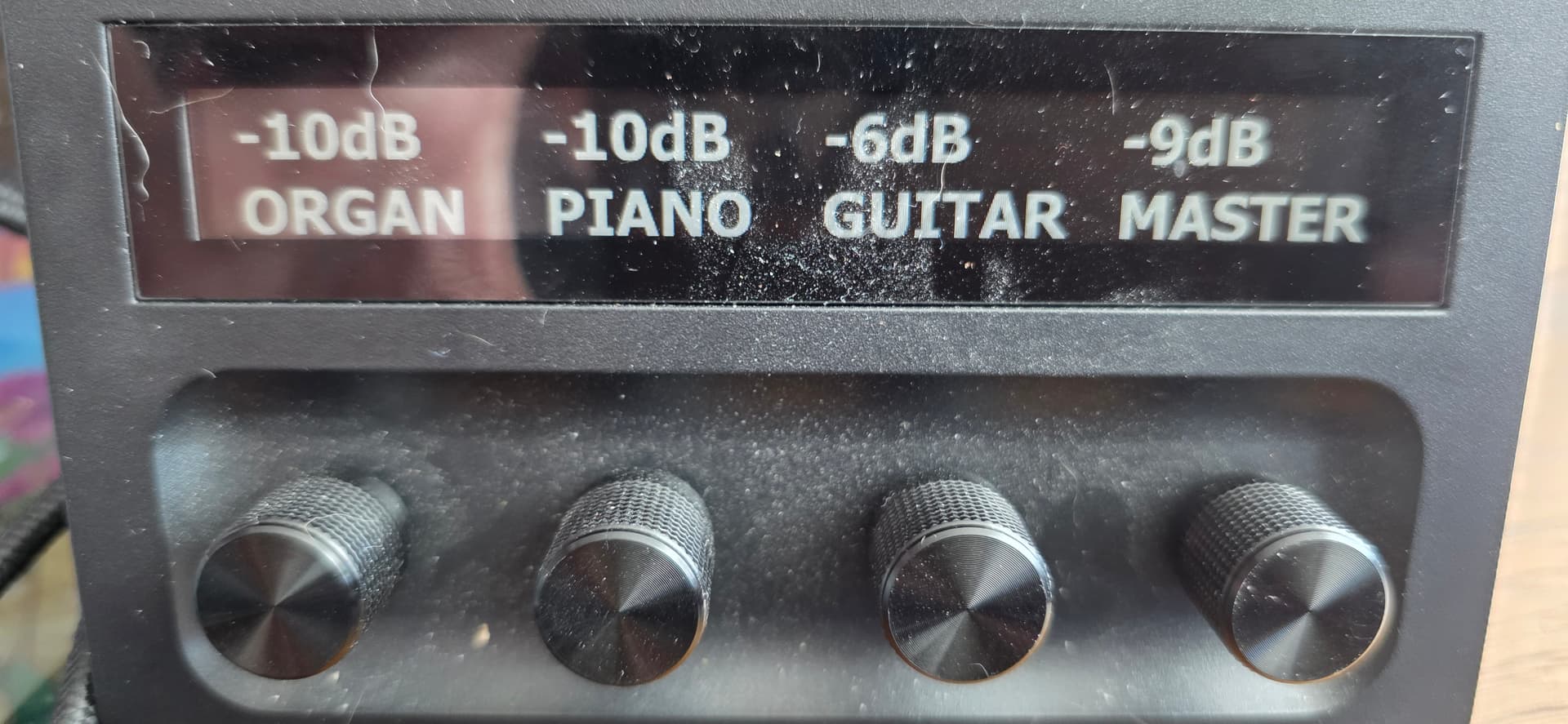
At this point I think I can do buttons, encoders, and lcd panel interfaces and I want to proceed with something useful. I took a quick look at what is needed for the pretty animated knob displays you see in typical StreamDeck apps. That made my brain hurt. I was able to send 200x100 svg files with text overlays, but, in reality, all the prettiness is a distraction. Basically, I would be happy with the same look as the controller bar with the controller bar slider replaced by the hardware encoder. A value and a caption in big bold letters.


In the picture the right hand knob is fully implemented. It has a binding available:
global.masterLevels.outputGain.
The others are just dummies for now.

It looks like the only way to get into those things directly is by rack index and plugin index. But I want these to change with the song selection, so hard-wired rack/plugin numbers won’t work. And those numbers will change with different setlists. Maybe there is a way to expose a binding that StreamDeck can see, but I don’t know how,

My plan is to add a simple mixer rack to every song and connect the individual input levels to StreamDeck. The only way I know how I might do that is via midi through osk. But when I try to watch that, StreamDeck Crashes.

The working watcher looks like this:
let masterOutputLevelsWatcher = C.bindings.watch(“global.masterLevels.outputGain”);
based on http://localhost:35007/api/bindings/availableBindingPoints i tried
C.onscreenKeyboard.open();
et oskWatcher = C.bindings.watch(“midiOutputPort.Onscreen Keyboard Out”);
but it is not happy:

file:///C:/MyShit/StreamDeck/Rays_cantabile-streamdeck-demo/node_modules/@toptensoftware/cantabile-js/CantabileAPI.js:489
handlerInfo.reject(new Error(${msg.status} - ${msg.statusDescription}));
^

Error: 500 - Internal Server Error - JSON parse error at line 5, character 17, context routingMode - syntax error, expected EOF found Literal
at Cantabile._onSocketMessage (file:///C:/MyShit/StreamDeck/Rays_cantabile-streamdeck-demo/node_modules/@toptensoftware/cantabile-js/CantabileAPI.js:489:24)
at WebSocket.onMessage (C:\MyShit\StreamDeck\Rays_cantabile-streamdeck-demo\node_modules\ws\lib\event-target.js:120:16)
at WebSocket.emit (node:events:508:28)
at Receiver.receiverOnMessage (C:\MyShit\StreamDeck\Rays_cantabile-streamdeck-demo\node_modules\ws\lib\websocket.js:720:20)
at Receiver.emit (node:events:508:28)
at Receiver.dataMessage (C:\MyShit\StreamDeck\Rays_cantabile-streamdeck-demo\node_modules\ws\lib\receiver.js:414:14)
at Receiver.getData (C:\MyShit\StreamDeck\Rays_cantabile-streamdeck-demo\node_modules\ws\lib\receiver.js:346:17)
at Receiver.startLoop (C:\MyShit\StreamDeck\Rays_cantabile-streamdeck-demo\node_modules\ws\lib\receiver.js:133:22)
at Receiver._write (C:\MyShit\StreamDeck\Rays_cantabile-streamdeck-demo\node_modules\ws\lib\receiver.js:69:10)
at writeOrBuffer (node:internal/streams/writable:570:12)

Node.js v24.12.0

I haven’t tried to trace those error messages in hope that you might have a quick answer.

I have been debugging with console.log(). The instructions you provide for debugging at http://localhost:23654/ don’t seem to work. Do I need a different localhost or a different regedit?

Have you shut down the StreamDeck desktop software? Sounds like it might be trying to drive the display at the same time.

You assume correct.

That can happen if you add a number and string. I can’t see anything in your code that would cause that unless sd.on(‘rotate’, (key, value) is passing a string as value

If you put your code in triple backtick separates it’ll come out formatted and you can include js syntax coloring.

Eg: entering this:

```js
function javascript_code_here() 
{
    // comment
    let x = 23;
}
```

results in

function javascript_code_here() 
{ 
    // comment
    let x = 23;
}

Cantabile only provides binding my name and by index. If the racks/plugins you want have consistent names you could use names, otherwise what mechanism would you like to use to identify which setting in each song goes to which panel?

You shouldn’t need to use the OSK for this. What settings exactly are you trying to get to?

I recommend using bindings4 for this:

C.bindings4.open();
C.bindings4.watch(
    "midiPorts",                // Bindable Id
    "in.Onscreen Keyboard",     // Binding Point Id
    null,                       // Bindable Params
    {                           // Binding Point Params
		"event": "Controller",
		"channel": -1,
		"controller": 64,
		"routingMode": "Continue",
	}, 
    (ev) => console.log(ev)     // Callback
);

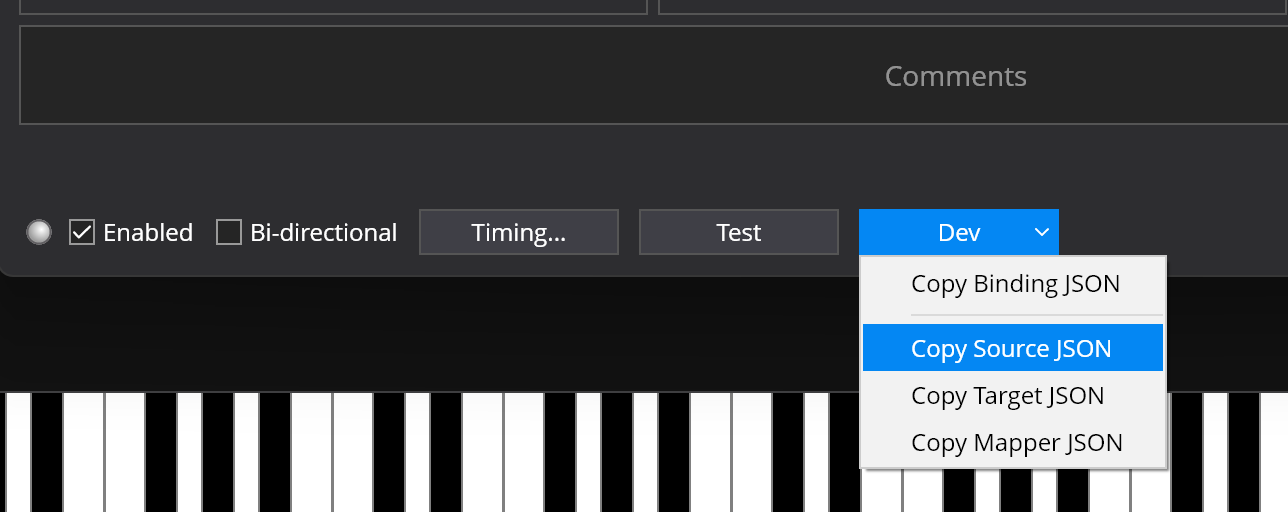
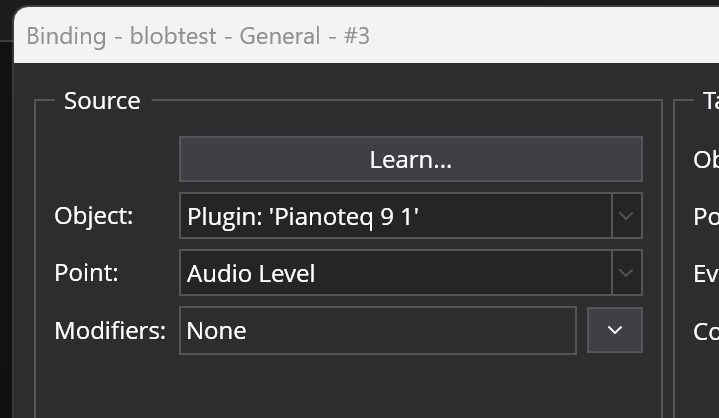
Note you can get the ids and params, but creating the binding you want in Cantabile and then clicking the “Dev” button and choosing “Copy Source JSON”:

That’s for debugging plugins for the StreamDeck desktop software. For this approach you can just debug the node program directly. Just use VSCode and you’ll get a full debugger right where you edit. eg: the streamdeck demo project I provided earlier is already setup for this - open it in vscode, press F5 and you’ll be debugging. The config is in ./.vscode/launch.json

See here for more.

Brad

1 Like

Hey Brad. I decided to punt on this. I didn’t realize that I could use mixtures of Buttons and Dials from various sources in a single StreamDeck profile. My initial working profile has mostly your buttons wired directly to Cantabile and dials from the StreamDeck Marketplace midi plugin. The dials interface to a simple mixer rack in Cantabile via CC7 on channels 1-4. Each song sends appropriate names to the dials. I’m happy to share the details if anyone is interested.

Is there a binding available for the VU meters?

ok

There is “Audio Level” on racks and plugins.

Note however it’s throttled and you won’t get the same update rates as Cantabile’s level meters. Also, the more Audio Level bindings you add, the slower the update rate. If you’re finding it too slow, let me know.