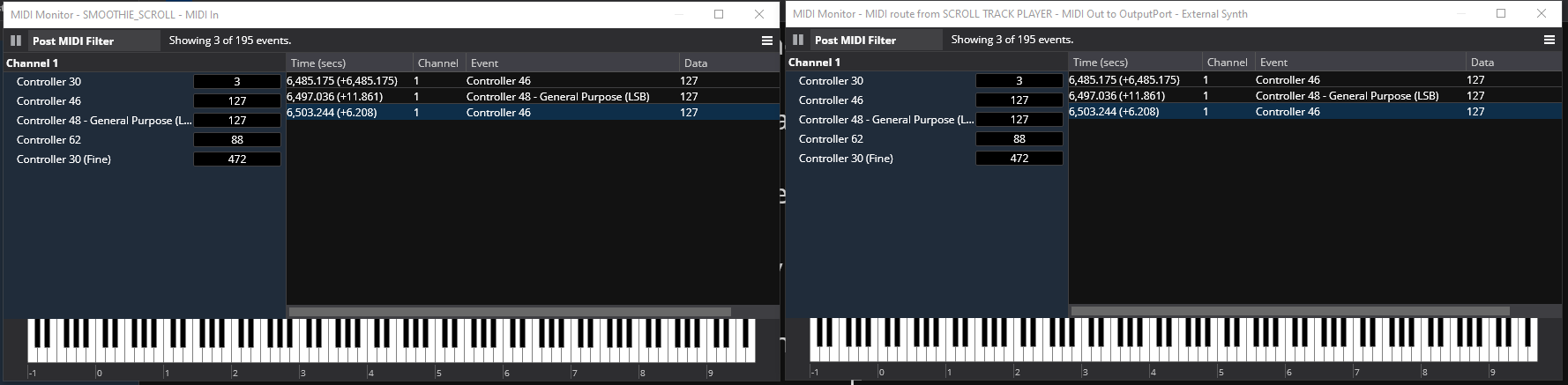
I am working on a rack in the new beta and while testing and adapting the rack to the new View options I noticed that a Media Player I have in the rack had some behaviors I can’t explain. The Media Player holds a MIDI file with only CC messages on it that are used to automate the Smoothie VST with the help of the bindings system in the rack. There are few CC messages on the track so viewing them in the MIDI monitor is easy. The media player inside the rack with the MIDI track is looped back to the input of the rack but to be sure the loop-back route wasn’t part of the issue I also placed a un-looped dummy route to an unused port and placed a monitor on it as well. Here is a view of them after running the media player from start to finish with no interruption.
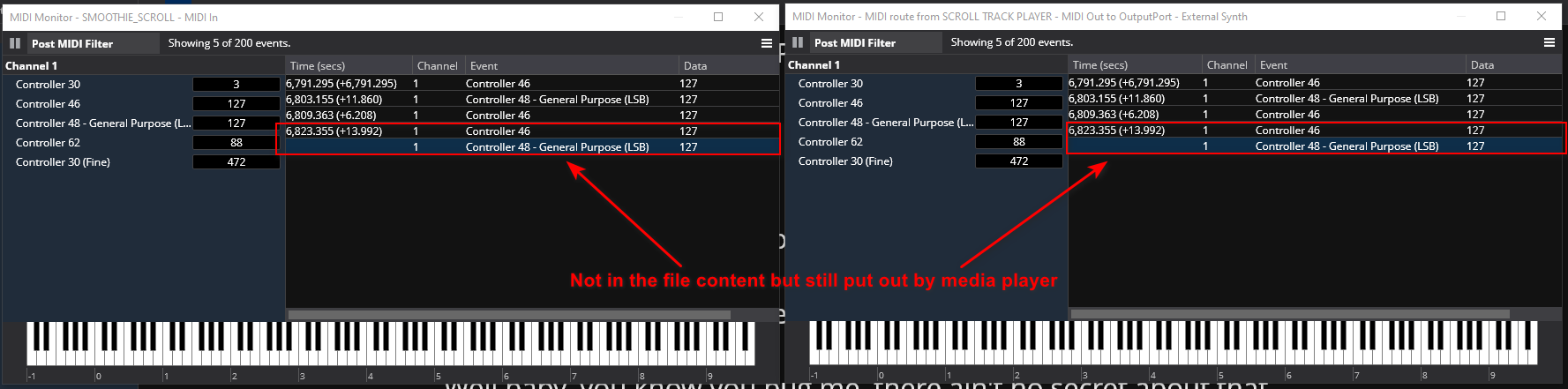
So far so good. But if I clear the logs on the MIDI monitors and then play back the same track until those original messages from the file are displayed and then pause it and then resume it the MIDI monitor sees these extra CC messages when resuming play added to the original shown below.
as is shown there are 2 new messages (in my case here) that are sent from the route (I assume) when resume is pressed. They look to be the previous 2 messages the Media Player sent but in reverse order. In my case this sends erroneous commands so I wanted to understand better how this might have occurred and how the route or buffer system for the routes worked.
Has anyone seen this before? @brad? Any help appreciated.
I took a look at this and it’s been like this for a long time…
When a MIDI player resumes play, it first scans through the file looking for the latest program change and controller change events and resends them. But due to the way the scan works and accumulates the current state of things the CC’s are sent in ascending order (ie: 46 then 48).
The main reason for this is so that if you move the play head forward then any intervening program change/CC are sent before resuming play.
I’m not sure what the correct fix is here. I suppose I could add an option to not do this. Or, perhaps we can come up with a better way to do whatever you’re using the MIDI file for - eg: a scripted plugin or something?
That explains things well. I did not know that a MIDI player did that on resume but understand why it was included behavior to help manage the PG and CC situation for a receiving MIDI device.
My use case is as follows.
I record the control bar CC messages from sliders and momentary buttons on to a MIDI track. This track is then played back from a Media Player as part of a Smoothie VST based auto scrolling rack I made. In the CC commands from the controller bar used to record the CC events there is a CC number for scroll down and one for scroll up. If I record a track where there is a scroll down in addition to a scroll up and then a scroll down again and they get accumulated in the MIDI playback event resend on resume. This causes the direction of the scroll to reverse direction and scroll up because of the re-ordering of the CC events to be ascending even though the final event on the track was the scroll down CC. Maybe I could reverse the CC numbers for up and down and make it so the scroll down CC was sent last as a default. Since down is the predominant direction in a lyric scroll and up is just to correct an overshoot that might sort it.
That is the issue from what I can gather. If the Media Player is standard issue I’m loath to alter it except in the case where an explicitly selected exception could be added to the default behavior for the players. And it would need to be on a player basis so as not to affect other MIDI players in the same song. Also it would need to be easy enough to justify the time. Not sure how a scripted solution would work for this but am open to suggestion.
What if you recorded the scroll events to the MIDI file as notes instead of CC messages? That way pausing and resuming the Media Player wouldn’t accumulate and replay them.
I did 2 versions of the rack. One like you described where Smoothie helped stripe the track with CC position messages and one like I described above where control CCs were recorded to remote control Smoothie on playback. The results were noticeably different. Letting Smoothie handle the scrolling was less jittery (Smoother ) than using a MIDI track with position messages in it. It did as you point out eliminate the problem and provided accurate relocation of the position of the Show Notes for rewind or ff. Still the smoothie method was a better visual because the slight jitter was an annoyance to me as far as eye focus went. I used 1000 steps which is what the Show notes positions allow FWIW in my version.
Using notes instead of CCs would eliminate the issue because they are not accumulated. Brilliant idea! I will give it a go.
I modified the rack to use MIDI notes as per Kevin’s suggestion and it is working as expected. I used only Note on events for the bindings and noticed that the player issued note offs for all the held notes on stop but not on pause. I am pretty sure that is an expected behavior and has no effect on what I am doing so I’m set to go and nothing is needed to be messed with in Cantabile.
I have an update to this thread. I was experiencing a noticeable jitter when playing back MIDI files that contained pure show notes positions. It turns out that the jittering that made it different from the Smoothie controlled scrolling was the resolution of the position track I was recording. I was using 1,000 CC Fine numbers to represent the 1,000 show notes positions. This was incorrect. Smoothie it appears to me generates a 10,000 number scaling from what I see in the GUI. I adjusted the recordings to record the 10,000 scaling and upon playback the jitter was the same as when Smoothie was the controller. This is a great thing because it can be synced to a Master media player with audio and enjoy locating, fast forwarding and rewind syncing.
Smoothie sends automation curves, which are truly continuous, not discretely sampled. Since MIDI files are discretely sampled, whatever recording method you’re using presumably discretely interpolates Smoothie’s automation curves at whatever rate it chooses to produce the MIDI file. That’s where the 10,000 would come from.
Thanks Kevin, I get it, it’s about my sample rate when I record as far as it’s ability to emulate the continuous curve that Smoothie generates. FWIW I did note that on the parameters of the GUI display for Smoothie the Inputs and outputs have a resolution of 0.0000 to 1.0000 so I assumed that using the same scale when recording it would be better realized or matched.
Even the GUI (which is discrete) is not actually produced by Smoothie. Cantabile interpolates the automation curves sent to it by Smoothie to generate printable numeric strings, which it displays in its (Cantabile-generated) GUI. So the numbers you’re seeing are also merely approximations of Smoothie’s continuous automation curves. The real values have infinite decimal places.
This design makes Smoothie really, really smooth. In fact, it’s mathematically impossible to be any smoother.

 ) than using a MIDI track with position messages in it. It did as you point out eliminate the problem and provided accurate relocation of the position of the Show Notes for rewind or ff. Still the smoothie method was a better visual because the slight jitter was an annoyance to me as far as eye focus went. I used 1000 steps which is what the Show notes positions allow FWIW in my version.