For quite some time I’m rather unhappy with the small USB connections on devices I use for rehearsal or on stage. Today was a bad USB day, the Dragonfly PageFlip micro USB B failed, so I had to go on batteries (advantage of PageFlip) and I had problems with the USB-C connection of my audiointerface UR22C. On the last I have three questions.
Question 1:
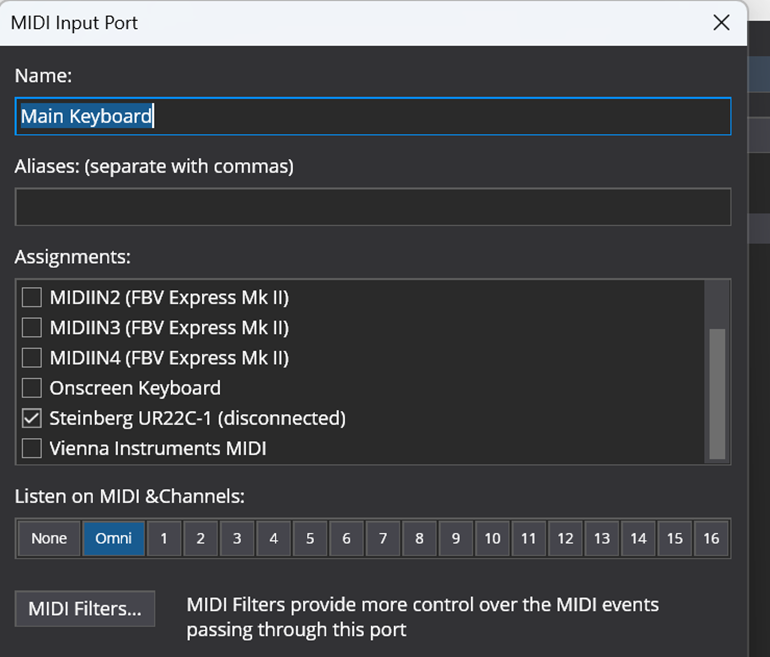
It turned out that in the Options/Midi Port I got an extra line with "Steinberg URC22C-1 (disconnected), see below
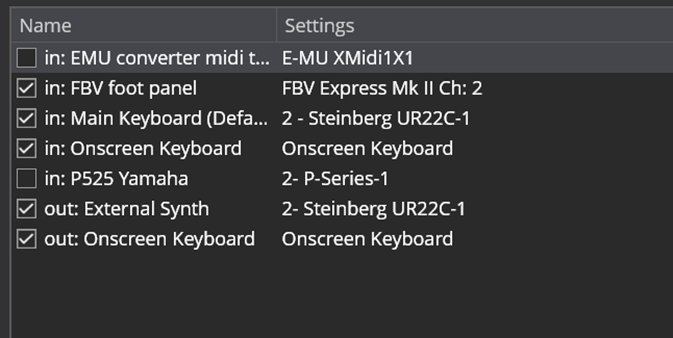
and the line with “Steinberg URC22C-1” was unchecked, you can’t see it on the picture as the view is scrolled down and the first line is not visible (sorry). I have no picture of that as now it works normally. After restarting Cantabile I get this as normal:
For years this did not happen ever, now it is usual after transport of the set-up.
Question 2:
Any suggestion to make this usb connection more robust. Glue it to the interface, make some box around it, other,.. It is rather annoying to buy a new interface because of a failing USB port.
Question 3:
Is there an interface with a more robust type of connection to the computer, something that can be e.g. screwed?
This will probably spark much debate but I do not think that USB connectors/cables are robust enough for stage use. I did try on my 2017 rig, but had way too many intermittent connection problems. So when I rebuilt my gig rig in 2024, I went back to DIN MIDI
Prior to trying USB, I of course had used DIN MIDI with no issues, and of course connected to a USB MIDI/Audio interface with short USB cables. I am now back on DIN MIDI (yes, with double the connectors) with no issues again.
USB is fine in pretty static configs, and, yes, DIN MIDI is “state of the ark”, but I am guessing MMA settled on that 5 pin D connector for a reason, and it is more mechanically secure than USB. Then couple it with that optically isolated interface to reduce noise/ground loops, and it remains a winner….
Hi Derek,
I’m using DIN midi cables from my keyboard to the audio interface, that works fine. How do you connect your interface to the computer without USB?
Hi John, that actually looks nice. Would even be better to have the part with screws on the male connector, I could try to make holes in the backplate of the audio interface. Otherwise it may be possible to fix the flat part of the male connector to the backplate. Any experiences out there?
Just a bit of my experience - I used to use a similar right-angle-to-straight adapter (on the USB Type A side coming from my laptop). But i ended up trashing them, as 90% of the time when i had a problem it was resolved by removing the adapter cable (just another potential source of failure).
Just to clarify, I am talking about USB cables in the context of trying to connect the synth to the computer via USB MIDI, which I found too problematic. My MOTU16 connects to the computer within my gig rack via a Thunderbolt cable, which is as short as possible, and with both the computer and MOTU being within the rack then that connection is fixed and doesn’t get plugged/unplugged
Running my live keyboards happily via USB (upper) / USB-C (lower) so far. Even running the connection through a CAT5-bridge and a USB hub with no nasties yet.
I’m clearly a bit less professional with just freestanding computer and interface that I place on some table or chest. Maybe I should find myself a small box to have that fix mounted.
If so you’re not the only one. I am even more stripped down. While I think that MIDI DIN is a very robust solution along with all USB connections in a case I went a different way and invested in some older HP tank style workstation laptops with 17" screens and a ton of USB ports on them (5). I have been going for almost 10 years this way. I have only replaced 1 cable that whole time. I also did some work on the USB ports on the laptops when they get loose and on 1 laptop I changed the USB port card on one side of it. I have 2 USB 3 ports for my power hungry hardware and 3 more USB 2 ports. I do most shows with just 3 or 4 ports. 1 for the main keyboard, 1 for the Babyface and 1 for the iLok key (and 1 more for upper tier when I set up that way). It works for me but I am interested in the small footprint Desktop units described in this thread, I would like some more core speed for some of my more ambitious song setups I’ve tried to make to cover all the VST activity I am trying to use at the same time. For now I will continue to learn from everyone here and build something when the piggy bank is looking better.
There’s various USB connections within the rack, but externally it’s connected to keyboards and controllers via USB B (not micro). I do change the external cables every year or two (or earlier if problems). I also either replace USB hubs on a similar timescale, and sometimes will disassemble them to tighten up the connections. I don’t use 5-pin DIN MIDI because keyboards need power, and I worry (unnecessarily I assume) about additional latency.
I did pick up one of those USB C extender things that I linked to earlier, seems to work, but don’t have a USB C keyboard to try with. If I did I would likely protect it with some stick-on rubber pads or similar.
Interesting how we all have different experiences, but I certainly had USB connection glitches, whereas now I am back on DIN MIDI I have had zero connection issues.
I do not think it is a question of being less professional. If your rig works for you then it works. I have certainly gig in a “lesser configuration” but where I am now has evolved over the years and I am also interested in having everything labelled and loomed for ease of setup and teardown
If you have an interest in what I did, then it is all documented here
I have a HP elitedesk mini G4, which you may find somewhere else in the forum, small, but still having a PC processor, following the recommendations of Torsten. Happy with that, although it starts to be a bit outdated now.
Rack mount is the only way to go, all that connecting and reconnecting is going to cause problems IMO. FWIW I had a rack mounted PC with a thunderbolt 3 port for my Quantum 2626 interface, and as you know thunderbolt 3 is basically the same connector as USB C, and the interface was also rack mounted with a short thunderbolt cable with all cables secured. After about a year of use I started having problems with the interface connecting, tried a new cable and that seemed to fix it for a little while but the problem returned. In the end it was the thunderbolt port on the PC itself. I had to replace the port but it showed me how fragile those ports are, especially since I rarely had to unplug or plug it in since it was all rack mounted, all wires neatly routed and taped down.
And yet I now have a NUC 12 that has two thunderbolt ports, I think I’m going on about 2 years now and never the slightest issue, only using Port 1. But everything else I use is Midi DIN. I wish interface manufacturers would give us a more robust connection, but I’m not holding my breath!
Tom
Not many people realise that connections are lifed for a certain number of insertion/extractions. Once you’ve exceeded the rated number of insertion/extractions then there is no guarantee of a reliable connection.
You also might be surprised to learn that some electronics connectors (especially high count multi pin connectors) are only rated for 30 cycles. I used to have this problem in IEC 96 way DIN connectors when prototyping and was often pulling 6U VME sized boards (with two 96 way connectors) and and out of racks for building/diagnosis. After a while the connectors would get intermittent and you’d have to replace both the connectors on the board and on the backplane and it’s no fun de-soldering/re-soldering doing 96 * 4 solder connections!
I have never checked that parameter for USB, so I just asked google “how many insertion/extraction cycles are USB connectors rated for?” and it comes back with a minimum of 10,000 cycles for USB C (even less for earlier style) so if that is correct it should be an issue, but it could have been a one off flaw.
I have been forced to move to USB MIDI for bandwidth reasons. When I play my Nord Stage 3 in the typical manner of a Hammond organist through DIN MIDI – lots of fast runs and slaps/glisses – I sometimes get stuck notes and missing CC, often enough to be a serious problem. I’m not sure if the problem is related to the ~30Kbps limits of DIN MIDI, or just a poor implementation on Clavia’s part, but all of my problems went away when I moved to USB MIDI about 3 years ago. Unfortunately, Mini-USB and Micro-USB are not robust enough for long-term gigging use, IMO. Ironically, the USB ‘B’ connector that has fallen out of favor because of its size seems much more robust. I have B connectors on both my Stage and Studiologic SL73, and they are still reliable after the same amount of time. USB-C connectors seem more reliable, but they are still smaller than I would like to see. (I have the same reservations about 3.5mm TRS plugs and jacks, for the same reason.)
You might consider getting USB B to Mini/Micro/USB-C adapters with short (6 inch?) cables, and attach them to the cases of your gear. If the adapter fails, it’s much easier and less costly to replace than the jack on the instrument/controller.
Also I run all of my USB connections to my rack through USB-A to USB-A bulkhead adapters. These are similar to the ‘feedtrhough’ connectors used with XLR and CAT-5/6 connections to make rack wiring simpler. The side that goes to the computer uses a USB-A male-to-male cable that stays permanently attached and remains pristine, while the bulkhead adapters and the keyboard-side cables can be replaced as necessary.
I’ve never had hanging note issues over DIN MIDI, other than during a major Windows upgraded which introduced a driver compatibility issue with my MOTU MIDIEXPRESS 128. I cannot remember the details now, as it was quite a long time ago
 but I do not think that USB connectors/cables are robust enough for stage use. I did try on my 2017 rig, but had way too many intermittent connection problems. So when I rebuilt my gig rig in 2024, I went back to DIN MIDI