Occasionally, but infrequently, I observe high time load (150-250%) after selecting a song that normally would be in the 50-80% range. This is predictably accompanied by audio crackling and glitching. If I check Windows task manager, overall CPU utilization is always under 20%, which is where it always is. If I exit and reload Cantabile, select the same song, the time load is back in the normal range.
The only commonality I can see is the songs where this happens often have multiple Kontakt linked racks. (I know, I should avoid Kontakt for live performance.) The fact that this behavior is very sporadic and does not indicate high CPU load or competing tasks leads me to believe it might be a Cantabile issue. Has anyone ever seen this or have any recommendations (besides dumping Kontakt)?
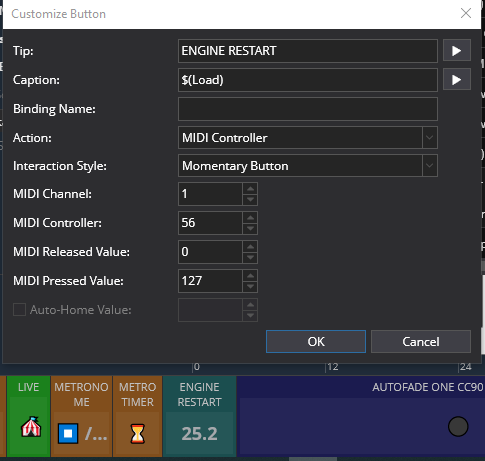
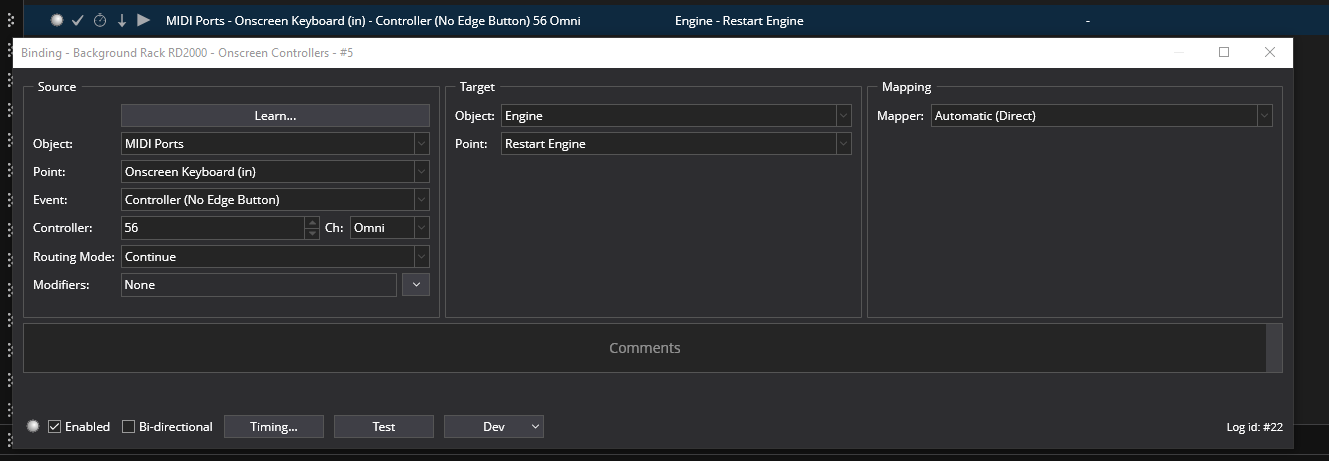
This happens to me with some VSTi plugins like B-3X but I don’t use Kontakt so it’s not necessarily tied to that VSTi IMO. I did 2 things to help. First I found that simply cycling the engine off and back on would do the same as shutting down Cantabile. So I put a controller bar button with the load displayed on it that when pressed cycles the engine and corrects the problem. I think it must be some memory usage conflicts since it only happens when I load large setlists that pre-load the VSTis. Hope this helps..
@dave_dore yes, that definitely helps. I will try the engine recycling approach the next time this issue occurs. Can you post a screen shot and command/parameter settings for the controller bar button you mentioned? Thank you!
Thanks, Dave. I assume I have to be in Live mode for the controller bar button to be visible? If so, is there a way to get Cantabile to startup in Live mode?
I am answering my own question, for anyone who may want to start Cantabile in Live mode. The is a /livemode command line switch you can insert on your Cantabile shortcut.
FWIW I have a binding that cycles the Engine after 4 secs on startup. It’s in a “Soundcheck” song that’s the first song on every Set list… it has my main sounds for levels, but it also has bindings that set certain plugins to my defaults, cycles a problematic plugi, etc. Seems to run smoother that way. Project Lasso also helped.
Tom
Just a quick thought: are these songs actually changing the loaded sounds of these linked Kontakt racks? In that case, temporary overload would be an expected consequence of this use case: when you change the Kontakt content by loading a song (and consequently a Kontakt rack state), Kontakt will get busy purging old samples from memory and loading new ones. So I’d expect the system to be more than usually busy in that phase - resulting in drop-outs and time load, because processing is still waiting for Kontakt to get its act together.
If this is the case, the only real remedy is to have Kontakt racks that never change the loaded Kontakt status (as long as you have enough RAM to have them all loaded at the same time). That will avoid the re-loading of samples.
Alternative hypothesis: crowded RAM - too many samples loaded, so Windows needs to swap samples from RAM to disk cache. Have you checked your RAM utilization?
Just poking at the “Kontakt specificity” of the issue…
I have a few Kontakt linked racks that use instrument banks that change sounds by sending program change via bindings. I am uncertain whether instrument banks purge samples when a different instrument/slot is selected. The majority of my Kontakt racks do not change sounds, however.
The fact that @dave_dore (and possibly others) experience the same issue with non-Kontakt plugins or linked racks leads me to believe this issue is not specifically related to Kontakt.
I should reiterate that this problem is very sporadic. Using the same setlist and songs, I can go several gigs without having any time load issues. Then out of the blue, it happens, as it did on Friday night.
Once the high time load issue starts, it continues when other songs within the setlist are selected until I exit and restart Cantabile. Perhaps an engine restart would also resolve, something I will test the next time it happens.
I have a feeling that this is a Cantabile bug, as it occurs on two different Windows 11 25H2 laptops. I know @brad is working on a refactoring of the audio engine, so maybe it will be fixed when that is released.
I experienced the high time load issue last night during a gig. I had played for about two hours with normal time load values, when I noticed some crackling in the audio. I checked the time load, which was over 200% for a song that is normally under 50%. I tried recycling the audio engine, but the high time load persisted. I had to close and restart Cantabile, upon which normal time load values were restored through the end of the gig. So for me at least, recycling the audio engine does not resolve the issue.
This happened again at last night’s gig. I went to start the second set, after a 20 minute break and time load was 150%. After exiting Cantabile and restarting the app, that same song was back to its normal 50-60% time load. I really hope @brad can resolve the intermittent high time load issue, as (for me) it occurs with frequency on the job.
I advise also looking hard for culprits outside of Cantabile. Many programs wait for no “activity” to do high-load things, but their definition of “activity” is very narrow and doesn’t include audio workloads. Restarting Cantabile counts as “activity” to them, and makes them stop. Unfortunately, launching a process monitor also counts as “activity”, making them difficult to catch.
Most times I’ve had this problem, after tearing my hair out looking at my plugins I’ve eventually traced it to some completely unrelated program that decided to index my files or conduct diagnostics or some other annoying background task.
That’s a great suggestion, Kevin. I have in the past checked Windows Task Manager and have not observed higher than normal CPU utilization when the high time load phenomenon occurs. My CPU % normally is in the 5-10% range with Cantabile running my primary setlist. However, I may be able to use Process Lasso to automatically suppress or deprioritize non-essential background processes. If anyone has any experience with PL in that regard, any guidance would be greatly appreciated.
Many here use process lasso, and I started using it a few months ago. That’s essentially what it does… Gives high priority to Cantabile and IIRC you can also shut down certain processes running in the background. There are quite a few settings. While I did not have your issue, I did notice it running smoother, faster state changes, etc. given the severity of your issue I would definitely give it a try. FWIW I used AI to set it correctly for my specific CPU and PC… It worked great.
Tom
Thanks, Tom. I’ve been using Process Lasso for about three years, along with Park Control from the same vendor, Bitsum. What I wasn’t sure of was whether it could automatically lower the priority of other active, non-system critical tasks while Cantabile is running. I don’t know of a way to do that, other than to change the priority of other tasks individually and irrespective of Cantabile.
What I did discover after reviewing Kevin’s post, is that the power plan setting in Process Lasso for the Cantabile process was set to “None” instead of “Bitsum Highest Performance”. Since my laptop’s default power plan when Cantabile is not running is “Balanced”, I’ll bet it was using the Balanced power plan when Cantabile was running. That would give other background tasks the opportunity to take resources, particularly after a prolonged period of low Cantabile activity (like after a break). I swear that I had once-upon-a-time set Bitsum Highest Performance as the power plan for Cantabile, but that plan has mysteriously “disappeared” a couple times, where I’ve had to manually reactivate it in Process Lasso. When it disappears, PL must reset Cantabile’s power plan to “None”.
I will report back on whether this change makes a difference, although I’m fairly confident that it was the root cause of sporadic high time load values, especially coming off a break.
I came across this issue last year. At first I thought it was the limitations of a low speed i5 processor and not much RAM, but it persisted when I upgraded to an i7 processor. Part of the trouble is indeed Kontakt, or in my case Kontakt Payer. Part of the problem is that Kontakt is known to grab RAM when it needs some, but then not let go of it again. This is why the issue can sneak up on us unannounced. I laboriously worked through all my songs, adding a start and finish state with everything turned off, and only turning on vsts as and when needed, and off as soon as they were done with. It did improve things, but @Derek Cook advised me to use Process Lasso and that has helped enormously. I have only used the basics which he advised, but there is a lot you can do if you want to dive deeper. Derek is a good egg, and does understand Cantabile well.
I do occasionally still get the high time Load, usually if I am playing quick and very involved music, maybe when I have a lot of large libraries loaded. My workaround for this is simply to simplify what I am playing, restricting my right hand to held pads, or left hand bass playing to single rather than octave bass notes.
It is quite likely that there is a better way of doing this than modifying all the songs and states like I did, but having done it, I am good to go!
Just for the record, every time I’ve looked into this it’s been processor scheduling/throttling related issues.
In other words, Cantabile doesn’t suddenly start doing more work that makes it increase CPU time - it’s basically the OS not giving as much time to the audio engine, or the CPU being throttled (running at a slower clock speed) and therefore just taking longer to do the same work.
Cantabile is quite explicit in its audio engine thread configuration - time critical threads, thread affinity settings and various other multi-media real-time settings but if something external to Cantabile (ie: OS, CPU other apps etc…) is stealing time, there’s not much else Cantabile can do.
Why would recycling the sound engine fix the problem in that case?
FWIW I had this (for the first time) 3 weeks ago. Never had this before in 7 years of running Cantabile. Also, I typically have dozens of Kontakt instances loaded (be it their state never changes) and never had issues with them. I’ve have issues with Arturia (e-piano) plugins taking ridiculous amount of CPU and have since swapped those out for less heavy plugins.
We don’t know why recycling the sound engine sometimes solves time load problems. Investigations by the most technical among us have not revealed a clear explanation. The best guess is that it resets something in the OS kernel or possibly even deeper (e.g., within the chipset firmware or microcode) that governs thread scheduling, memory paging, caching, or something else related to multithreading efficiency.