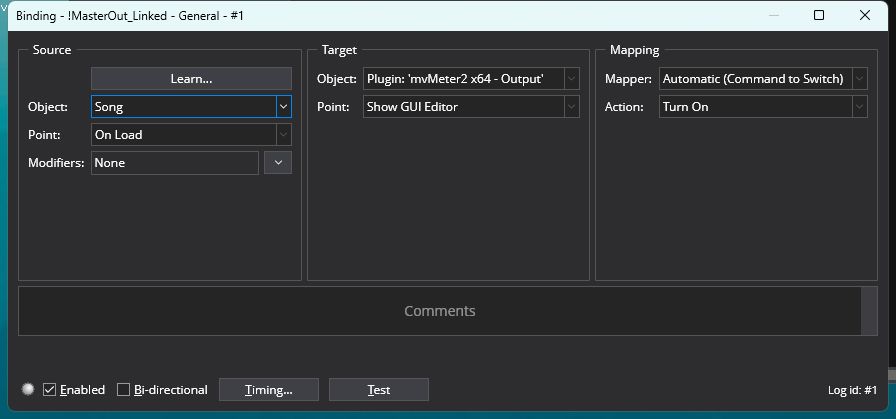
I have a rack that I use in every song file that I use as my master volume. It contains a VU meter plugin. On my previous computer, I was (somehow) able to keep that plugin open at all times. I “thought” all that I had done was to save the rack with the plugin open, but that doesn’t seem to do the trick any more. I also tried to create a binding to force it open, but that seems to be a “per song” setting, and not saved with this “master volume” rack.
Hmmm… I’m pretty sure I had the settings correct in my binding. The binding was within the rack. But for some reason it only worked in the song I had originally created it in.
So, I’m gonna post this here as a warning to anyone else that just might walk down the wrong path rebuilding their system.
I made the correct decision a long time ago to keep everything related to Cantabile in Dropbox. It was a decision I will never regret. My “old” system was starting to have some issues, so about three months ago I started purchasing a new NUC and interface. I also started grabbing any config info, and made sure all my patches were backed up.
Well… of course… a couple of weeks ago, the “old” system took a catastrophic dump. Won’t power up… nada. Luckily, I keep my old Nord Lead Rack for just such occurances.
When I started in earnest on my “new” system, I though “I’ll just create a new directory in Dropbox, and copy everything over.”
Big mistake!
Cantabile is smart… paths are not relative. So as I copied songs and racks into the “new” directory, Cantabile was looking into the old.
That is why my binding didn’t work “universally.” My modified rack was in the “new” directory, but every other song was looking at the old.
Lucky for me, I hadn’t gone too far down the rabbit hole before I discovered my problem.
So if any of youse ever have to take this journey, rename your “old” directory, and use the original name as your new.
This works for me also, i have a main rack i use in every song, with vu meter, volume controls, eq, chord display.
It’s shown every song switch in c3.
Maybe it’s a c4 thing?
Cantabile should use relative paths in preference to absolute paths. ie:
When the path to a linked rack is saved in a song, both its absolute path and its relative path to the song file are saved.
When the song is reloaded, the relative path to the rack (from the song being loaded) is checked first. If the file isn’t found there it reverts to the absolute path.
If that didn’t happen for you then it’s a bug or something else went wrong but would need more information to know what exactly happened.
I it wasn’t a bug. Everything worked as you described. It was my own “didn’t think this through” that caused the issue.
So to sum up…
Old system died. All data was in DropBox. When I built my new system, I created a new top layer for Cantabile and started from there. Cantabile did what it was designed to do and looked at the “old” top layer.
My “solution” was to rename the old top layer, and start from scratch.