I’m a first time user, Lite on Windows 11. I have one MIDI route from the onscreen keyboard to a VST piano, and can hear audio thru my headphones (WASAPI). When I click on the route, I get a simple dialog that includes only the Channel section. I want the “Edit MIDI route” dialog iinstead. How can I launch it? Thank you very much.
Hi J. L. and Welcome to the Forum! 
On Cantabile Lite there is no Edit MIDI Route command to speak of. But to be sure I know the whole story I ask, what is it on the MIDI route that you want to edit?
Dave
Thanks Dave. I want to add a second VST, and split the onscreen keyboard, to send left hand notes to one VST and right hand notes (either side of C3, for example) to the other. The second intro video shows this being accomplished very easily, using a dialog with “Edit MIDI route …” in its title.
Adding a second VST and another MIDI route from the onscreen keyboard to its input port doesn’t change the symptom.
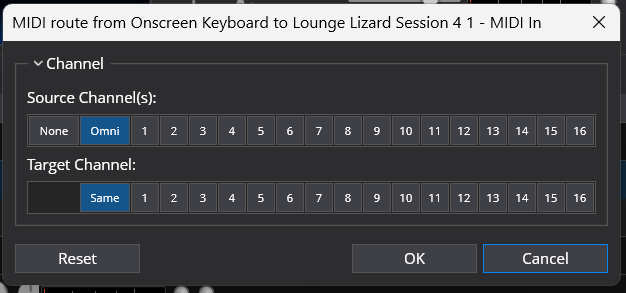
It’s a limitation of the free Lite version, right? At least, it was in 2019. (Where “it” is the inability to create MIDI keyboard splits, among other MIDI modifications..)
Hi J.L.
Yes, you have run up against the limitations of the Lite version. For splits you need at least the Solo version of Cantabile. It adds a lot of features. Sorry there was no solution for you with Lite.
Dave