Hello.
Is it possible to make it so that when a note is pressed once, it stays pressed? And when it’s pressed a second time, it releases?
Thanks
Hello.
Is it possible to make it so that when a note is pressed once, it stays pressed? And when it’s pressed a second time, it releases?
Thanks
Hi Felipe,
One way is to put a Sticky Note filter on the input channel to your VSTi like this. You’ll need to set the input route range so only the key or keys you want to react to the filter are available.
Dave
Thanks @dave_dore its works!
How can I make it so that when the metronome reaches measure 3, that note automatically stays active until measure 60?
Thanks
Are you wanting to trigger the note automatically or use the sticky note and manually play the note? I know how to turn the note off I think but am not sure how you want to turn it on.
I want the note to be activated in measure 3 and remain pressed until measure 60.
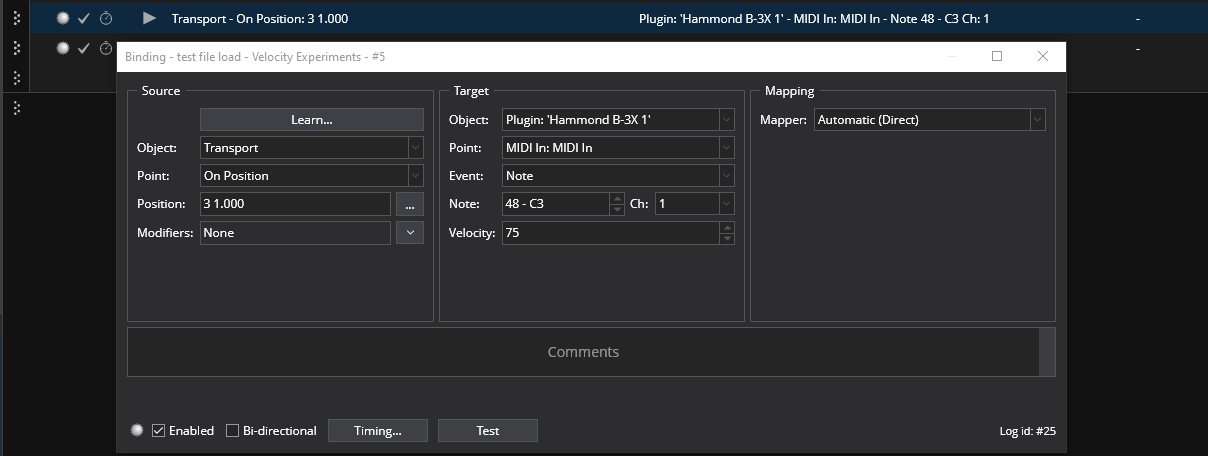
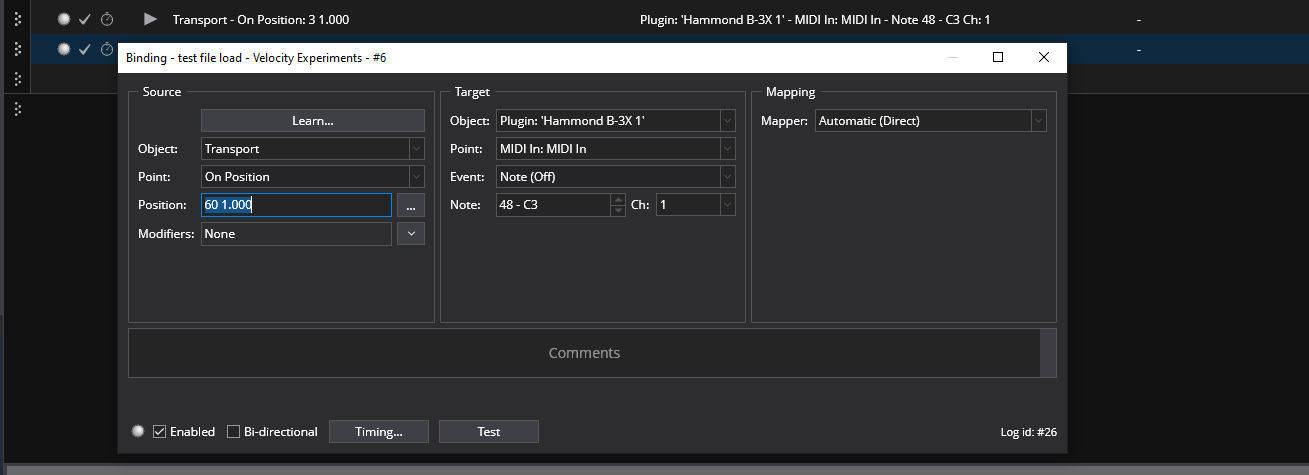
OK, here is an idea but it doesn’t use the sticky note filter. It is automated by the main transport.
You place a binding that monitors the transport position and have it send the note ON at measure 3. You must set the velocity of the target. I used 75 for this example
You then have another similar binding that sends the Note OFF at measure 60.
Hope this helps. If you wanted to use a sticky note filter the procedure is a little more complex. Let me know if you do want to do it that way.
Thank you so much!
This works perfectly, even with sticky notes.
Best regards