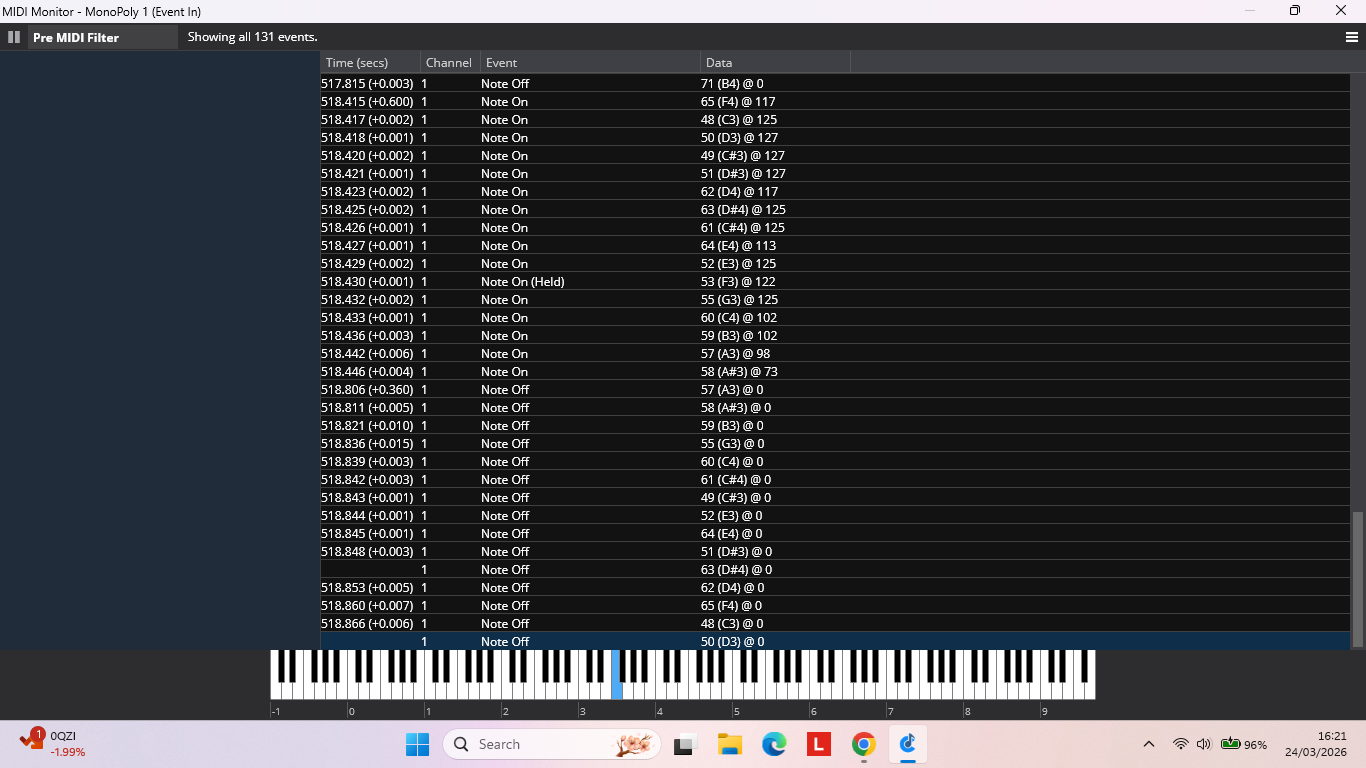
I’m having an issue with hanging notes. As I hope you can see from the screen shot below . Occasionally a note off event does not seem to be generated when releasing a key. This occurs on W10 and W11.
This behaviour occurs when using my cheapo Sub Zero controller, Korg Nautilus and a kontakt keyboard.
I recently ran into a hanging notes problem. I tried bindings with individual Note Off actions but that didn’t consistently work well. I know about All Sounds or Notes off but is there a way to make that be extremely short, like 100 ms or so, just enough to kill the hanging note? I couldn’t find a way to do that. Thanks!
Tom
The only hanging notes I seem to get are with the Wavestate Native vst, but in astrange way. If I change to the next state, often i will hold the existing notes to avoid a silence, and then play the next set of notes, and everything works fine. But If I need to cycle back to the previous state, the last Wavestate note is still waiting there for me. I am assuming that holding the notes across the original “next state” action is what cause the problem. The Wavestate notes don’t continue, but then do seem to have been hanging around and sounding for the return “previous stae” journey! Most odd. I do use the panic button, but have also included a binding to the top note on my keyboard because it is rarely used musically, and this will kill the errant sound.
It is a little annoying but not a deal-breaker or gig-stopper, so I have learned to live with it.