I noticed that when switching songs within a set list, Cantabile automatically saves the current state within linked racks, even if no changes were made. Is there a way, short of locking the states within linked racks, to disable the auto state saving when switching songs? It appears to be unnecessary overhead that could delay the transition from song to song.
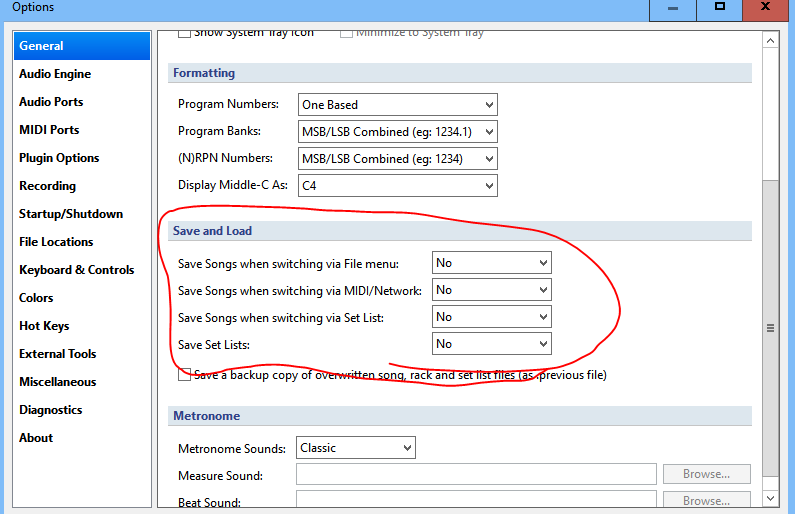
I checked my setup and 3 of the 4 options were set to “Prompt”. I’ve since changed these settings to “No”, but I’m not sure that’s the issue. It’s not the song or setlist that is automatically saving. It is the current linked rack state that is auto saving, even though I’m just switching songs and not making any changes to linked racks.
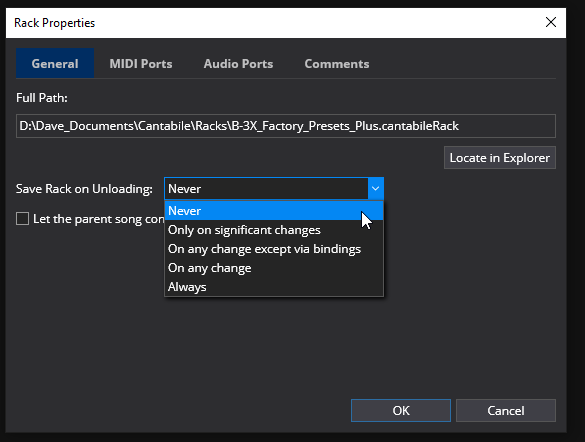
Thanks, Dave. That should work. I’ll have to update every rack used by my set list, which is a lot.
I was hoping for a similar attribute at the set list level that would apply to all racks and states.
If you’ve got a lot of racks, don’t forget the .cantabileRack files are just text files. You could use a text editor that supports “search and replace in files” to update them all in one hit.
eg: replace this:
"modifiedBehaviour": "SignificantChanges"
with this:
"modifiedBehaviour": "Never"
1 Like
I tried Dave’s suggestion of setting the rack property “Save Rack on Unloading” to Never, but it is still auto saving the previous song’s rack states when switching to another song in the set list view. All I am doing is cycling through songs, not going into any of the racks or making any changes. Are the song’s bindings making it look like the rack states have been modified and therefore need to be saved?
What do you mean by “auto saving the previous song’s rack states”. Do you mean writing to disk, or do you mean the setting persists to the next song?
When switching between songs that use the same linked rack, the rack isn’t reloaded, it’s kept in memory and left processing (for faster switching). This means settings can carry over.
What you might be looking for is state reset.
Brad
When I am in set list view and switch songs, a message displays in the header area, “Saving ”, where is the current rack state in one of the song’s linked racks. This message appears just before the new song loads and references a state in the song being unloaded. All I am doing is cycling through songs. Why does it do this when I’m not accessing nor changing anything within any linked rack?
Ah, I see what you mean. “Saving” a state really just means it’s capturing the state from the actual objects (plugins etc…) to the rack or song’s internal state representation. This happens automatically when leaving any unlocked state. To prevent it, you can either lock specific states, or use the State menu → Lock All to lock all states in a song or rack.
If you want to lock everything across all racks, there’s no command for this, but a text editor search and replace in files would work. Replace
"locked": false,
with
"locked": true,
When I select a song in the set list view, the Lock All option under the States menu is greyed out. How do I lock all states within a song (including all states contained in linked racks used by that song)?
I suppose the bigger question is, is there any additional delay or processing overhead when I switch songs that I am avoiding by locking all states? Or is the “Saving…” message just a harmless artifact of the state unloading process that would happen anyway, even if I locked all states?
You need to actually load the song for those commands to become available.
Usually it’s negligible, but it does mean your songs/racks will be more likely to be marked as modified. The worst case would be if you’re using the Entire Bank state behaviour on any plugins - in those cases it needs to save the entire plugin bank when saving the state. But this option is off by default so unless you’ve explicitly enabled it, it shouldn’t be doing that.
Brad
I did load the song and the State menu lock options were still greyed out. The song itself does not contain states, however multiple linked racks within the song do have states (that are being “saved” when I switch songs).
I use the Entire State option on several linked racks, in cases where the plugin does not expose its preset model to Cantabile.
Given that there is admittedly delay and/or performance impact, would you consider adding either a global or set list level option to bypass automatic state saving if in fact nothing has changed?
Then you need to open the rack and choose Lock All States.
Just to be clear there’s two similar things here:
-
The Entire Bank state behaviour:
-
The preset model setting:
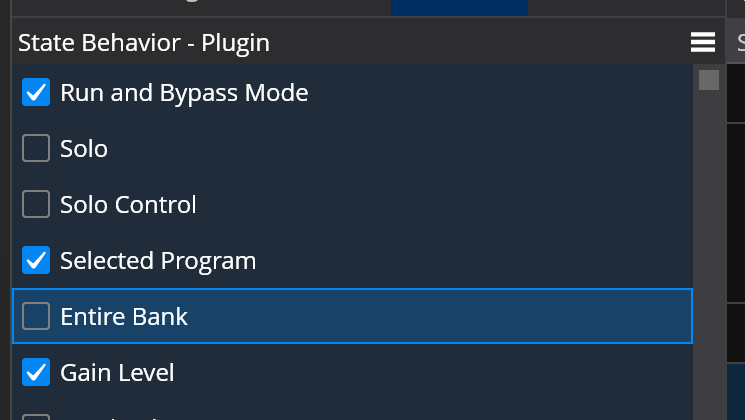
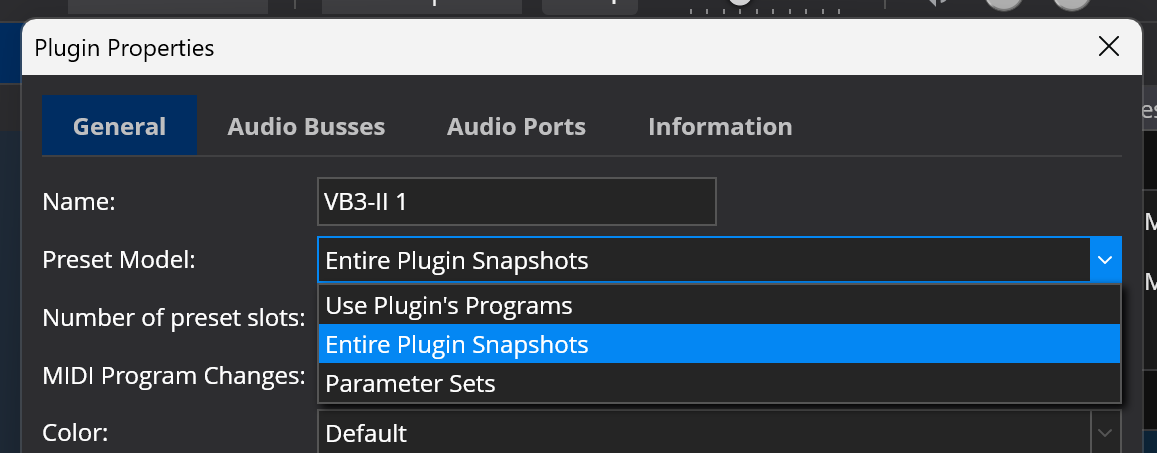
I was talking about option 1 having negative effect on saving unlocked states. If you’re using option 2, then state save time isn’t affected.
I’m not against it per-se, but my concern here is this is already complicated enough and adding another layer of control which isn’t even local to the song/rack will make things even more complicated.
Anyone else encountering issues in this area?
I don’t think most users would consider this an “issue” per se, more of an inefficiency. Anyone who needs to switch quickly between songs would benefit from the option to disable state auto save when there have been no changes. Adding an option at the set list level would save a lot of work and unnecessary rack level locking.
@brad any further consideration for this enhancement?
As an old IT guy, it just doesn’t make sense from an efficiency perspective to save objects that are known to be unchanged.
Hi Bruce,
Sorry I haven’t had a chance to look at this - I’m in the middle of a big refactoring of the audio engine and don’t want the two branches to diverge too much.
The problem is it’s not known… states capture a lot of different settings and some of it is optional (depending on state behaviours). Tracking exactly what’s changed and what’s important would actually be a fair bit of work. It could capture and then diff it, but that’s just going to take longer. Also, not everything in a state can be known if modified - eg: with VST 2 plugins you can’t know if something has changed. You can with VST3, but it’s poorly implemented by many plugins.
That’s a fair assessment, Brad, and some information about state handling that I was unaware of. I appreciate your thoughtful response and consider this matter closed.
Hey @brad, can you provide more details on the audio engine refactoring? Perhaps this should be a separate thread, but what are the primary benefits or advantages architecturally and from the perspective of end-user audio engine performance, features, and efficiency?
Not yet… I’m in the middle of this and want to get it nailed down and confirm it’s workable before I explain it. In short it’s basically refactoring of the way Cantabile’s front end constructs and connects the real-time audio graph used by the audio engine. It’s revisiting 15-year old code that’s getting pushed beyond it was designed for.
2 Likes