Cycle between two states that share a third state

Hi
Using Cantabile Performer I have 3 states: StateCommon, State2, and State3.
State2 and State3 are linked clones of StateCommon. I’d like to map a single key of my midi keyboard to an action that cycles between State2 and State3.
i.e. if I’m on State2, press of the key switches to State3. Another press switches back to State2. Another press switches to State3… you get the idea.

I’m confused as to what Expression is needed for “Song - Load State by Index”. I’ve tried setting Result tp “StateIndex == 2 ? 3 : 2” with Fire set to “Always” but that does not work. I’ve tried other combinations but still no luck.

Can someone please help?
Thanks!

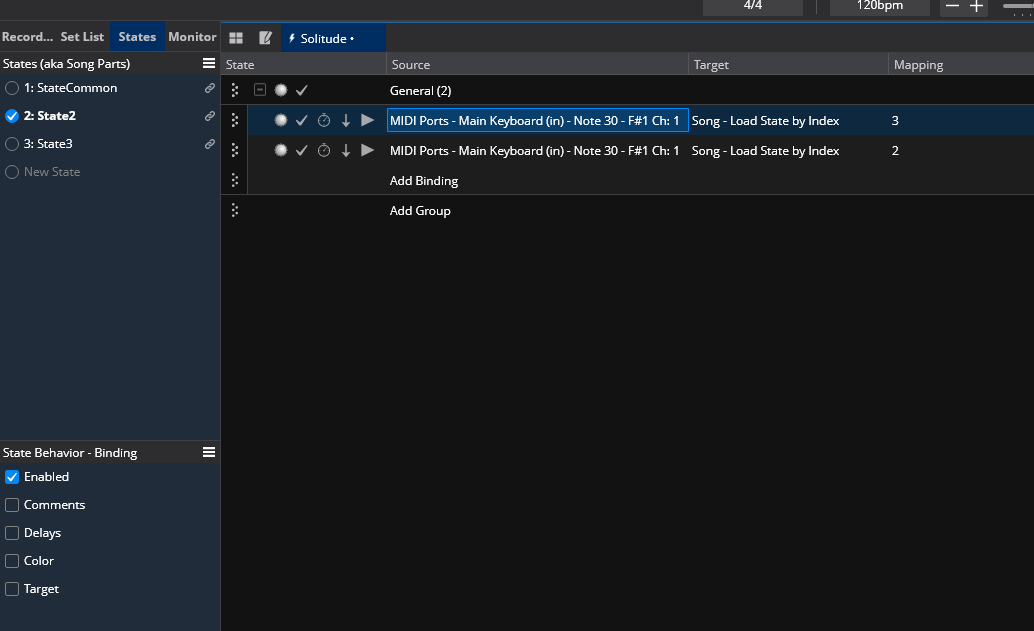
State behaviors are your friend here: Create two bindings, one binding ALWAYS transitions to State3, the other always transitions to State2. Then enable state control for the “Enabled” property of both bindings (the second checkbox in the State behaviors panel). Now you should be able to activate the first binding only when in State2 and the second one only when in State3.

Thank you for your answer @Thijon . But I must be missing something.

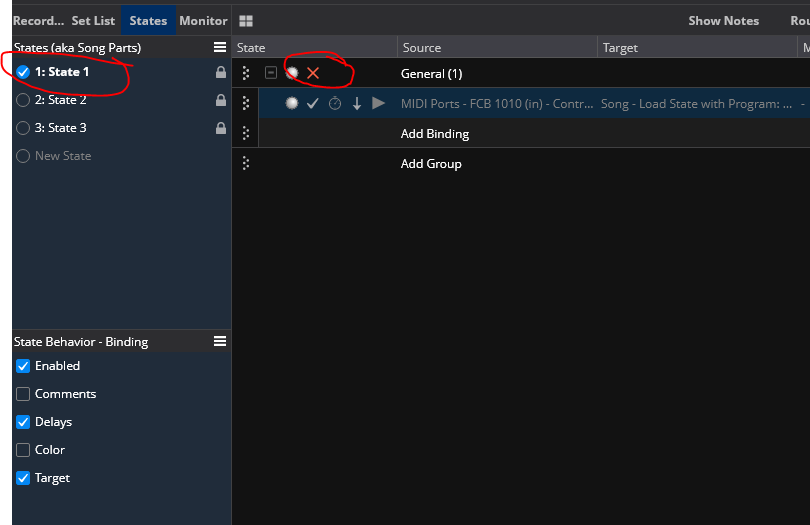
  • click on State2
  • click on first binding and tick Enabled in State “Behaviour - Binding”
  • click on second binding, Enabled is already unticked: OK
  • click on State3
  • click on first binding: Enabled is already ticked. This is not expected, I would expect this property to be independent on State2. If I untick it, it gets also unticked for State2.

Is this because State2 and State3 are linked clones from State1? How do I work around this?

Yes you’re right. However, you should be able to ignore the linked clone feature for just that one state behavior by right-clicking the “Enabled” state behavior.

@Thijon I’ve ticked “Exclude from Linked Clones” for that field on all 3 states and can see a symbol on the right of the field. Mouseover says “Store separate values in each state for this behaviour - even across linked clones”.
But again, if I go to State2, select a binding, click Enabled, go to State3 I can see the state is Enabled. If I untick and go back to State2 the field is now unticked.
So this is a bug in the product?

No, not a bug. In your screen shot above both bindings are enabled when in State 2. You’d only want the one that goes to State 3 to be enabled. When on State 3, vice versa.

I don’t use Expression I use Command to Value or Automatic. But what you’re trying to do should work, but without seeing the file or detail it’s hard to tell. Here’s another way:
Save the song as another file just to protect what you’ve done so far (I do this every time I’m making a significant edit… can’t tell you how many times that’s saved me a lot of time). Now on the new file unlink the 3 cloned states. This will help you get it going then you can diagnose what’s wrong with your Binding exceptions on the clones.

Bypass the bindings you’ve already created (make sure the State Behavior for the Binding Group is unchecked then disable the group).
Now create new binding. Note that I’m away from my rig so your Source side will look different… use the Learn function and press your midi key or switch.
So State 1 is disabled… you advance however you normally would to 2: (or you could Set it to State 2 so it goes from 1>2, then 2 & 3 toggle.

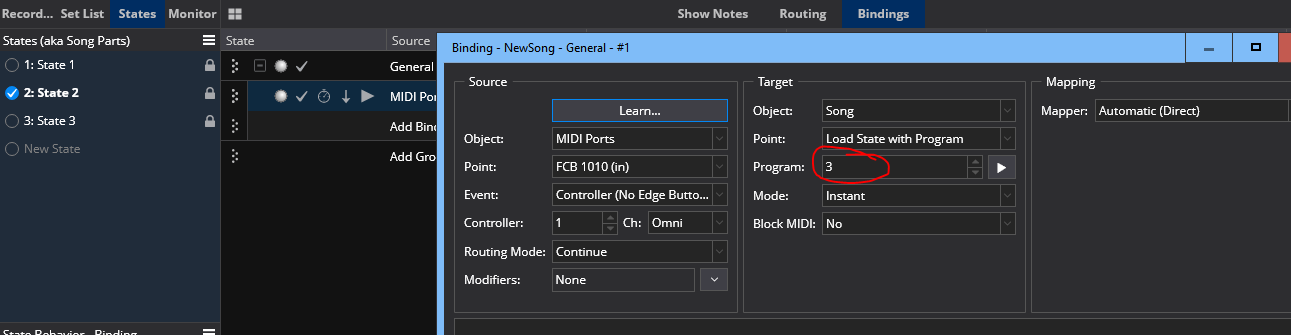
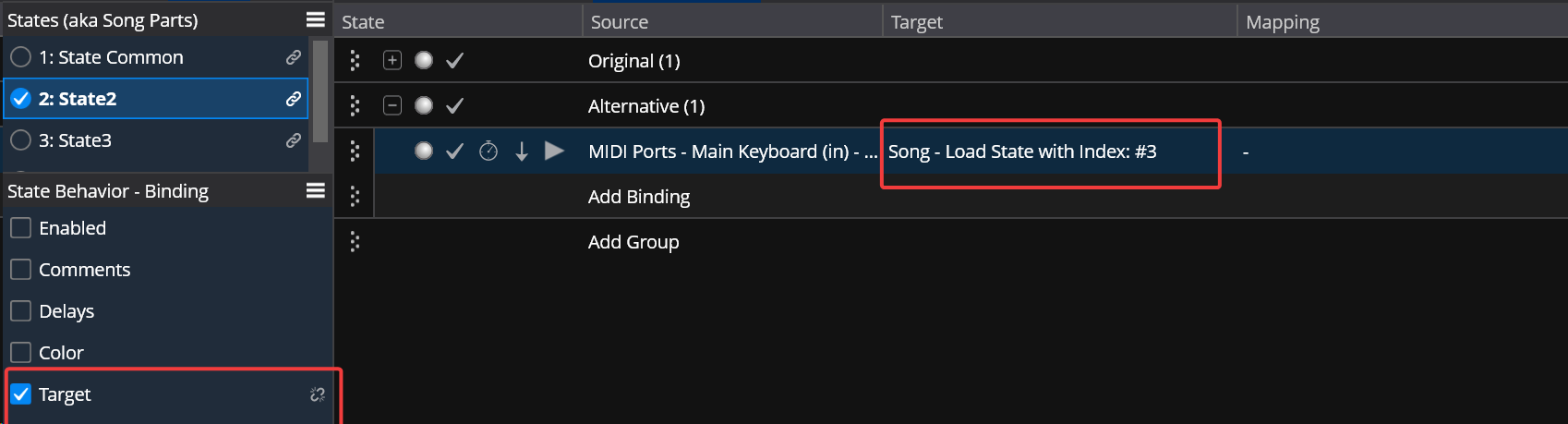
Now State 2 is enabled and here’s the binding to go to State 3. (On the Binding Behavior I check Enabled, Delays, and Target… so I use just one binding where the Target changes between states, or you can use 2 or whatever). Note again that your Source will look different:

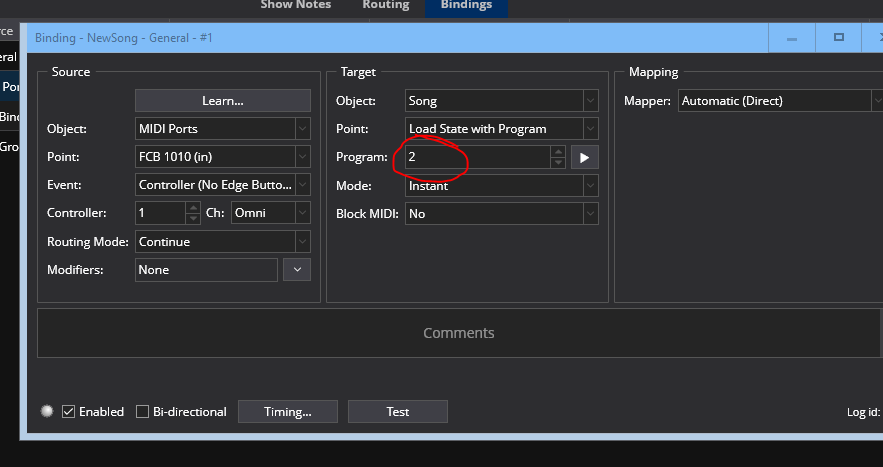
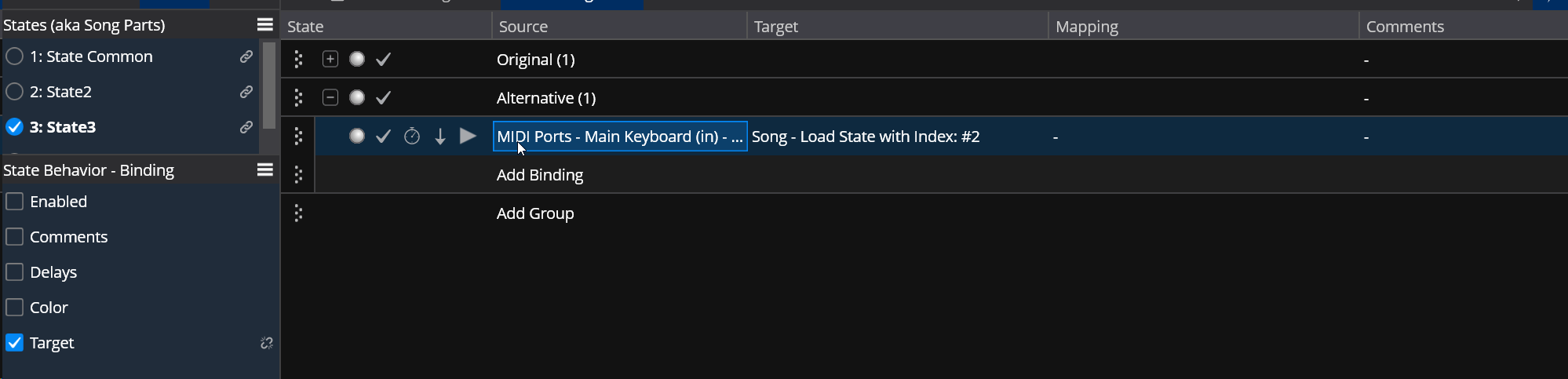
And here’s State 3, also enabled, but with a Target to change to State 2.

So essentially State 2 binding commands to go to State 3, and State 3 binding commands to go to State 2.
Not sure exactly what you’re changing between states, but just FYI in Bindings you can get a Toggle command for changing routes. I often do this when I don’t want a State change (which often causes a breif interruption of the Audio engine, depending on what your changing, if you’re loading new samples, etc). So for a sampler I might have 2 instances of the same Sampler plugin (in 2 separate linked racks), and a binding that simply toggles the routes on and off. Both racks and plugins are always on, not suspended, so you get smoother performance. You’re essentailly just muting/unmuting the routes. Same idea as above… Set one route enabled and another disabled, save/lock the State. Now jsut toggle and the routes will “swap”.
Hope this helps.
Tom

TL;DR: RTFM :grinning_face:

Many thanks @twaw , I realise I made a confusion between State Behaviour “Enabled” checkbox and the tick in the State panel that controls whether a binding is enabled or not. For anyone reading this topic, State Behaviour “Enabled” when ticked means that the enablement of a binding can be controlled independently between states. So you want to check “Enabled”, then go to State 2, enable first binding (in State panel), disable second binding. Then go to State 3, disable first binding, enable second binding.
Also, thanks for your FYI, I actually wanted to toggle routes instead of switching states.

PS. I can’t help but think that the label “State Behaviour” is ambiguous and potentially misleading. I’d rather have it as “Shared between states - Binding” and all checkbox ticked by default. Or something.

:+1: The more you work with the software the more you will get used to the labels."state behavior"appears in a few places for different things, and it actually does make sense once you start working with it a lot. The beginning learning curve can be a little daunting, but it is well worth it in the long run. I have yet to run into anything that I need to do, that can’t be done with Cantabile. And I do some crazy stuff, since I switch between a MIDI wind controller /sax and guitar all night long, with some really fast changes… Just as an example some require a sax note to be played or held when my first note of guitar happens, or the fourth time I play the same note it needs to change a rack state on a sampler. And if you can’t figure it out just post it… Everyone here is very helpful.

I’m very new to this yet was able to play a setlist live at an event 4 days after discovering the software (there were breaks with speech between each song so I didn’t need fast switching just yet). So yes it looks like Cantabile does a pretty good job! Nice also to see there is an active community :+1:

Your method can actually be made to work - you just need to

  • add a function to convert “StateIndex” from string to integer
  • recognize that the “Load State by Index” target uses zero-based indices, whereas StateIndex is 1-based

@brad: This discrepancy between Load State by Index and the StateIndex value is very confusing, TBH, maybe something you could address? It becomes worse: “Load State with Index” again uses 1-based indices :exploding_head:

So your original approach can be made to work; the problem with this is just that this binding will also jump to state 2 when you’re in “state common” - not sure if that’s something you want…

Alternative

Instead of having multiple bindings with their “enabled” property driven by state behavior, I would use only one binding with its “target” property driven by state behavior:

Making Target state-dependent means that you can have an individual target value for this binding for EVERY state in your song, not just toggle between 2 and 3.

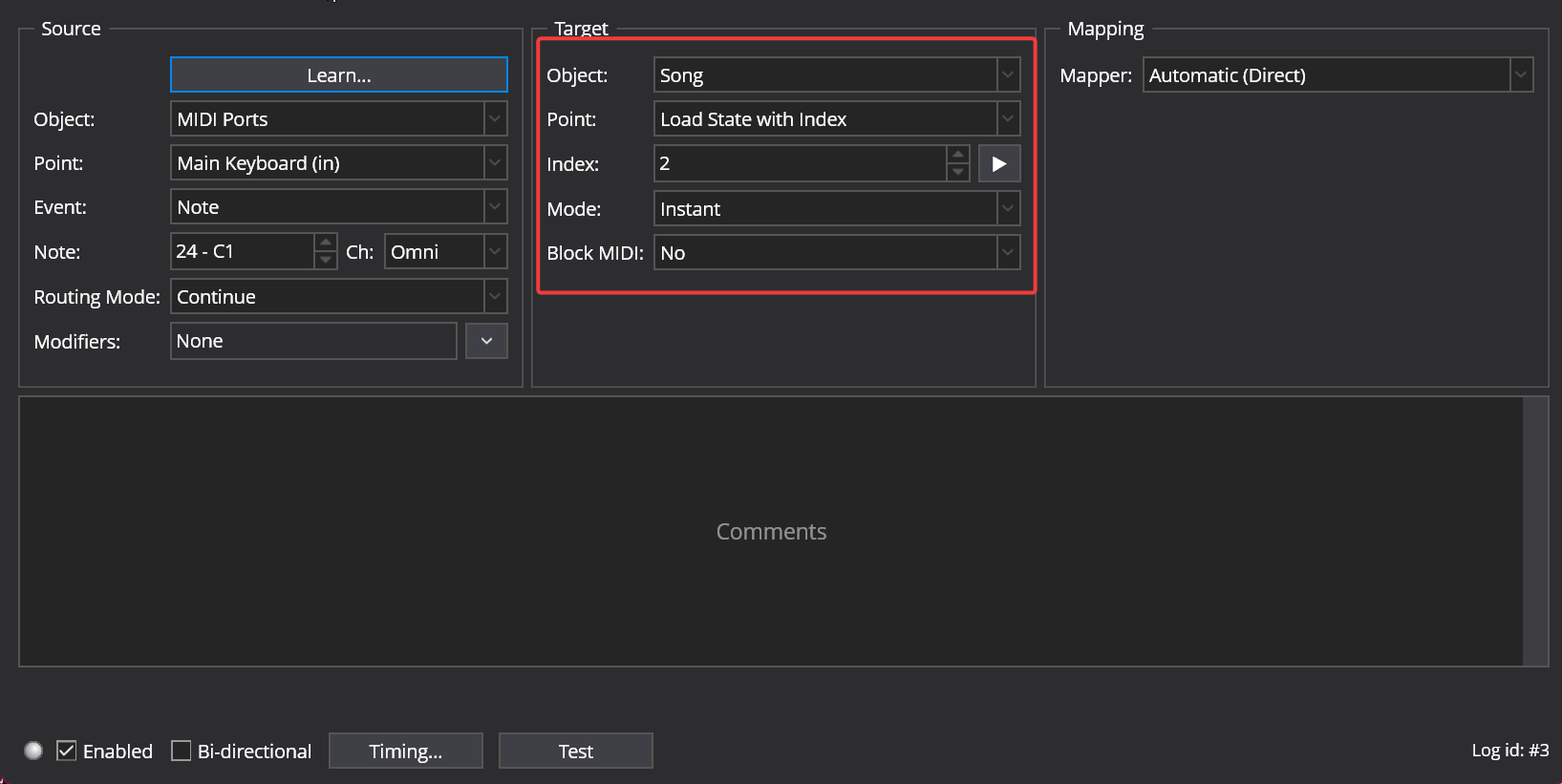
See that for state 3, I’ve set the target to state #2, so all works as you intend it to.

For “state common”, you can set separately if you want it to jump to state 2, 3 or any other state…

With “Load State with Index”, you need to use the 1-based “index” values in the “Target” area of the binding.

Again - @brad: this divergence between 1-based “Load State with Index” and 0-based “Load State by Index” had me confused for quite a bit - not very intuitive (although very logical from a programmer perspective :wink: )

Note that I’ve set the “Target” state behavior to unlinked from clone

image

As you correctly assume, this allows you to have separate values for the binding target, even though the states are linked clones.

There’s always multiple ways of doing things in Cantabile - having multiple bindings with their “enabled” property state-driven certainly works, and it can be more transparent at first glance, but once you want to customize things for a larger number of states, making a binding target state-dependent is far more economical and less error-prone.

Cheers,

Torsten
What @Torsten said!

The problem here is 1 based indices are a display concept - internally everything is zero based. Unfortunately binding expressions don’t have the context to know if a value should be 1 or zero based, so everything is always zero based in this case.

But, from what you’ve described it also sounds like there’s another discrepancy there which I’ll check out.

Not really, it’s all somehow logical once you dig into it:

  • “Load by index” as a binding that transforms input values via a mapping, uses the internal numerical representation - as such, it is 0-based
  • “Load with index” as a binding that carries the index directly in the Target area, uses the display translation to address the target index.
  • $(StateIndex) as a variable is (counter-intuitively) a text variable, as such again subject to display translation

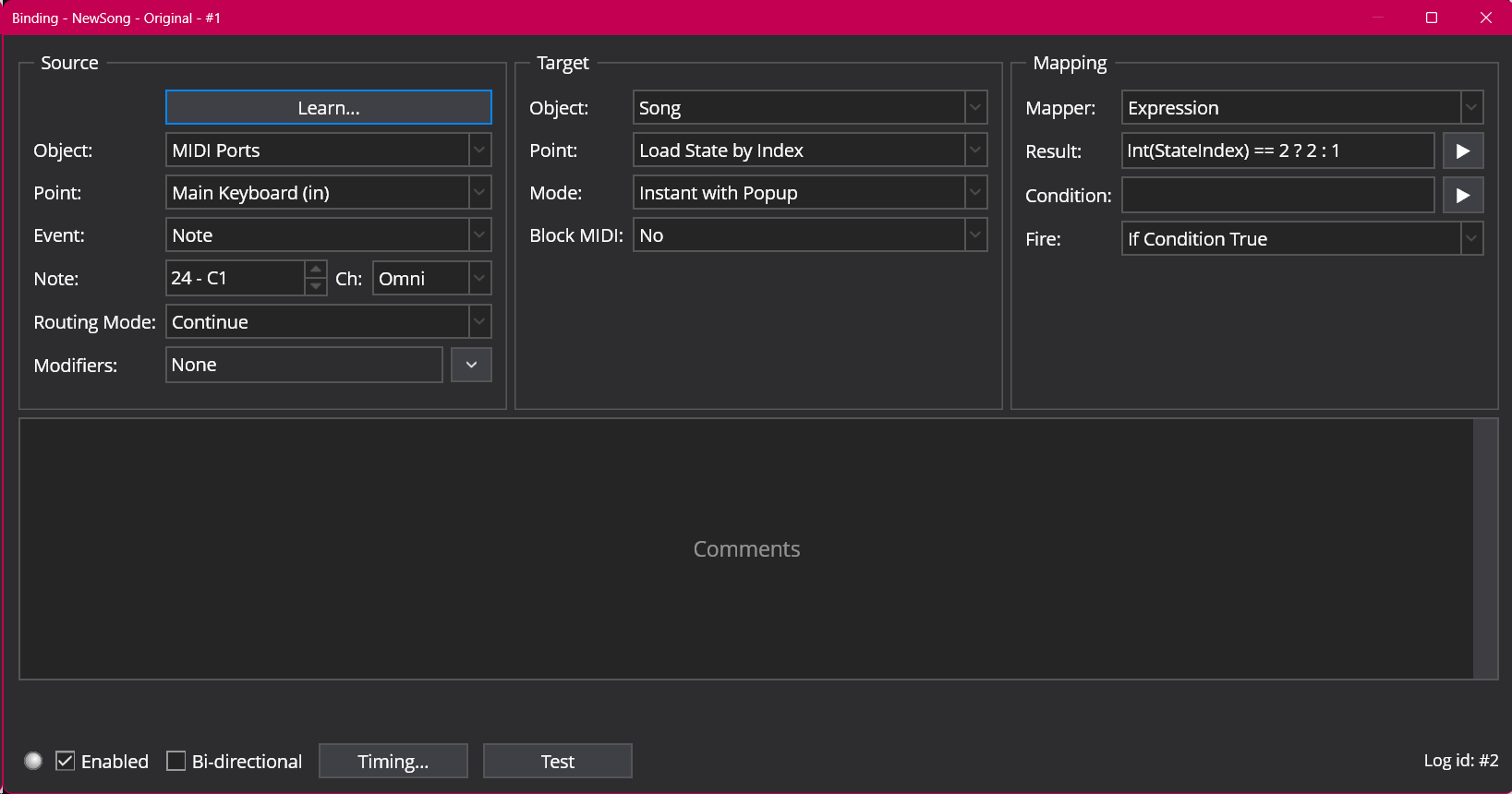
The issues pop up when you bring the two worlds into direct contact in an expression as above: Int(StateIndex) == 2 ----> this is comparing the 1-based text representation of state index
but “Int(StateIndex) == 2 ? 2 : 1” maps that into 0-based index representation of Load by Index, so when the (1-based) state index is 2, it results in a value of 2 that really means the state index displayed as “3”. That is the key discrepancy.

Load State with index doesn’t allow any expressions for its index; it just lets you pick from the states in the song, so there is no potential for index discrepancies there, I believe

@Torsten Thanks, yes I was able to make the expression work using your expression.
But… I’m baffled that the correct expression is StateIndex == 2 ? 2 : 1
I would have expected the event to be stuck when StateIndex is 2, given a usual ternary operator condition ? true : false
I guess that’s what you meant by the discrepancy. I understand it, but it results in a counterintuitive expression… Labels next to states are explicitely labeled using 1-indexing.
Also, somehow I didn’t need to cast to int, behaviour is correct whether using StateIndex == 2 ? 2 : 1 or using int(StateIndex) == 2 ? 2 : 1