That simple, huh? Told ya I felt dumb

1 Like
Yea, on a binding like this where the target includes a text display like caption it reads as when the binding sees the correct note it will display the result to the appointed Controller Bar button. The result in this case is arbitrary text you chose and enclosed in the quotes in the Result field.
1 Like
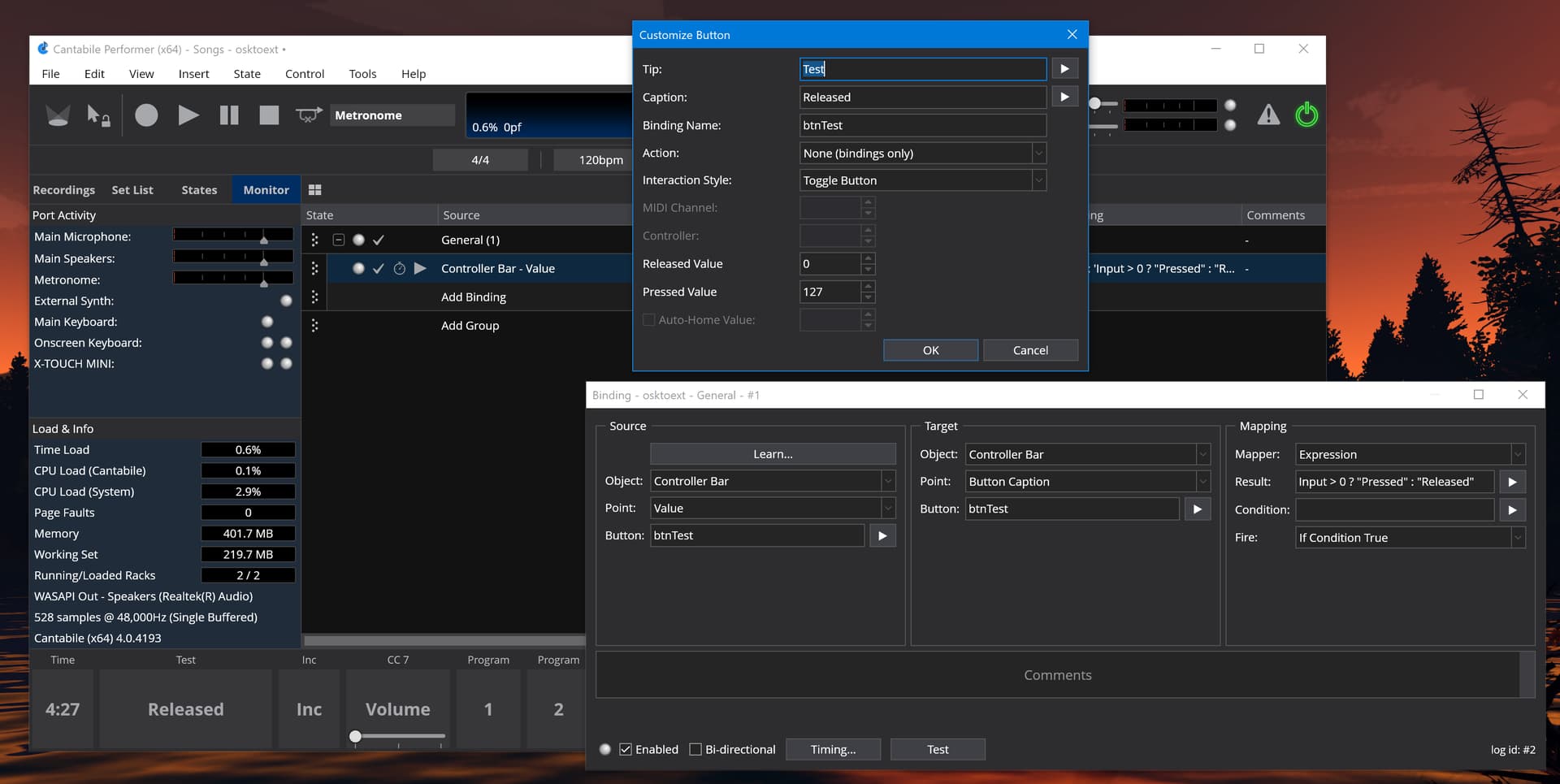
Yep, this good stuff @brad , Thanks for posting it and I’m sorry @Ade , I didn’t see this solution but learned to look harder from Brad having shown it. 
1 Like
Thanks @brad and @dave_dore for getting me a wee bit closer to button nirvana.
Brad, I’m going to substitute my current method for your script which seems quite streamlined.
Looking forward to the last crucial piece of the puzzle … to get parameter return into bi-directional controllers on state load. 
1 Like
Try build 4196 available now.
1 Like
My first attempt at controller bar bindings. Very cool! My first experiment is using it for a slider to control the output level of a rack, It was fairly easy to get it working.
My wishlist:
Display the target range of the binding instead of 0-127. -20 to +6 or whatever
Vertical mode for the sliders with a much bigger “grip” for us touchscreen users. No need for a popup, just a nice vertical fader. Realistic or just a line or split light and dark color.
Ability to float so it could go on another screen. Maybe allow it to be taller for my vertical sliders.
Hi @raydyo,
Thanks for the suggestions - sounds like you’re talking more about a mixer panel (which I will get to one day)
Brad
3 Likes
Yes, a mixer is my current goal. But I think displaying the target value may have wider benefit.
This is an “aside” for this thread, but had a dramatic impact on my use of the Controller Bar:
I discovered (by accident) that the widely-used Faderfox EC4 can be written to and display values. This capability allowed me to reduce by half the number of things I show in my C4 Controller Bar. There is only a very brief mention of this capability in the EC4 manual. I actually emailed Mathias at Faderfox asking about this, and he simply replied:
please send back the value with same CC/channel# and it will be displayed
Bingo! major win …
1 Like
sounds like you’re talking more about a mixer panel (which I will get to one day)

Thanks, Dave.
I get that, though it seems like a lot of work for something that is already displayed in the desired format elsewhere. Rack output gain is my immediate need.
But my main issue is getting that number, regardless of the format. I started a new thread on that topic.
No problem about it being a lot of work but I think it would get pretty confusing for some to have the function you propose. There are the possibility of many racks so sorting it out would be necessary to know one from the other whereas there is only one Master Output. I guess you could use the rack index numbers to help out but they depend on keeping the order of the routing list consistent.
FWIW Brad pointed out that he had created functions to shorten the expressions shown in the thread I pointed to.
e.g.
$(formatGain(CCToGain(cc(7,1))))
Hi Dave,
I don’t claim to be an expert here, but this stuff is already connected via the 2-way binding. No need for a user to deal with rack indices or whatever. If I move the slider in the controller bar, the slider in the rack or plugin moves. If I move the slider in the rack or plugin the slider in the controller bar button moves. But I don’t see a way to make the button caption reflect the current value of the slider. It seems like it would be simple to get the raw data to the caption. Even better if I could get the target value. The sliders are connected together. The target value in the binding is connected to the raw data. I don’t see how it would be confusing to have a caption selection tied to the current settings raw or target value. Maybe I’m missing something…
I didn’t fully explain so I will do so now. Sorry that I jumped ahead.
The binding you already made that tie a control bar slider to a rack outer gain slider involved converting MIDI CC for the pop up slider with it’s values of 0 - 127 to the Rack gain sliders value curve.
e.g. binding from the control bar slider to the rack slider
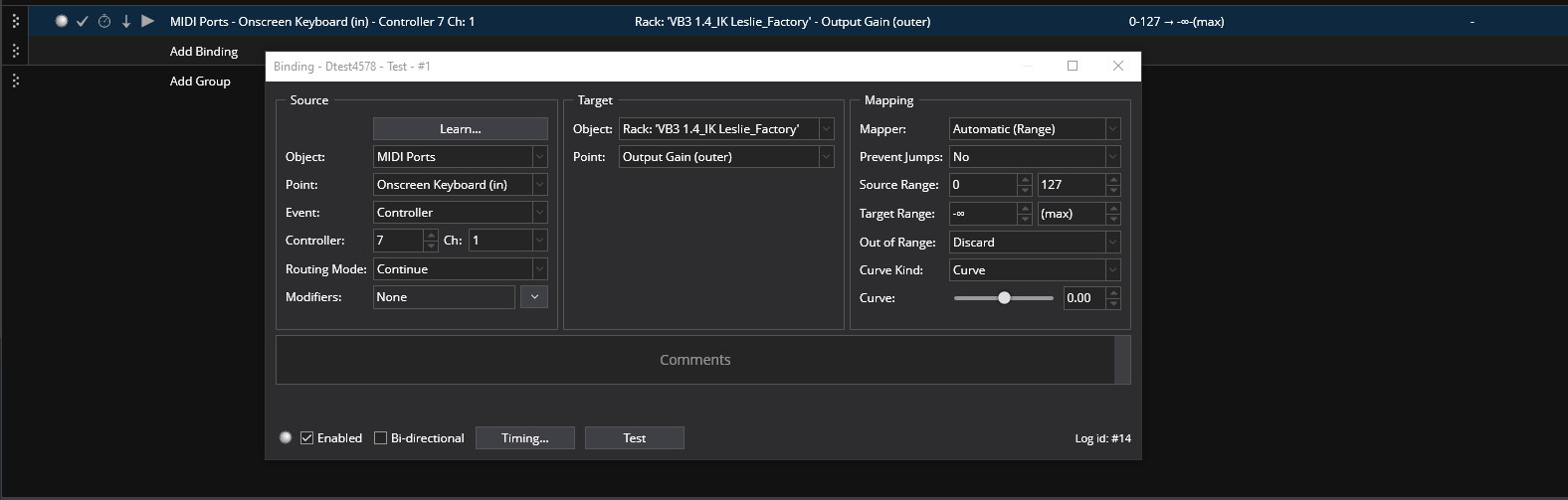
and the control bar button with the expression in the Caption field
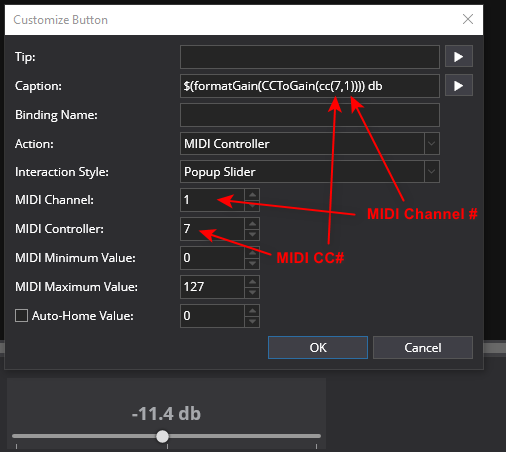
So you already have the data from this controller bar button that has the pop up slider and it is transmitted on the CC number and midi channel that the button/slider is set to. The value of the CC that the controller bar button popup is set to is the MIDI CC number you want to set in the expression. To change the expression’s cc number and MIDI channel you edit these numbers in the expression after you paste it in. You also can add “db” to the end of the caption after the expression to dress it up
You might have done your binding differently but I don’t know. Maybe you could post one your bindings so I could check that if they are different.
For the calibration to be correct you need to have the control curves all set the same in options
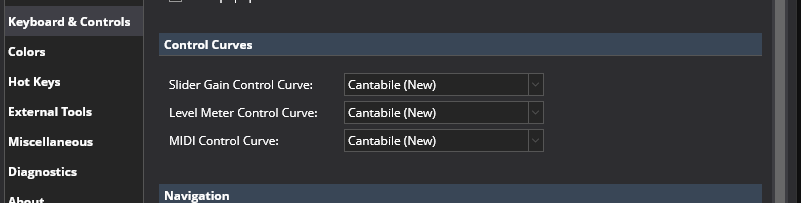
Anyway this is what I was pointing to with my previous post and hope it helps. 
Dave
Thanks Dave,
I have turned the computer off for the day so I am going from old person memory. I only have a single named binding between the rack and the controller bar with the 2-way box checked. I also have a second binding from a keyboard controller knob to the same rack point. All that stuff works and syncs as expected.
My customize button menu is set to “None (bindings only)”. That CC number field you are ponting to is blank. That seems like a big clue to my problem. Tomorrow I’ll try changing out of the “None” setting. But that seems like a bad move overall. I’m thinking that I will now need to manually keep track of two sets of books. If I change the rack binding to a different channel or CC#, i will need to remember to make the corresponding change in the button. And, like I said “old person memory”  . With “None”, it’s all self contained in the rack binding.
If this is unclear, I will send the screen grabs tomorrow. Thanks again!
-ray
Sure thing, my bindings might not be the thing so if you want post your current binding, it may be better than what I did. I bet it can be done without changing from “None” but it would still need a declared cc in a binding that was sent to the onscreen keyboard port. Have a good one.
Can you please post some screen shots of your custom button and any related bindings - it’ll make things much clearer.
That’s said @dave_dore’s suggestion above is probably the simplest. Even if you’re using it directly in a binding, by using MIDI Controller for it you can retrieve the value and use it to format the title.
But it depends on exactly what you’ve bound to… there might be other ways.
Brad
After Ray pointed out that he used no CC number in his controller button/slider he used it got me to thinking that maybe he was using the bindings label for his controller buttons so he could use the popup slider on the button via the value function. I came up with this solution based on that assumption.
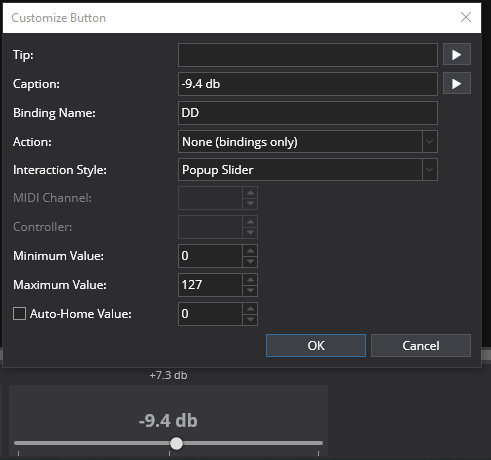
So I set the button up with a binding name. (which I named DD in the binding name field).
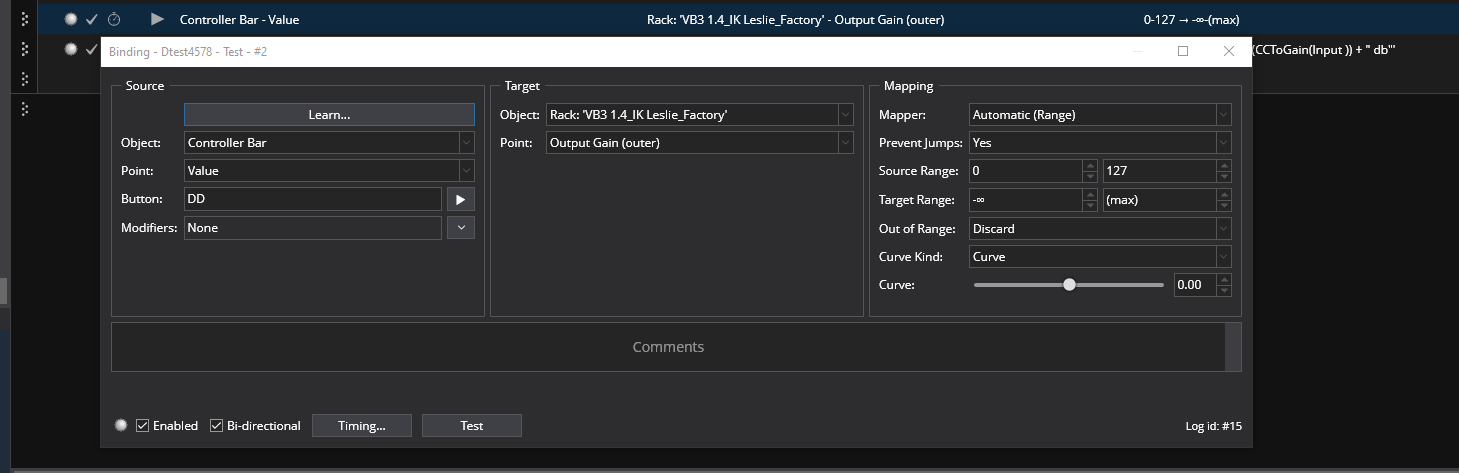
The first binding for the button takes care of linking the controller bar slider to the rack outer gain slider. It is set to bi-directional.
and the second would do the caption label with the db readout of the slider position using an expression as the mapping. It is not set to bi directional because that is shown to be illegal and that makes sense.
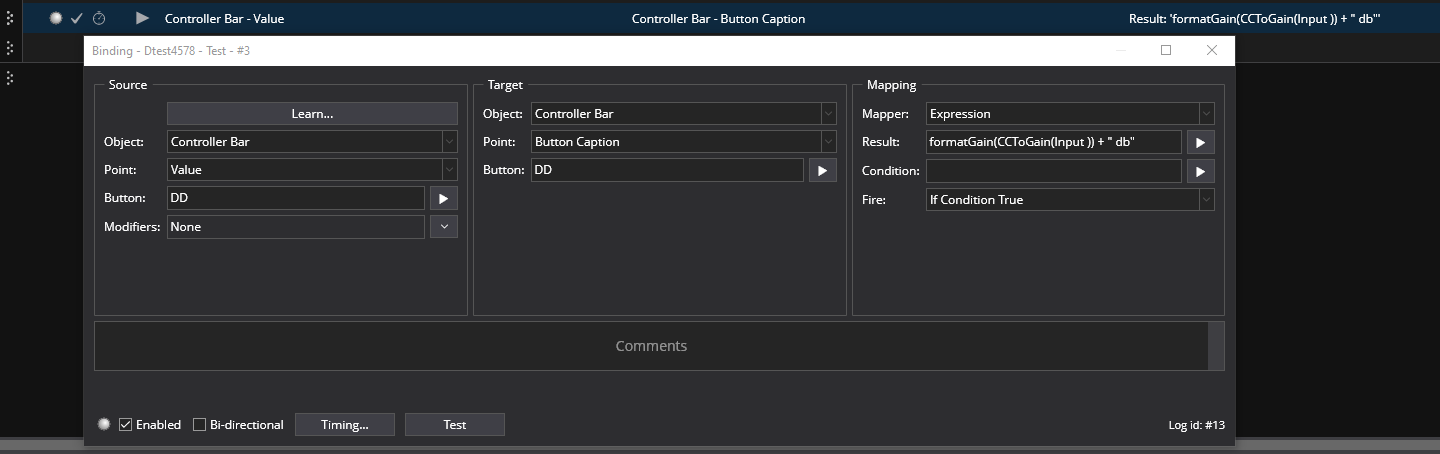
This works here and does make the bindings unique because of the binding name designation and requires no cc numbers or values.
I’d have never known Cantabile could do this because I never tried it before. So many ways to do things with the newer features.  Very Cool
Dave
1 Like