I need a little help from the experts. I’m trying to control the media player speed with a decrement/increment button in the Controller Bar. I was able to do this with a slider but I would prefer to use the buttons because my adjustments would be small percentages usually. Using a mouse or trackball with the slider can be tricky. This is for wav file loops only, not MIDI. I’ve tried different settings but so far I can’t get it to behave the way I need. Any thoughts or direction would be appreciated.
I do something similar by tapping foot pedals. First i route them to the onscreen keyboard via loopback:

Then create bindings to control the media player speed (actually i don’t recall why i went through the onscreen keyboard rather than binding directly from the pedals.):
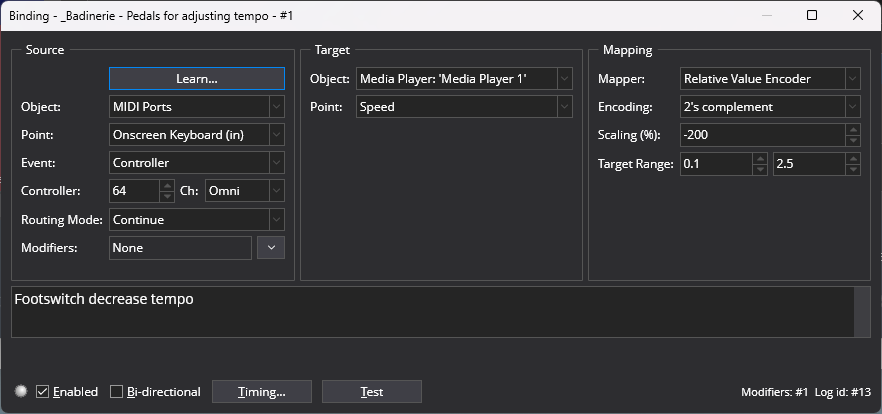
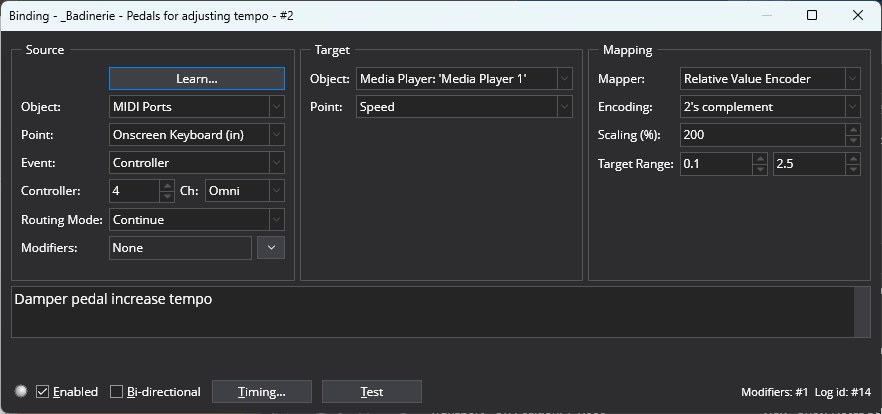
So i would think you should be able to do something similar with the Controller Bar buttons.
I hope that helps,
– Jimbo
Thank you, but that approach is not working for me.
So I decided to map MP speed to a knob on my controller. However, as I adjust to speed I would like to see the speed change displayed. Currently you have to click on the MP speed control to see the percentage change. Any ideas?
Thank you
For my use case I just display $(Tempo) in a Show Note - would that serve ?
– Jimbo
Thank you JimboKeys, I appreciate the suggestion. I failed to mention that I am using wav files as percussive/beats/pulse loops. Apparently with wav files the MP speed control changes the percentage of the wav files original tempo(BPM). So in my case Cantabile Tempo does not seem to affect these files. However, I did notice that BPM is displayed and this is directly reflective of the MP Speed control. At least that’s what I am noticing.
So I finally figure this out. My use case is I want to have two buttons in the Controller Bar. One that increases speed (BPM) and the other to decrease BPM of the Media Player (which is playing a looped wav file) with each click. I discovered that Expressions can do this. Being I am a retired developer this made sense. Using a Controller Bar Slider control or even a rotary or slider control on my Keyboard controller made it challenging to make subtle changes (like 1 BPM increments). My solution is not perfect however. I assume because we are dealing with a percentage of the original wav BPM I have not been able to get consistent 1 BPM changes. For example, my wav is 120BPM. The first increment goes to 121 as desired. The next increment goes to 121.999 and so on. I have tried a number of different equations, as in Target + 0.008331, but I just can’t to get it consistent. I have looked at some of the functions available to no avail. If someone has a suggestion please let me know. I’m close enough that I can live with what I have. This solution is intended for small changes in BPM, +/- 10% at most. If you are interested in what I came up with let me know and I’ll post screen shots.