Change song tempo when loading a state

I have a song with 5 states.

The first state has a tempo of 80.

At measure 34 (still in state 1), I bind the tempo to double the tempo to 160.

I switch to states 2, 3, 4, and 5, and everything is fine.

But if I want to start the song again and press state 1, the tempo is still 160, and I want to return to 80 when I press state 1.

How do I do this?

Thanks

Hi arcoss,

You need to place a State “On Load” binding in the first state that sets the tempo back to the one is was when the song loaded.

Dave

1 Like

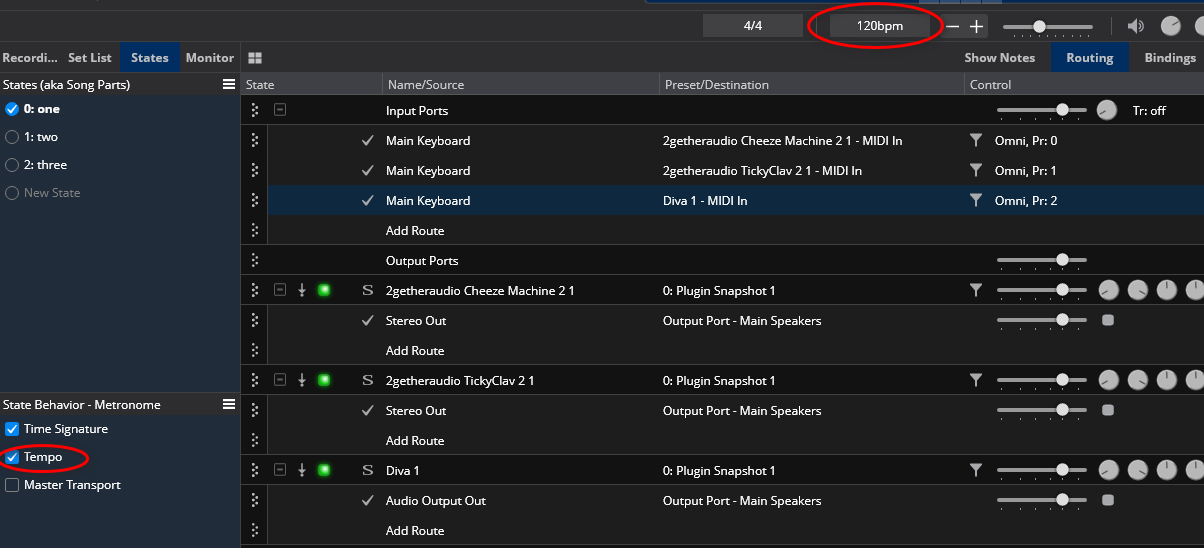
Hi, you may also simply click on tempo (Bpm up center) while Song states are shown in the left column.
On the bottom left, State Behavior will now let you check:

Time signature
Tempo
Master Transport

Once checked, those will be memorized with song states.

Save state 1 with 80 bmp
Save States 2-5 with 160 and you’re good to go.

No bindings needed.

3 Likes

Hi, I’ve tried both options, but I can’t get it to work with the first “bindings.”

I’m wondering if @dave_dore can show me an example with Cantabile 4.

Thanks.

Hi Felipe,

To set up what Igbro described you need to have the tempo state behavior checked for the metronome in the song. To see it click on the metronome strip tempo button. For each state set the tempo, cycle through the states to check it’s right and save the song. No bindings required.
If you still have troubles post the song file and we can check it out.

Dave

Thanks, now its ok!

1 Like