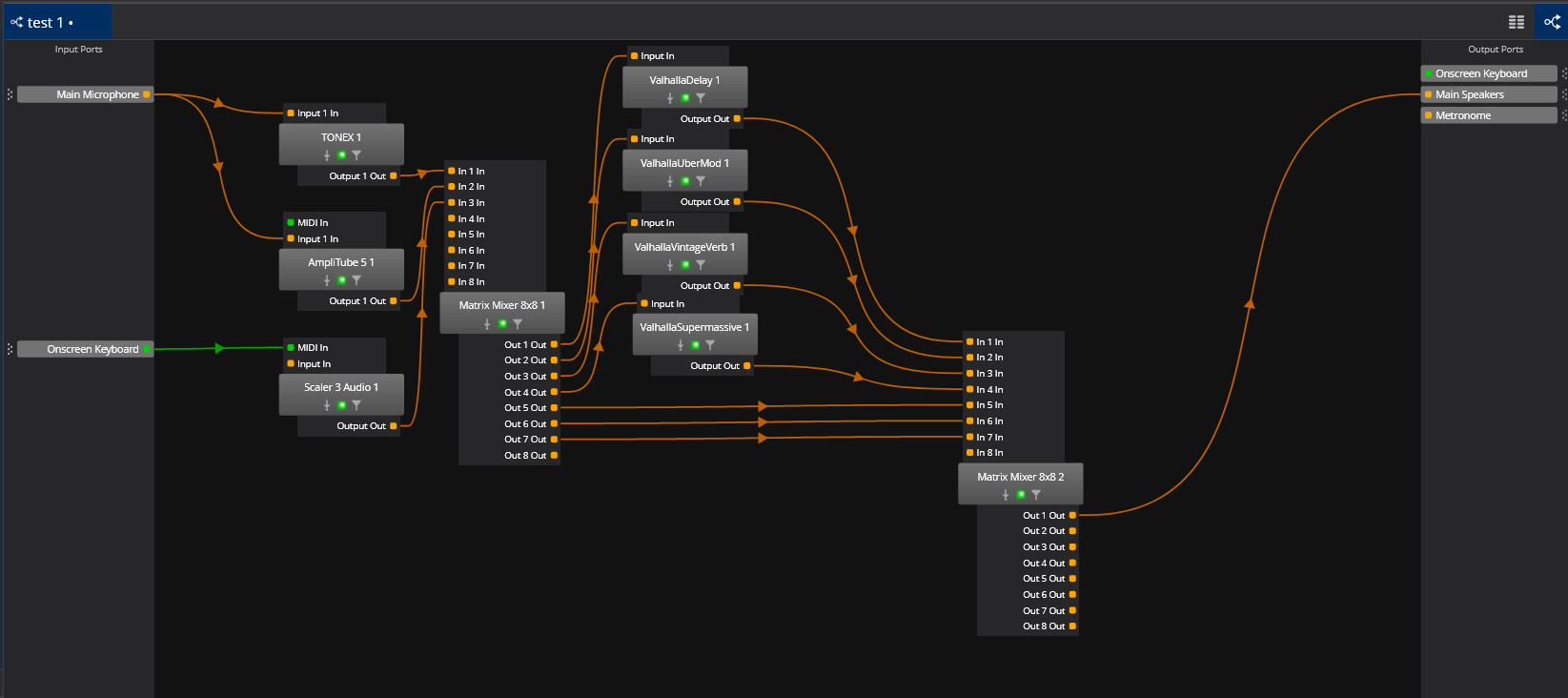
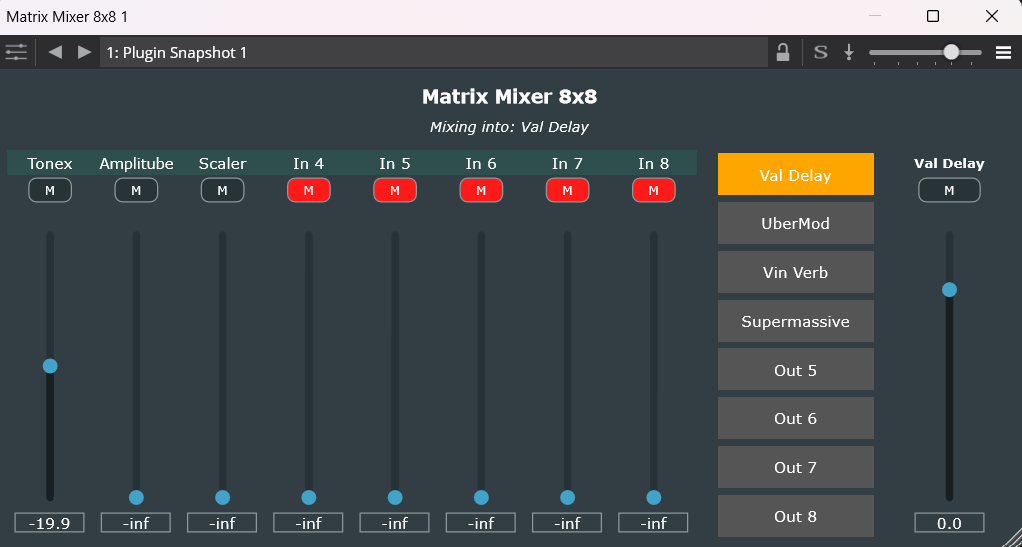
I’m just starting with Cantabile Lite and I was trying to put together an electric guitar rig with multiple amplifiers and multiple effects on aux sends. When I wired it all using the normal wires it is an unsightly mess of wires that is hard to follow and even harder to balance out. I went looking for a VST mixer with aux sends and came up empty. So I decided to give vibe coding a shot. I saw videos about it, but I never wrote or published any code other than super basic Lua script. Claude walked me through the installation of CMake, Visual Studio and JUCE and gave me 4 files to compile. It took a few tries and fixing some errors but I have a custom 8x8 VST mixer that works like a physical digital mixer I’m used to using. It actually works and passes audio as expected. You wire the inputs and outputs and select one output at a time and dial in a mix for that output. Intuitive for an old guy like me. I have to say I’m blown away by how good Claude was at following my direction and working with me through solving errors and then making little revisions to the project.
Nice work.
It’s awesome and scary how good Claude is an projects like this.
Well done!
I have an interest in creating something similar to what you have here (I have previously created a Cantabile mixer rack). I don’t want to clutter my computer with IDEs and compilers, which has been the main stumbling block until now, but I’m hoping to get around this with online options.
Now I’m inspired to give it another try! 
It wasn’t too bad as far as the additional software goes. VStudio from Microsoft was a big install at 4GB, but JUCE and CMake are both fairly small files. The one thing that blew me away was how quickly the whole project came together. From the start to first version of the plugin was maybe 2 hours and then testing and a couple of changes took another hour. I can get back to it and ask for a different look and it will be done in minutes. The colors and shapes are default JUCE for now. But since this is not a product for public release I don’t really care.
I think that we are at a point where a creative musician can dream up their tools and have them made to order with very little effort these days. I was looking at the NAM community and there are multiple projects that are complete guitar rigs in a single VST posted for download, that are configured the way their authors want their rigs to work. I suspect it’s a lot, if not all, AI generated code.
I found that I can create the whole plug-in end-to-end within Github without any local compiler or other installations.
Welcome! Nice work, I’m just curious as to why you are sending your guitar rigs to Aux sends? I’m primarily a guitar player and I’ve been using Cantabile for many years now but I just send it through the main outputs…and my other instrument is a midi EWI. When I had a 2in/2 out interface I sent both instruments to the main outs. Now I have an 8 in / out interface so in Options/audio ports I root my guitar rigs to two channels of the interface and the EWI to another two channels of the interface. Anyway, you’re going to love Cantabile. BTW you can set up a rack that goes in front of your amp plugins and create different presets for different guitars.. I primarily adjust EQ and sometimes a little gain. And now that Brad is reworking the engine and the background rack I believe you can put that pre-amp rack in the global “background rack”. I used to be a tube amp guy but I will never go back… Just the song States and the ability to advance through sections of a song with one button on your foot pedal, not to mention show notes, makes gigging so much easier than it used to be.
Tom
Effects on sends is the old school way of getting sounds that I know well. I used to have a guitar effects rack with a line level mixer and rackmount hardware effects on auxes. I know I can string up a bunch of VST’s in series per amp, and Amplitube does just that, but shared reverbs and delays do have their place.
In any case, I like the option of getting sounds that way so that’s why I had Claude make me a VST mixer. I’m sure it will come in handy in other setups too. For example a multi output sample player like NI Kontakt would be well served by it.
If it works for you then that’s all that matters. Most of us have a separate, linked effects rack in Cantabile, so you can route any instrument to it. So it’s just one rack, far lower CPU hit then trying to load duplicate effects in each amp rack. And yes, you can put them in series but you can also put them in parallel if you wish. And creating several rack States for that effects rack allows you to call up whatever combo of effects and settings you want, across all amps and all songs. So you don’t need to load each amp rack with duplicated effects. But that is just one of the powerful aspects of Cantabile… There are so many ways to customize it to what makes sense to you. Best,
Tom
I’m new to Cantabile, so I was not aware of all the powerful solutions that exist inside it. Also, I downloaded the lite version to get a feel for it and the advanced rack functionality you are talking about is not included as far as I can tell. But it’s great to know that should I go with the Performer edition I can accomplish things in a different, possibly better way.
The Performer version has a lot of toolbox things in for creating busses and such but the GUI for them is confined to the table view where you can see the sliders you would need. The version has embedded rack and linked rack capability for those types of utilities. That said the VST3 plugin you showed here that you created with AI assistance is great looking from an audio guys point of view with the sliders being vertical and the patching available. It also is a creative way to extend the capability of the Lite version. Thanks for sharing your work. 