Hi. Naive user here. I’m trying to set up Audio Damage Enso looper with Cantabile. I have a MIDI pedal set up to ‘Trigger’ the recording (via a MIDI Expression unit), which works fine but every time I try to record it tells me I need to press play on my DAW. What’s this about and how do I set this up so the first ‘Trigger’ starts the loop, the second stops it, and the third plays it?
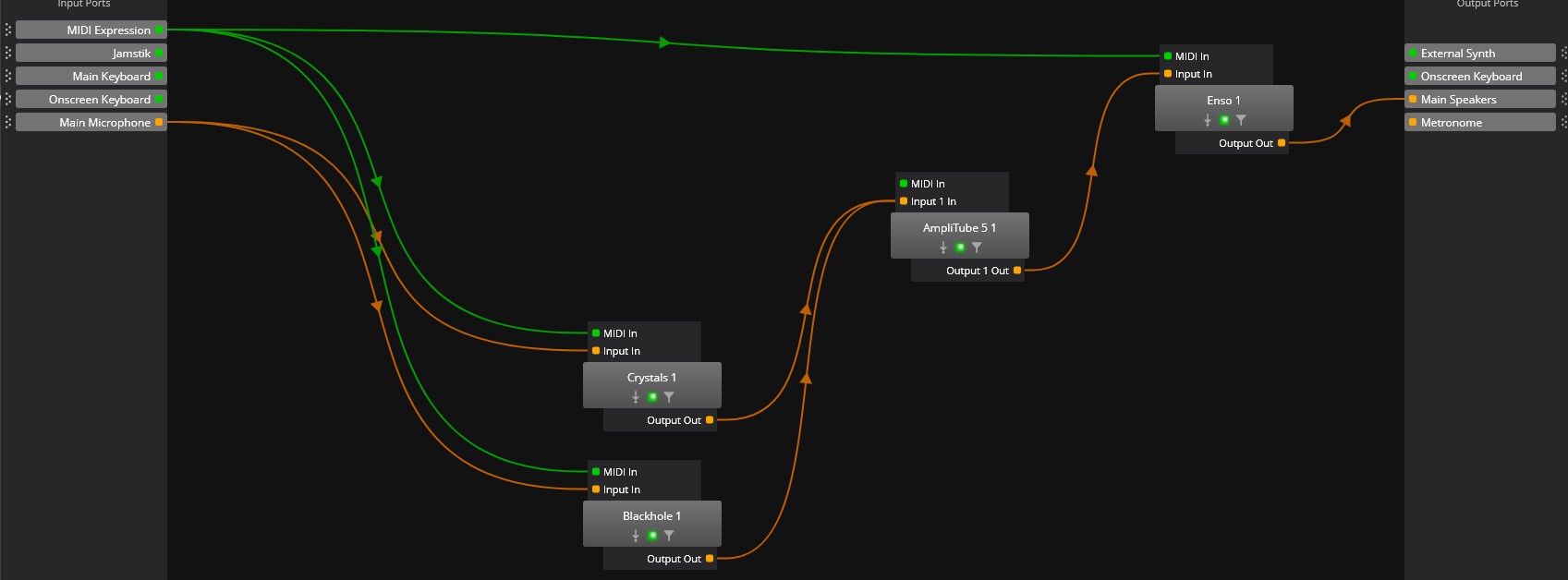
I’ve attached a screen shot of my routing which I’m guessing isn’t correct (everything works here except Enso).
I haven’t used Enso for a while but have a few projects where I use it in Cantabile. Enso relies on the transport (in any DAW I believe) in order for the triggers to work as its based on next beat/bar/measure based on the Enso settings. From manual;
"Important: your host DAW’s transport must be running to make Enso operate. Enso depends upon its host for timing information and will just
sit there doing nothing if its host is stopped."
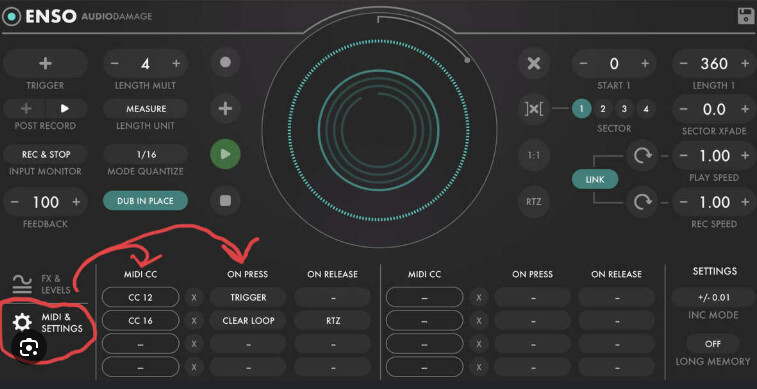
I think there may be a way to set it to free mode (but this is just so it records until you tell it to stop (rather than wait for a number of measures) but it still relies on transport to be running. In terms of the trigger (I’m doing this from memory) the Trigger button can be set so that the first press starts recording (at the next measure) and will usually loop for the configured measures/time (so no stop per se) and auto-play the loop recorded. The mode the Trigger changes to after the loop is playing can either be overdub or just left playing. There are MIDI CCs which are in the bottom panel (MIDI Control) where you can also set Start/Stop/Reset (and combinations) too…
Your routing looks fine but not sure what MIDI CCs you are sending from your pedal (or what Enso is receiving). So its probably just a case of making sure a) transport in Cantabile is playing and your pedal(s) CC(s) are set to match those set in Enso for the functions you want… Not sure if that helps in anyway but if you need to see what MIDI CC is being sent from your pedal (and what Enso is receiving) you can right click on the “MIDI Expression” and select “MIDI Monitor” so you can see what CCs are sent (or alternatively do the same with Enso to see MIDI CC received).
NOTE: The way you have the audio routed means ALL audio goes through Enso which means in order to hear any audio at all (particularly when Enso is not looping/playing) make sure you have “Input Monitor” set to “ALWAYS” otherwise you just won’t hear any audio
NOTE (2): MIDI Control has a kind of MIDI Learn feature so you can click on the MIDI Message button then click whatever pedal you want to press and then define what Enso button this will trigger etc so this will also tell you what MIDI CC (or note) your pedal is sending and hopefully get doing what you want…

Thanks. After I sent this, I tried hitting the right facing triangle at the top of the Cantabile screen. This started a timer running and once I did this Enso allowed me to start recording. I’m not clear on what the buttons at the top of the Cantabile screen are all about. I assumed they were for recording but not exactly sure what the play button does except that Enso seems to require it.
The MIDI buttons I have connected via a four port MIDI expression unit work fine. I selected channel 5 and 6 so that Enso could use them without them being picked up by the Eventide plugins (I’m using an expression pedal connected to the Audiofront unit to control selected knobs on these plugins). I tried setting channel 5 to the Enso trigger, but I couldn’t get it to cycle from Record to Stop to Playback either via the footswitch or by clicking the Trigger button with the mouse. I’ve seen YT examples of this being done so I will have to try various settings until I figure it out. Right now, I have the first footswitch button (channel 5) set to start recording and the second footswitch button (channel 6) to stop. This isn’t ideal because I want playback to automatically start when I stop recording.
I also have a license for Melda mSuperLooper and will try this as well. I typically use guitar pedals like the BOSS loopers as well as Digitech Trio+. I mostly want to get a looper plugin to use with MIDI Guitar 3 so I can loop synthesizer plugins. I’m fairly new to using plugins for guitar, so it’s a learning curve. I’ve been using Cantabile for a number of years for keyboards and it’s worked very well, but my usage there is a lot more straightforward.
Nice to hear of someone else looping in Cantabile!
I have both Enso and Melda’s mSuperLooper. The Melda looper is very capable but takes some effort to get to grips with it. Enso is much simpler to use.
The main thing is to get some controls under your feet. I found a combo of a Helix and a Morningstar MC8 helped me greatly. If you are consistent with your controls you can reach a point where you can swap between loopers without having to re-learn anything.
If you have an iPad and a suitable interface - and the patience to build your ideal looper - then Loopy Pro is also worth trying.
No problem configuring my foot pedal with Enso. I can set either button for trigger or any other control. My problem is that I can’t get ‘trigger’ to work as I’d like. Basically I just want a simple looper that starts recording when I press trigger, stops and immediately starts playing back when I press trigger again. Overdubbing and immediately playing back when I press trigger again after that would be a bonus. I don’t want the recording to stop by itself until I press trigger. I can’t seem to find the settings combination for this basic looper behavior. I’m not sure if it’s the Enso settings or the way I have it running in Cantabile but it seems like this should be easier.
I installed mSuperLooper and briefly tried to configure the MIDI pedals. Much more complicated and will require reading the documentation.
I have four different physical looper pedals and they’re all intuitive and easy to use right out of the box. Was hoping for a plugin along these lines but so far I haven’t found it. Power and versatility are great but I wish they had a basic mode!
So with Enso, if its receiving MIDI (which I think I understand you DO have working) then when Transport is running (the play/right facing triangle), if you press (or trigger via MIDI) the “Trigger” button in Enso it will now wait for an audio signal (so you need some audio coming in too) and Enso will then start recording. When it stops is dependent on a few factors around the Length unit (how long it will record before auto stopping and going into play/overdub) mode and Mode Quantize (when the recording will start e.g. next bar, next 1/4 note etc) but it you set it like this (see image below) you will get a 1 bar loop which will, once audio is received at the start of a bar, record for one bar and then go into Overdub (so it will playback and also start recording any additional audio (this is based on the button below Trigger (the plus means when is stops recording it will go into overdub. if you select the play/triangle button here it will just go into playback… Next press of Trigger will then go into the other option of what is selected…
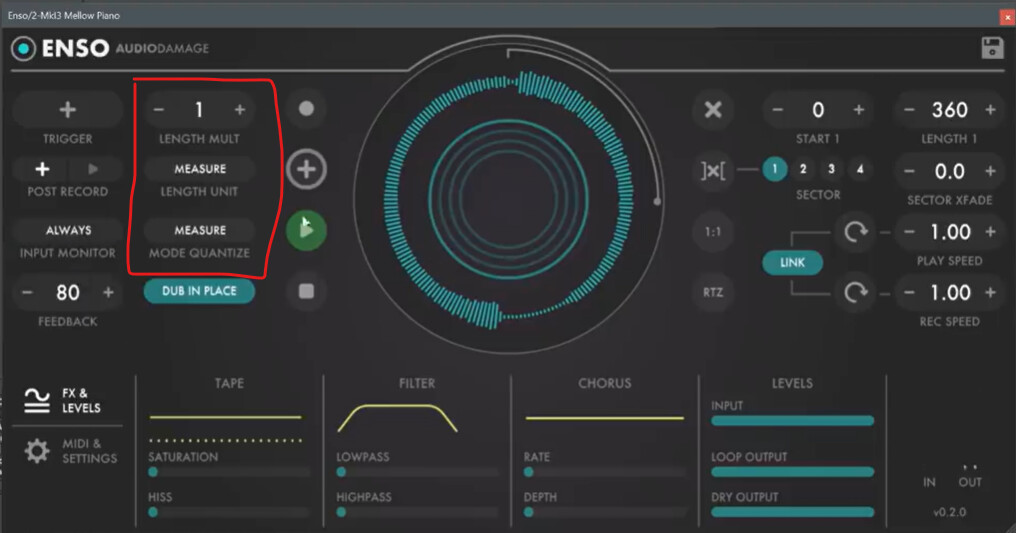
If you have the Length Unit and Mode Quantize set to “Free” it will just start recording whenever you press Trigger and then stop and auto playback (or overdub) on the next press.
If you already recording some audio you can clear it all using the “X” button and start again.
It seems like you have the MIDI working from what you said so you should just be able to open the MIDI and Settings at the bottom, and click in one of the MIDI CC buttons and just press the button you want to use as Trigger (the equivalent of a one button pedal like a guitar looper) - this acts like a MIDI learn function - then “On Press” set to Trigger
When I first started using Enso I watched the video below which helped me get started. Enso is quite deep but also relatively simple ONCE you figure out how to use Trigger etc which can be a bit baffling at first;
https://www.youtube.com/watch?v=3hWjP4PqeXA
Not sure if any of that will help but I’m sure there will be a Eureka moment and you’ll be looping happily away. Its a great tool so hope you can get it working the way you like.
EDIT I should note once you have a setup working the way you like do save it as a preset and then you’re good to go each time you want to use it!
1 Like