Is there a way to adjust the output levels of all the VSTs in a rack?
Often, when building a rack made up of several VSTs, I find that the mix is perfect (each VST is well-balanced in relation to the others) but the overall level exceeds the distortion threshold.
It would be handy to be able to select ALL the VSTs and lower their levels simultaneously, so as to keep the overall sound level within a distortion-free range, without having to adjust the outputs individually.
Is this possible? And if so, how? Thanks
How about just changing the output level of the rack? As long as all instruments within the rack send their output to Rack:Out, this should achieve what you want.
Unfortunately not, because the ‘distortion’ comes from within the rack. Turning the volume down doesn’t get rid of it.
The outputs gains of VST X and Y (etc.) could be bound the the output gain of VST Z. When Z is moved, the others would move. However, I think all the gains would be the same in this case. You might have to adjust mix internally to the VSTs to keep the same mix. Solalksis FreeG (or something similar) could be inserted after the VSTs and bound to each other in the same way.
1 Like
It’s a good idea. However, it would be interesting to implement a sort of multiple selection feature (like the tracks in Reaper, for example) and allow users to reduce the volume of all tracks proportionally by moving a single slider.
Hi TheBorga,
The gang slider proposal is indeed a feature on many DAWs however in the absence of it there is a way to do adjustments in a gang style using a few control bar or custom rack buttons and a few bindings for each plugin in your chain. It would require using expressions in the binding mapping as well. So, as with many of my ideas it can be done but it’s no easy button thing since there is the custom bindings aspect to it. If you wish more detail let me know, otherwise your proposal of a ganged gain sliders feature in Cantabile would be something @brad could comment on when he can.
Addendum:
Since the challenge was still there and I had a good feeling that the functions available supported it I decided to extend my post.
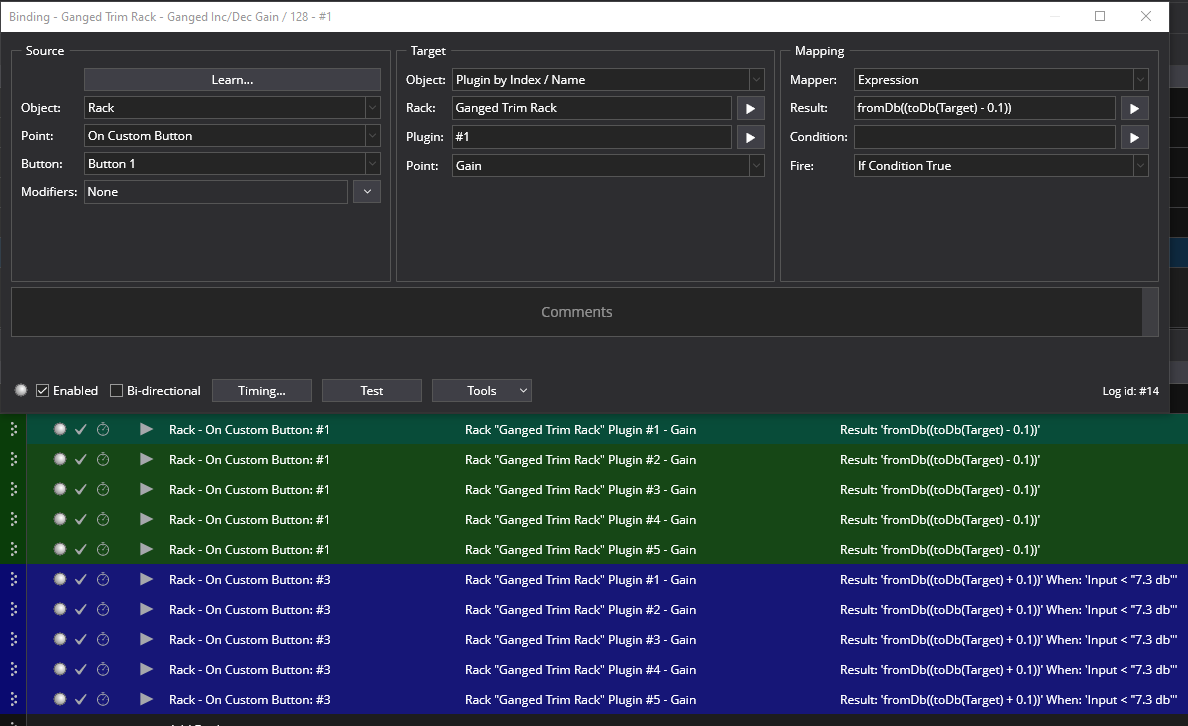
I created a linked rack that could act as a starter shell for up to 5 VST plugins that can be either attenuated or amplified as a ganged group. The custom buttons on the rack act as the means of adjusting the group either up or down by increments of .1 db. The following explanation illustrates the flexibility of the Cantabile function set as well.
So, to create it I made 10 bindings. 5 for the decrement and 5 for the increment. Each binding contained an expression like this
fromDb((toDb(Target) - 0.1) ) or fromDb((toDb(Target) + 0.1) )
The jist of it is using the toDb() part of the expression to convert the target gain slider’s current scalar value and convert it to db and also subtract or add .1 db to the value. Then using the fromDb part of the expression convert back to scalar for the sliders new value. This way the sliders gain curve is preserved while gang adjusting the multiple gain sliders up or down. The add .1 bindings included a condition expression that prevented overshooting the 7.3 db limit on the slider. Since the bindings for the plugins are indexed the rack is generic. You just include them in every new rack and edit them to point to the new rack. They could be copied from this one I post or You could use the rack as a starter and then save it with a new name when it’s populated. If you wanted to exclude any plug from adjustment you would disable it’s index bindings.

Works well. I love some of the things functions can do from a doodlers place. 
Ganged Trim Rack.cantabileRack (34.8 KB)
Dave
2 Likes
You might also try putting an instance of Blue Cat’s Gain (free plugin) on the output of each of your instruments in the rack. The gain controls can all be linked (i’ve never used this feature) so that you can adjust all the gains from a single knob.
– Jimbo
Hmmm, just to clarify something: All Cantabile routing operations are in 32 bit float, so they can’t really distort. Distortion typically occurs when audio gets converted to fixed-format integers. That happens at the output, when audio gets transferred to the audio interface (typically as fixed-length integer, e.g. 24 bits) or it happens within plugins, depending on their internal architecture.
Just to test this, I’ve created a rack with three parallel organ plugins, boosted all of their output level by 17.9 dB and played some notes. Of course, the result shows bright red in Cantabile’s level meters, and the output distorts massively.
Then, I pull down the rack’s output gain until the final output level reaches healthy levels again - and: no more distortion!
So as long as the distortion does not occur within a plugin, you can bring levels down to a healthy level without distortion using the rack output gain - it’s simple multiplication.
The only exception to this would be if you had a final plugin WITHIN your rack that all the individual plugins feed into and that gets driven into distortion by the sum of its inputs. Then you actually create distortion within the rack that can’t be fixed by pulling down the rack output gain fader.
My idea to address this situation with a final distorting plugin would be to insert a little embedded “volume” sub-rack within the rack before the final plugin that simply routes its input to its output - instant volume fader before the final plugin! So instead of routing your instruments to the final plugin, route them to this “volume rack” - that way, you have a volume control that keeps the relative levels of your individual contributing plugins intact within your rack and prevents your final plugin from overdriving.
Makes sense?
Cheers,
Torsten
1 Like