Cantabile doesn’t have access to buffer settings for all ASIO drivers, e.g. for RME interfaces, Cantabile is just “informed” of the buffer size, but can’t change the buffer size. For that, you need the specific RME app. So this feature would be an automatic no-go with RME interfaces
Changing buffer size will probably not be possible without turning off audio processing, turning it on again - essentially a full “engine restart” with a config change in between. Since this can take a bit of time (on my system, a pure engine cycle is a 2 second process - add to that the time for a buffer size change in the driver), possibly not something I’d want to change in a live setting between songs, TBH
also not sure how such an engine reboot might interfere with the process of setting up the song when trying to do things in parallel, so it would probably be: turn off the audio engine → load the song → turn on the audio engine with new settings. Overall quite a bit of down-time between songs.
I’m not much of a fan of open-heart surgery during gigs - I try to optimize my setup so that everything runs nicely at 128 samples buffer, so I don’t run into this requirement . Any song that scratches the limit gets brutally simplified, and any plugin that hogs resources gets replaced.
And TBH, I wouldn’t let Keyscape near my live setup - this beast opens so many resources and file handles, it’s not even funny… Yes, it may be the “ultimate” realism for some instruments, but given the battle for acoustic space in a typical rock mix, nobody is going to hear the difference between Keyscabe and VTines / VReeds in a live setting…
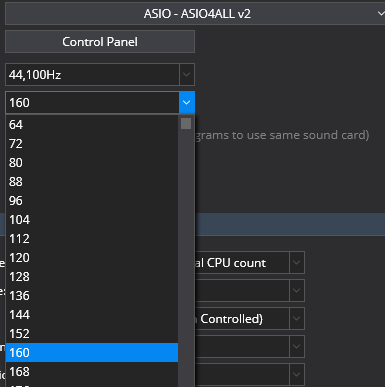
I guess I’ve sorted my particular requirements out. That ASIO4ALL driver at 160 only costs me 1.5 ms in the round trip when compared to 128. I can’t detect the difference. That fraction of headroom, however, gives me the time load headroom I feel comfortable with. Great on keys - great on guitar.
I’d be interested to hear if any other users who might struggle at 128 can get the benefit by substituting the ASIO4ALL driver. At the same buffer setting it’s fractionally worse, like a few (EDIT 100ths of) ms worse. But if you can get in between, you may doing way better.
Even in @Corky’’s situation where 512 was the minimum for the chosen plugins, maybe that would come down to mid 350s or lower?
Being that I started out playing church organ as well as rock organ with the amp at least 15-20 feet away, I earned the right to make a wise-crack to somebody a few years ago, “I play with my fingers, not my ears!” Those two setups kinda demanded it from me to focus on the fingers and I have ever since.
I am very curious, Ade, about your reports concerning using ASIO4ALL. I apparently have been entirely off-base with my thinking that it was merely a driver for Windows Audio that masqueraded as an ASIO driver for software that required you use an ASIO driver. I had no idea it could deliver low latencies. Though I’ve heard that WASAPI approached ASIO levels of performance, I didn’t know ASIO4ALL had access to that - nor to an ASIO interface! Please clarify if you can.
I have a MOTU M-4 that is pretty good, and a MOTU 828 mk3 hybrid I use when using more analog gear, but I do like the possibility of having access to “intermediate” buffer sizes like the 160 you found success with.
I have heard that said, but could never work out whether it was a good thing
ASIO4ALL is an alternative ASIO driver that can substitute for the ‘company’ driver. It absolutely does deliver low latency. It reports a few 100ths of a ms longer than the equivalent company driver, but it offers a big smorgasbord of non standard settings that, as I mentioned previously, allows you to drop a few ms off your regular buffer while still maintaining your desired headroom.
Dropping from 256 to 128 can be an ask in some situations. What if you use 160? I’m getting discernably better response than I was at 256, but 128 was just too big an ask for some of the plugins I want to use. This gets me to a sweet spot.
I thought WASAPI was not so hot on audio input?
Anyway, here’s how the ASIO4ALL buffer options present in Cantabile:
 . Any song that scratches the limit gets brutally simplified, and any plugin that hogs resources gets replaced.