It’s belongs to audio engine, it’s like ASIO alternative with extra steps specific for Voicemeeter (load library, login into API calling C functions). Similar like calling win32 functions… not a driver. I bet basic implementation itself is pretty simple, making UI for it is harder.
I’m not convinced this belongs in Cantabile - it seems very niche and outside what most Cantabile users need. That said, the API does look reasonably simple - if you really need this you could probably pretty easily write an very thin ASIO wrapper driver that bridges to it and Cantabile could load that.
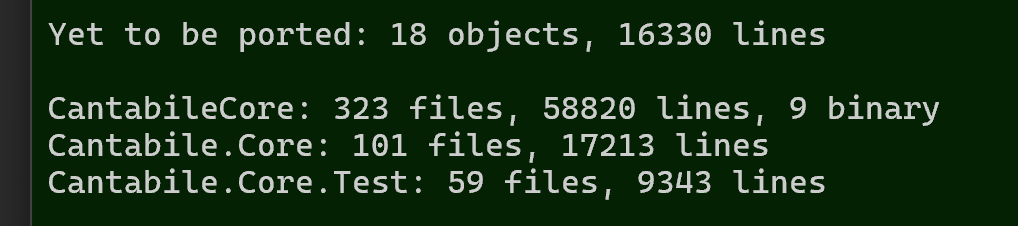
Done: MidiClockGenerator, MidiTimeCodeGenerator, MidiFilterAudioRouter, MidiFilterUIAutomationTarget
Other misc work:
- Ported Windows Explorer Shell handling code from C++/Core to C# (ie: out of engine where it doesn’t belong)
- Ported the comms between Cantabile and CantabileScanServer from C++/Core to C#.
- Added back binary resource files (wave files for metronome sounds)
- Misc tweaks to yesterday’s
MetronomeSoundscomponent.
Started on Audio/MIDI players by implementing base Player object.
6 Likes
Yes, Coding Agents and units tests go along well 
1 Like
I’m watching WoW RWF at the moment (yes… I like my World of Warcraft in-between a bit of sound design, gigging and rehearsing with Cantabile) and seeing that “Yet to be ported” number drop is even more exciting than watching the bosses get knocked down!  Great work, Brad!
2 Likes
Thank you
Not much visible progress today:
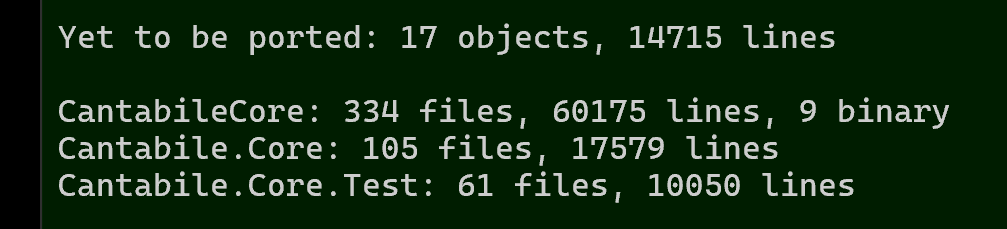
But behind the scenes:
- I need to rework most of
AudioPlayerandMidiPlayerand have “scaffolded” most ofMidiPlayerready for actual implementation tomorrow - Lots of refactoring and clean up of how time info is tracked and time conversion functions
- Ported
TransportTriggernode - Fixed a small bug in
MidiClockListener - New node
MidiClockTapfor splitting/forwarding clock vs normal midi events - New node
MidiSourceConnectionPointfor nodes with multiple MIDI outputs (eg: MIDI player which has one output per track) - Vacuumed the house
5 Likes
 !
!
1 Like
Then, stop by my place, too…
If it’s any consolation, now my gig activities for the year are out of the way, and before I get into some serious recording, today I am trying to get back into my montage.factory update for the Montage M and Trello tasks / code I have not touched for over a year. One of they key challenges being that the Yamaha Montage file format is one of the most complicated I have ever come across.
You probably know that serious work requires a lot of uninterrupted time whilst you are holding everything in the grey matter, so trying to get back the state I left it at is quite a challenge, but I’m getting there…
Looking forward to seeing what the new version of Cantabile looks like once all of your porting is complete, and with no planned, gigs, happy to mess with the experimental versions once they are ready.
My problem with old code like this is “I can’t remember this, better rewrite it again from scratch”.
This is where Claude Code (for me anyway) is a game changer. It’s excellent at doing mechanical work, reviewing code, fixing obvious bugs, giving a summary/explanation, writing documentation, writing unit tests.
It’s also excellent for brainstorming and designing - especially if you tell it to think critically and push back (otherwise it can be a bit agreeable).
Me too
Thanks - it’s going to need some serious real-world testing.
3 Likes
The numbers say I’ve been slacking it…
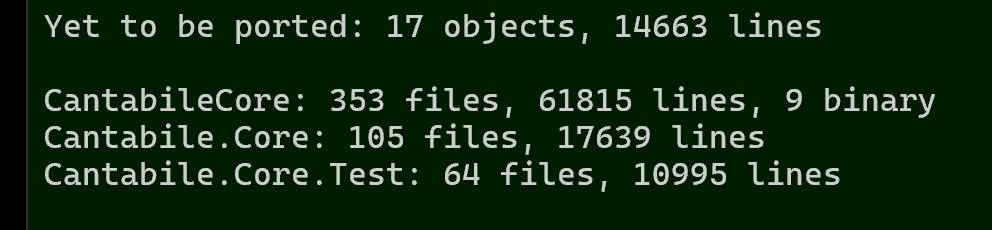
…but, I’ve now got MidiPlayer ported (actually re-written) and working in main and synced mode (I’m switching terms from “master/slave” to “main/synced”).
I’ve always struggled with the code for media players and I finally figured out why - it’s because I based Cantabile’s TimeInfo structure on the VST 2 one and it’s really not suitable for what Cantabile actually needs.
The old structure is a mix of time position information in various formats and a ton of flags indicating what’s valid and what’s not. It’s overly complex for what I need and missing some information that makes things much easier.
Here’s Cantabile’s old VST 2 inspired TimeInfo:
ENUM_FLAGS(TimeInfoFlags,uint32_t)
{
	None = 0,
	TransportChanged     = 1,
	TransportPlaying     = 1 << 1,
	TransportCycleActive = 1 << 2,
	TransportRecording   = 1 << 3,
	AutomationWriting    = 1 << 6,
	AutomationReading    = 1 << 7,
	NanosValid           = 1 << 8,
	PpqPosValid          = 1 << 9,
	TempoValid           = 1 << 10,
	BarsValid            = 1 << 11,
	PlayRangeValid		 = 1 << 12,
	TimeSigValid         = 1 << 13,
	SmpteValid           = 1 << 14,
	ClockValid           = 1 << 15,

	// These are custom to Cantabile
	BarNumberValid		= 1 << 20,
	NativePositionValid	= 1 << 21,
	NativeLengthValid	= 1 << 22,
	PpqPosNextValid		= 1 << 23,
	PlaybackSpeedValid  = 1 << 24,
};

// Time info
struct TimeInfo
{
	TimeInfoFlags flags;			// TimeInfoFlags
	int64_t samplePos;				// Position in samples
	double ppqPos;					// Musical Position, in Quarter Note (1.0 equals 1 Quarter Note)
	double ppqPosNext;				// Musical Position, in Quarter Note of next audio cycle (never goes backwards)
	double tempo;					// current Tempo in BPM (Beats Per Minute)
	double barStartPos;				// last Bar Start Position, in Quarter Note
	double cycleStartPpq;			// Cycle Start (left locator), in Quarter Note
	double cycleEndPpq;				// Cycle End (right locator), in Quarter Note
	double playbackSpeed;			// Playback speed
	int timeSigNumerator;			// Time Signature Numerator
	int timeSigDenominator;			// Time Signature Denominator
	int barNumber;					// current bar number
	int64_t nativePosition;			// current position in media file native units (samples, midi ticks etc)
	int64_t nativeLength;			// length of media in native units
	LOOPINFO loopRange;				// Inner live loop range
	LOOPINFO playRange;				// Outer play range
	TransportLoopMode loopMode;		// Current loopmode
};
Yesterday I threw all that away and designed two new TransportPosition structures that are concise, cover exactly what Cantabile needs and include an ITimeScale interface for converting between units. Suddenly everything became simpler and much more well defined.
Here’s the new structures:
// Describes the current transport position  (Main Thread View)
// Note: main thread has its own, but separate timescale for unit conversion
struct TransportPosition
{
	bool playing = false;		// Currently playing
	bool changed = false;		// Did start, stop or seek
	int64_t position = 0;		// Position at start of cycle
	LoopInfo liveLoopState;		// Inner live loop range
	LoopInfo playRangeState;	// Outer play range
};

// Describes the current transport position  (Audio Thread View)
// Extends TransportPosition with additional audio cycle specific information only
// available on the audio thread, and only valid for the current audio cycle.
struct TransportPositionEx : TransportPosition
{
	ITimeScale* timeScale = nullptr;	// Time scale for this audio cycle
	int64_t positionNext = -1;			// Assumed position at the next audio cycle (never goes backwards even if looping), -1 if unknown
	bool broke = false;					// Did a loop or stop break happen this cycle
	int breakDeltaFrames = 0;			// Sample offset in this cycle where the break occurred
	int64_t breakPosition = 0;			// Position where break occurred
	int64_t breakContinuePosition = 0;	// Position where play continued after break (or -1 if stopped)
};
This meant reworking MetronomeSequencer, MidiClockListener, MetronomeSounds, MidiClockGenerator and MidiTimeCodeGenerator, but after doing that MidiPlayer which I’d been struggling with for a few days, came together in a couple of hours. Got Claude to hit it with a bunch of unit tests and it’s looking good.
AudioPlayer is next… hopefully I won’t decide to throw everything away and start again… again.
6 Likes
Under the hood progress is always hard to measure, but pays dividends
2 Likes
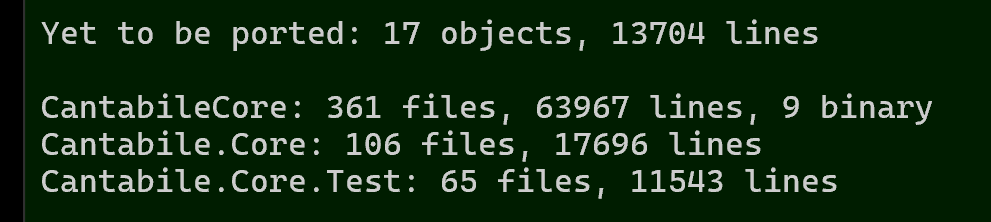
Slow going but audio player is done and all unit tests passing except one.
I don’t have much faith in unit tests for midi and audio players - they’re very time sensitive and have lots of weird edge conditions around looping, play ranges, syncing with a main transport, audio stream buffering, ensuring continuity of consecutive buffers, ramp up/down etc… I think once the engine port is complete, and before moving Cantabile to it I need to setup some interactive test benches to actually run the engine. ie: I’ll be more confident once I see/hear it doing its stuff.
As for that one failing unit test - it’s a crash due to a dangling audio buffer top-up task on the thread pool that’s not being cancelled before the audio player is destroyed. It needs some plumbing/infrastructure work to sort this out which I’ll address tomorrow.
After that, audio and MIDI Recorders are next…
7 Likes
Good progress on audio and MIDI recording today.
I decided to collapse the previously separate MidiRecorder/MidiRecorderHook, AudioRecorder/AudioRecorderHook and RecorderController objects into a single Recorder object that handles both audio and MIDI and produces a Recording object. This is mostly possible because both audio and MIDI data follows the previously discussed pull model (ie: midi no longer pushed).
- Last night - scaffolded the new object classes and properties.
- Today - implemented all the real-time thread side which hands off captured buffers/events to a thread pool task for writing to disk.
- Tomorrow - the disk writing and unit tests.
One notable change… when using musical time format when recording MIDI there has to be a running transport. The old engine used to automatically “play” the main transport. The new model sits and waits for the transport to start. How that manifests in the UI I’m not sure yet - either the record button will flash some kind of “ready but waiting” indicator, or perhaps the UI side can handle starting the transport. Something to resolve later.
3 Likes
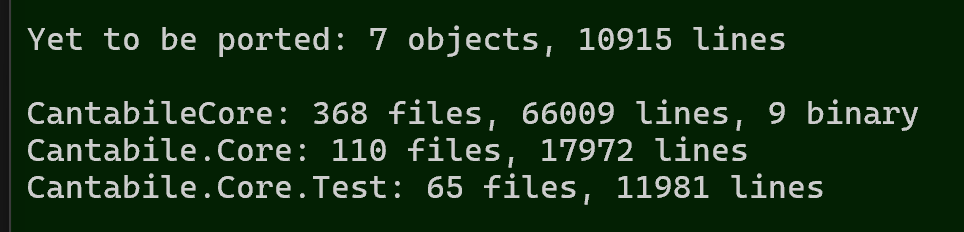
PluginHost ported. No unit tests because this is just the base class for VST 2 and VST 3 plugin hosts.
7kloc to go:
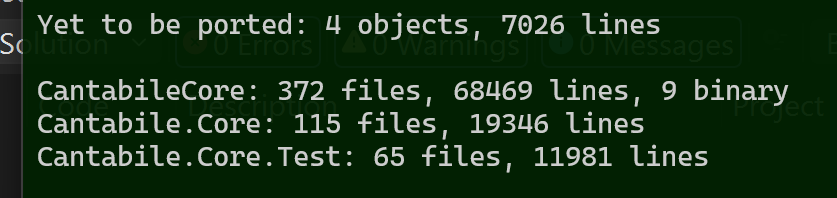
VST 2 plugin host next.
5 Likes
Am I going to be unpopular in suggesting that VST2 might be worth dropping?.. 


I’ve thought about it, but it’s only about 3,000 lines of code (compared to 80,000 for whole engine) and it’s pretty stable. It might also be a major pain for some users so happy to keep it for now.
5 Likes
I feel sure I could hear howls of anguish when I made that post! Grin!
1 Like